NSX-T URL Analysis Using Webroot: Complete Guide
Organizations access thousands of websites through enterprise networks every day. However, not every website is trustworthy. Malicious URLs, phishing websites, and suspicious domains can expose organizations to cybersecurity risks.
Therefore, security administrators need reliable tools to analyze website activity and identify potential threats.
NSX-T URL Analysis uses Webroot threat intelligence to provide information about accessed websites, including URL categories and reputation scores.
In this guide, we explore how NSX-T 3.0 integrates with Webroot, processes URL reputation data, and displays security insights through NSX Manager.
How NSX-T URL Analysis Works with Webroot
VMware NSX-T URL Analysis uses Webroot threat intelligence to evaluate website reputation and categorize URLs.
Webroot combines several technologies to assess websites, including:
Global threat intelligence sensors
Machine learning algorithms
Website classification systems
Historical and behavioral analysis
Reputation and risk assessment
As a result, administrators can better understand the potential risks associated with websites accessed through their networks.
Furthermore, Webroot maintains URL categorization and reputation information to support security analysis.
Webroot Threat Intelligence Integration
In the NSX-T 3.0 implementation described here, NSX Edge nodes communicate with Webroot cloud services to retrieve URL intelligence.
First, NSX Edge nodes establish secure connections to the cloud service.
Next, they download URL category and reputation information.
Then, NSX-T uses this intelligence to analyze relevant website traffic.
Finally, NSX Manager displays the collected information for administrators.
According to the original NSX-T 3.0 implementation, Edge nodes request updated URL intelligence approximately every five minutes.
Consequently, administrators can examine URL reputation information and investigate suspicious website activity.
Important: This article describes the historical NSX-T 3.0 implementation. Product functionality, licensing, service availability, and integration support may differ in later VMware NSX releases.
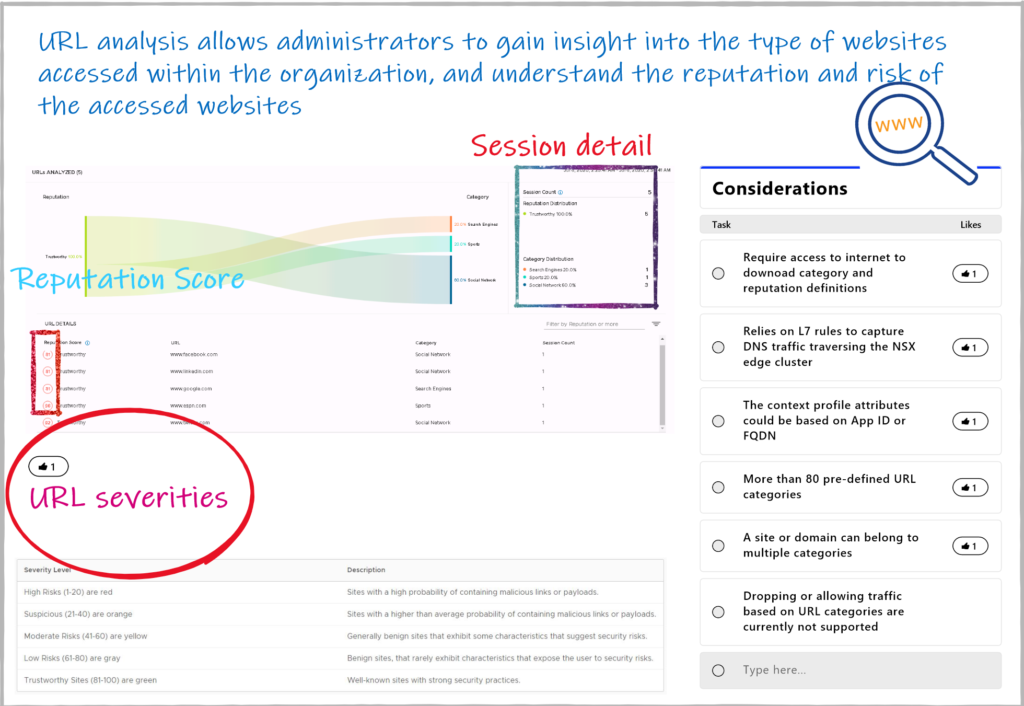
Understanding the NSX-T URL Reputation Score
The NSX-T URL reputation score helps administrators evaluate the trustworthiness of a website.
In the implementation covered by this article, reputation scores range from 1 to 100.
Webroot determines these scores using several factors, including:
- Website history and age
- Domain reputation
- Website popularity and ranking
- Hosting and network information
- Links and associated domains
- Contextual and behavioral indicators
Based on these factors, websites receive reputation classifications.
For example, suspicious websites may receive higher-risk classifications. In contrast, established websites with favorable reputation signals may be considered more trustworthy.
However, administrators should evaluate reputation information alongside other security indicators before making decisions.
URL Categorization and Threat Analysis
In addition to reputation scoring, Webroot provides website categorization intelligence.
These categories help security teams understand the types of websites users access.
For example, administrators may use category information to investigate unusual browsing patterns or identify potentially risky destinations.
Furthermore, categorization provides additional context during network security investigations.
However, URL categorization and URL blocking are different capabilities.
In the NSX-T 3.0 version discussed here, URL Analysis primarily provides visibility and reputation insights rather than automatically blocking websites based on their reputation scores.
NSX-T URL Analysis Architecture and Process
The URL Analysis workflow involves three main components:
1. NSX Edge Nodes
First, NSX Edge nodes obtain URL intelligence from Webroot cloud services.
2. Webroot Threat Intelligence
Next, Webroot provides URL reputation and categorization information to support analysis.
3. NSX Manager
Finally, NSX Manager presents collected URL information through its management interface.
As a result, administrators can review website activity and investigate potential security risks.
This integration improves the information available for security analysis without requiring administrators to assess every URL manually.
Viewing URL Analysis Results in NSX Manager
After NSX-T processes the relevant traffic information, administrators can review the available results in NSX Manager.
The management interface provides useful details for security investigations.
Depending on the configuration and available data, administrators can examine information such as:
- Accessed URLs
- Website reputation scores
- URL categories
- Session information
- Associated traffic details
Among these details, session information and URL reputation scores are particularly useful.
For example, session information helps administrators understand the context of website access. Meanwhile, reputation scores provide additional indicators of potential risk.
Therefore, combining these details can support more informed security investigations.
Benefits of NSX-T URL Analysis for Enterprise Security
NSX-T URL Analysis provides several operational benefits.
Improved Website Visibility
First, administrators gain greater insight into websites accessed through relevant network traffic.
Better Security Investigations
Additionally, URL reputation information helps security teams prioritize suspicious activity for further investigation.
Centralized Security Insights
Furthermore, NSX Manager presents relevant analysis information through a centralized interface.
More Informed Security Decisions
Finally, administrators can combine URL intelligence with other security information to evaluate potential threats.
Nevertheless, URL reputation analysis should complement existing cybersecurity controls rather than replace them.
Limitations of NSX-T 3.0 URL Analysis
Although URL Analysis provides valuable security insights, administrators should understand its limitations.
In the NSX-T 3.0 implementation covered here, the feature does not automatically enforce blocking decisions based solely on URL reputation scores.
Instead, it primarily supports monitoring, analysis, and investigation.
Moreover, the availability and accuracy of URL insights depend on supported traffic, configuration, and threat intelligence data.
Therefore, organizations should evaluate URL Analysis alongside other security controls, such as firewalls, DNS security, secure web gateways, and threat detection systems.
Conclusion: Strengthening Network Security Visibility with NSX-T URL Analysis
NSX-T URL Analysis using Webroot demonstrates how URL reputation intelligence can support enterprise network security monitoring.
By combining website categorization, reputation scoring, and session information, the historical NSX-T 3.0 feature helps administrators investigate suspicious website activity.
Furthermore, NSX Manager provides a centralized view of relevant URL information. As a result, security teams can make more informed decisions during investigations.
However, URL reputation visibility alone does not guarantee protection against malicious websites. Organizations should combine threat intelligence with appropriate preventive and detective security controls.
Ultimately, effective enterprise cybersecurity requires visibility, informed analysis, and a layered security strategy.
For additional technical articles, explore the VMware networking and security resources on NetworkBachelor.
Need Expert Assistance with Network Security?
Understanding URL reputation is only one part of securing enterprise infrastructure.
TREZBON TECHNOLOGIES helps organizations evaluate network security architectures, strengthen infrastructure visibility, and plan practical cybersecurity improvements.
Whether you are reviewing VMware NSX environments, network segmentation, or enterprise security controls, our team can help you assess your requirements.
Connect with TREZBON to discuss your network security challenges.
vCloud Director: NSX-V to NSX-T Migration Part-2
NSX-T Series: Part 17 – NSX-T Segment T1 and T0 on same Edge Cluster T0 as SR

Nozomi Networks: Securing OT and IoT Environments
About Author

Muhammad Marakkoottathil(MM)
Expert in the field of SDN, cloud computing, virtualization, active-active data center design & migration. Passionate about helping organizations to achieve their digital transformation objectives with strong 15+ years of experience in design, deployment, and managing heterogeneous network solutions across the industry verticals. Major Industry Certifications: Cisco CCIE, CCDP, VMware VCAP-NV_DESIGN, TOGAF, ITIL, NUTANIX NCSE, Google Cloud Architect, Azure Fundamentals More info please visit my page @ LinkedIn: https://www.linkedin.com/in/contactmm/