How to Configure Azure VNet Peering Across Regions
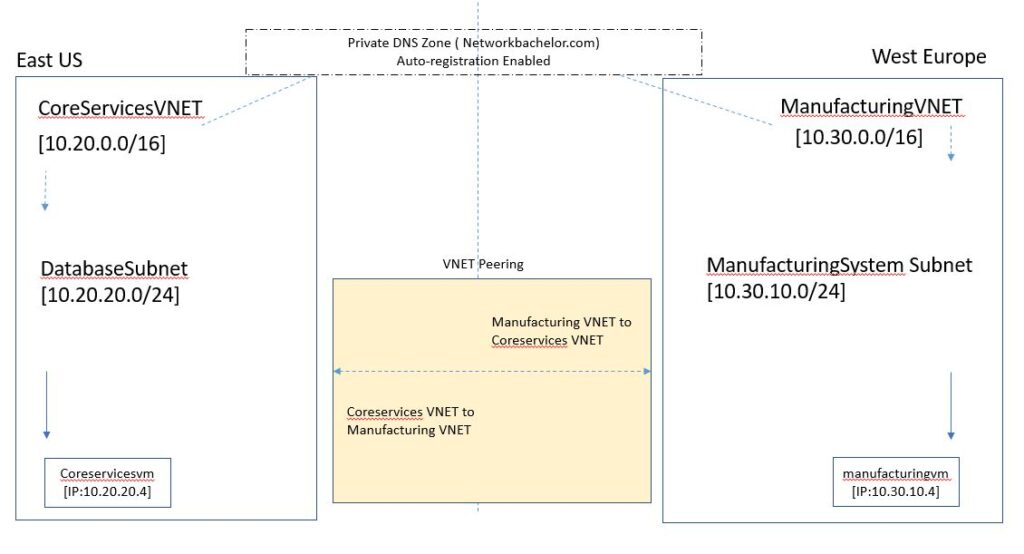
In this lab, we will configure Azure VNet peering between the East US and West Europe regions. We will then test connectivity between virtual machines in both VNets.
Azure VNet peering allows two virtual networks to communicate through Microsoft’s backbone infrastructure. You can use VNet peering to connect VNets within the same Azure region or across different regions.
| High-Level Tasks | Sub-tasks |
| Create VNets in each region | Create a resource group and configure a VNet in the East US and West Europe regions. Create the required subnet for each VNet. |
| Deploy virtual machines | Create VMs and assign each VM to the appropriate VNet subnet. |
| Create a Private DNS Zone (Optional) | Create a Private DNS Zone, associate the VNets with the zone, and enable automatic registration if required. |
| Create VNet peering and test connectivity | Configure VNet peering between the East US and West Europe VNets and test connectivity between the virtual machines. |
In this lab, we connect VNets in East US and West Europe. First, we create the required VNets and virtual machines. Next, we configure VNet peering and optionally set up Private DNS. Finally, we test connectivity between the virtual machines.
Lab Topology
Review Azure VNet Configuration
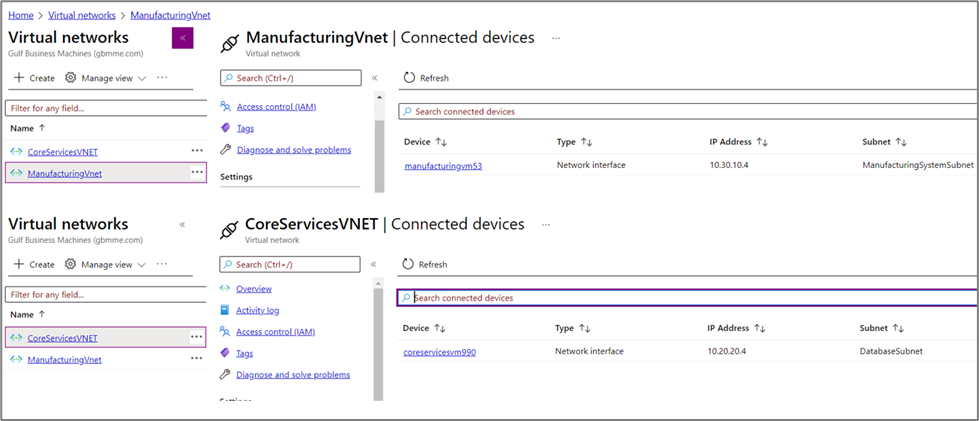
Before configuring VNet peering, review the properties of each Azure VNet.
First, check the VNet address space and subnet configuration. Make sure that both networks use the correct settings.
Most importantly, the East US and West Europe VNets must use non-overlapping address spaces. This helps prevent IP addressing conflicts between the connected networks.
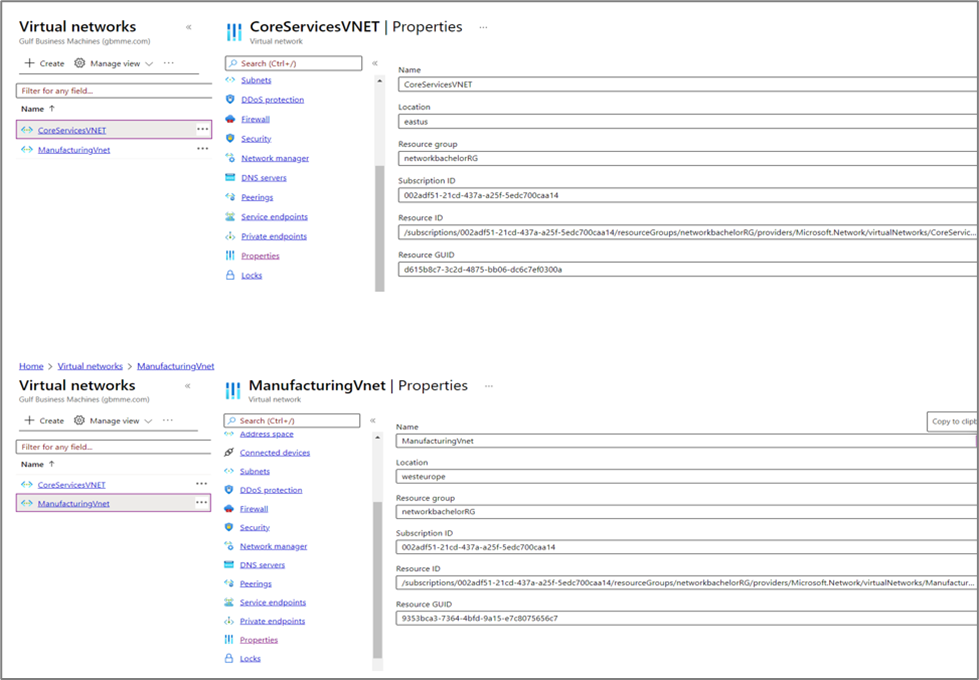
Azure VNet Properties
Next, review the properties of both VNets. Verify the address space, subnets, and regional configuration before creating the peering connection.
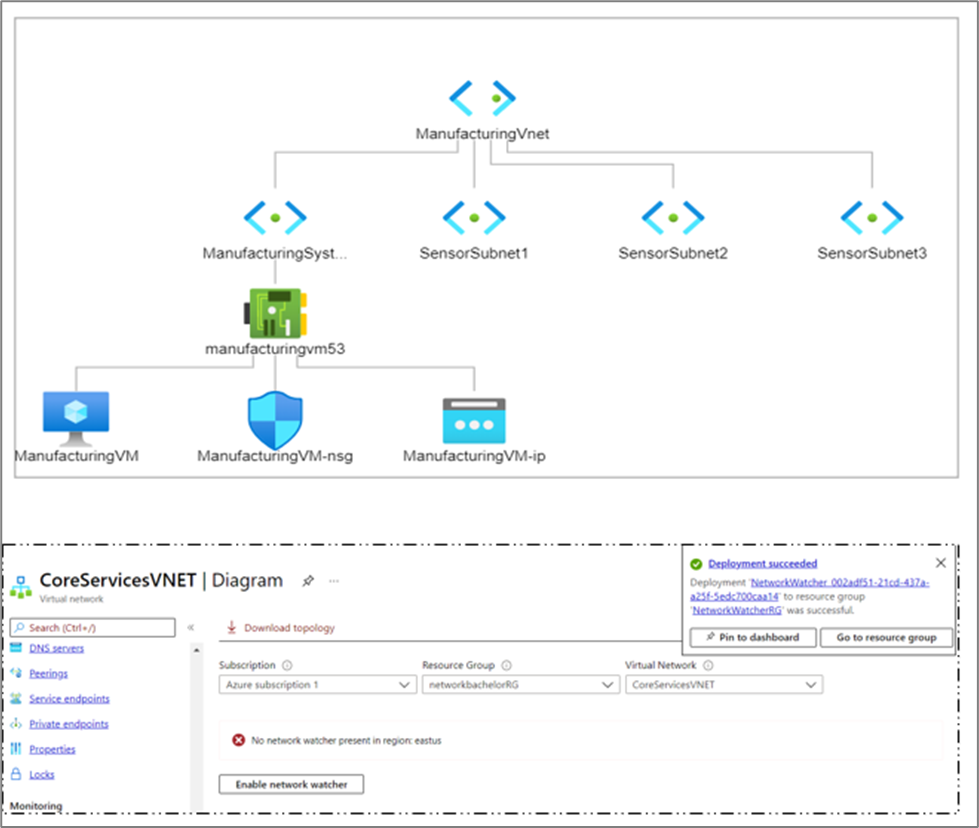
View VNet Topology Using Network Watcher
You can use Azure Network Watcher to review network connectivity and topology.
Note: Network Watcher was not available in the East US region when this lab was originally tested.
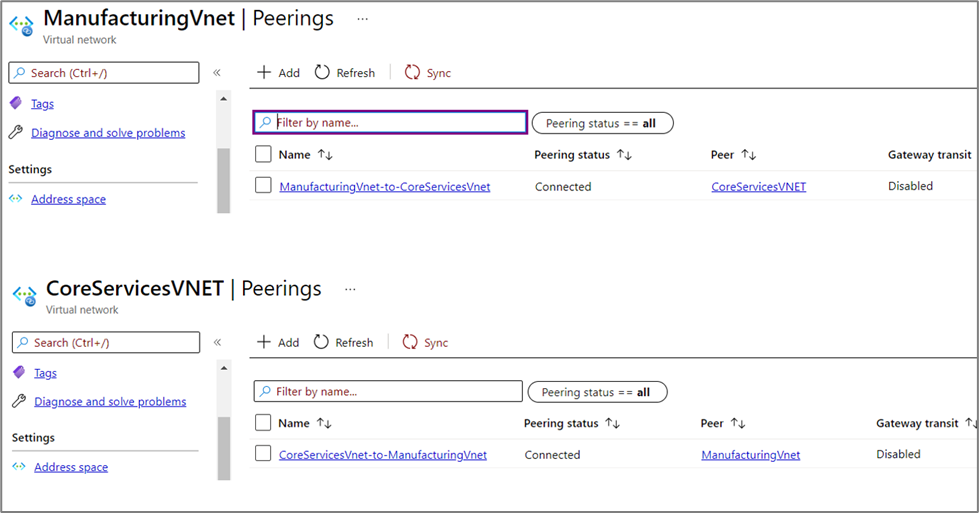
Configure VNet Peering Between Coreservices and Manufacturing
Next, configure Azure VNet peering between the Coreservices VNet and the Manufacturing VNet.
Create a peering connection from each VNet. Then, enable the appropriate options for virtual network access.
After creating the peering connections, verify that the peering status shows as connected on both VNets.
Configure Private DNS Zone (Optional)
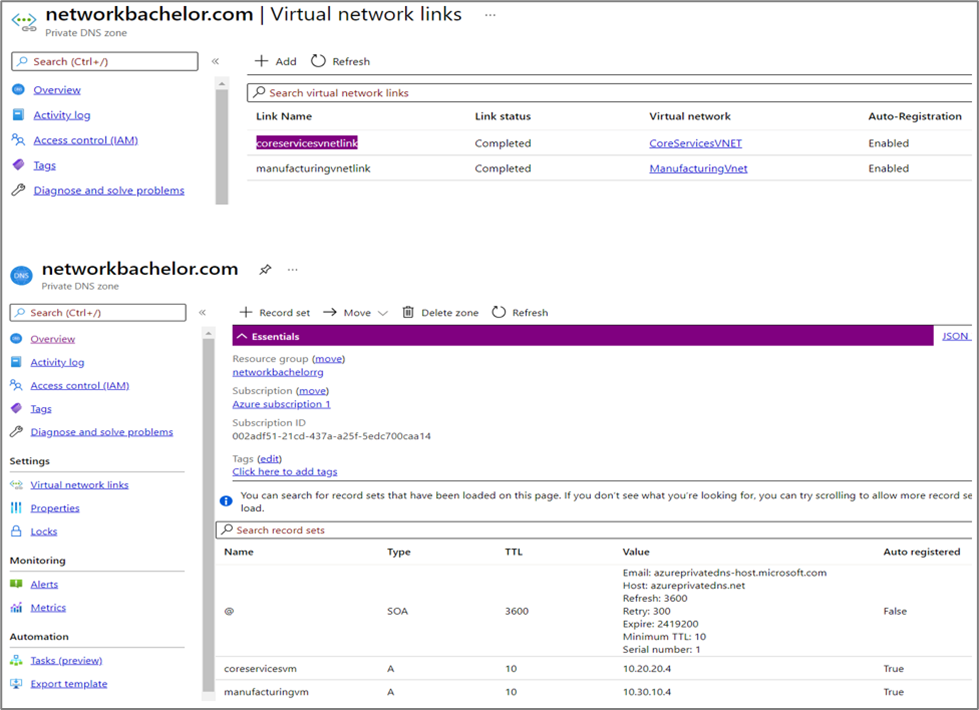
A Private DNS Zone can simplify name resolution for resources in connected VNets.
If required, create a Private DNS Zone and associate it with the relevant VNets. You can also enable automatic registration based on your environment.
Test Connectivity Between Azure VMs
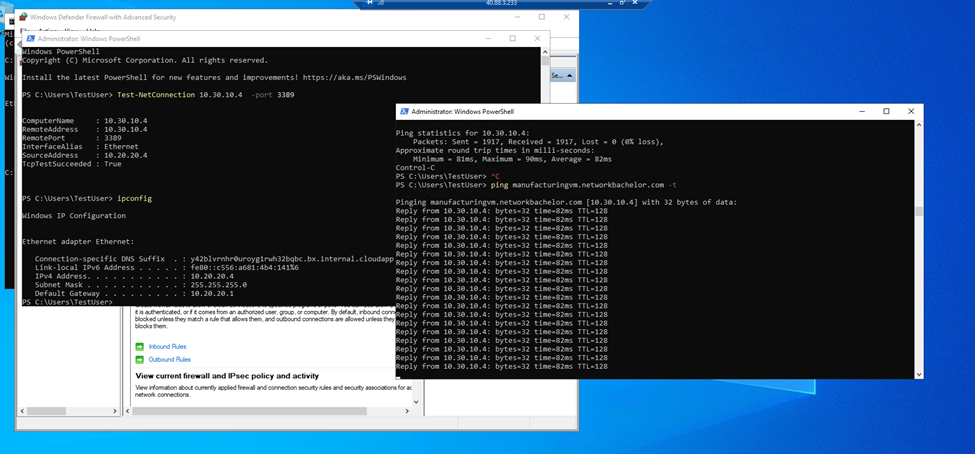
Once the VNet peering connection is active, test communication between the virtual machines.
Use the private IP addresses of the VMs to verify connectivity across the peered VNets.
Understanding Azure VNet Peering
Azure VNet peering connects Azure virtual networks through Microsoft’s private backbone network.
As a result, resources in peered VNets can communicate using private IP addresses. Traffic between peered VNets does not need to travel over the public internet.
VNet peering is particularly useful when organizations need to connect Azure VNets across different regions.
In this lab, we configured peering between the East US and West Europe VNets. We then tested connectivity between virtual machines in both networks.
Conclusion
In this lab, we successfully configured Azure VNet peering between virtual networks in the East US and West Europe regions.
We created the required VNets, subnets, and virtual machines. Next, we configured VNet peering and tested connectivity between the connected networks.
Azure VNet peering provides private network connectivity through Microsoft’s backbone infrastructure. Therefore, it offers a practical way to connect Azure virtual networks across regions without sending traffic through the public internet.
Overall, this lab provides practical experience with Azure VNet peering, cross-region connectivity, Private DNS, and communication between virtual machines using private IP addresses.
Need Help With Azure Network Connectivity?
Planning to connect Azure VNets across regions or design a scalable cloud network?
Trezbon Technologies can help organizations assess Azure networking requirements, design secure cloud connectivity, and implement solutions aligned with their business and infrastructure needs.
Discuss your Azure networking requirements with Trezbon today.
In this lab, we successfully configured Azure VNet peering between virtual networks in the East US and West Europe regions. We created the required VNets, subnets, and virtual machines, configured VNet peering, and tested connectivity between the connected networks.
Azure VNet peering provides private network connectivity between Azure virtual networks through Microsoft’s backbone infrastructure. It is a useful solution for connecting workloads across Azure regions without routing traffic through the public internet.
This lab provides a practical understanding of Azure VNet peering, cross-region connectivity, and communication between virtual machines using private IP addresses.
Public Cloud Security: Challenges, Solutions, and Security Appliances

How to Connect Azure VNets Across Regions Using VPN Gateway
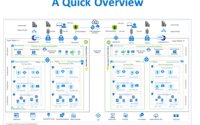
A Quick Overview of Azure IaaS Reference Architecture
About Author

Muhammad Marakkoottathil(MM)
Expert in the field of SDN, cloud computing, virtualization, active-active data center design & migration. Passionate about helping organizations to achieve their digital transformation objectives with strong 15+ years of experience in design, deployment, and managing heterogeneous network solutions across the industry verticals. Major Industry Certifications: Cisco CCIE, CCDP, VMware VCAP-NV_DESIGN, TOGAF, ITIL, NUTANIX NCSE, Google Cloud Architect, Azure Fundamentals More info please visit my page @ LinkedIn: https://www.linkedin.com/in/contactmm/