Azure Has Lost the Plot: When Feature Marketing Replaces the Promise of Easy Cloud
Cloud was supposed to remove friction. Provision compute in minutes, route packets without owning a single router, let infrastructure teams move at the speed of the business instead of the speed of a six-week change-board cycle. That was the pitch. A decade in, Azure increasingly delivers the opposite: a platform so layered with named services, rebrands, and governance checkpoints that simple operational tasks now require a war room of cross-functional teams just to get a VM talking to a backup target.
This isn’t a complaint about ambition — Microsoft ships an enormous amount of capability. The problem is what gets prioritized: launch velocity on new product names over operational clarity on the constructs engineers already depend on.
A day in the life: a routine installation becomes a four-team incident
Picture an ordinary task: standing up Zerto for disaster recovery replication inside Azure VMware Solution (AVS). On paper this is an agent install pointed at an environment Azure already fully manages. In practice, it routinely unfolds like this:
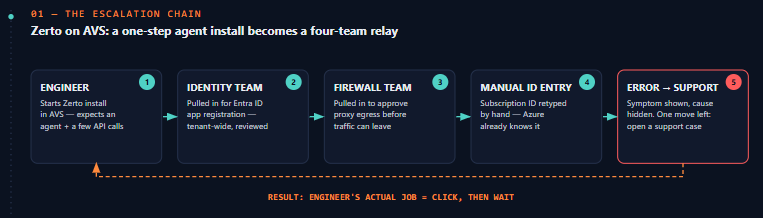
- The installer needs an Entra ID app registration to authenticate against the management plane — so the domain/identity team gets pulled in, because app registrations are a tenant-wide, security-reviewed object, not something the infra team can self-serve.
- Outbound calls need to traverse a forward proxy — so the firewall team gets pulled in, because the egress rule needs review.
- The wizard then asks the engineer to manually type in the subscription ID and other context that Azure should already know — the AVS private cloud, its resource group, its region are all already bound to that environment, yet the platform makes a human re-enter identifiers it could have auto-populated from the session.
- Mid-deployment, it fails — with an error that names a symptom, not a cause. No indication of whether it’s the NSG, the proxy, the app registration’s conditional access policy, or a mistyped ID that’s at fault.
- With no actionable diagnostic on screen, there’s exactly one move left: open an Azure support case.
That last point is the real cost. When a platform can’t tell an engineer why something failed, the engineer’s actual job quietly shrinks to clicking through a wizard and escalating when it breaks — not troubleshooting, just initiating and waiting. None of the individual steps is unreasonable on its own — identity governance and firewall review are good practices. The problem is that Azure’s tooling doesn’t make the cross-team handoff cheap, and it doesn’t respect context it already has. Each team optimizes its own blast radius, nobody owns the end-to-end path, and the “ease of cloud” promise dissolves into a ticket queue.
The rebrand treadmill: Azure AI Studio → Azure AI Foundry → Microsoft Foundry
If networking complexity is the old problem, AI services are quickly becoming the new one — except now it’s also a naming problem.
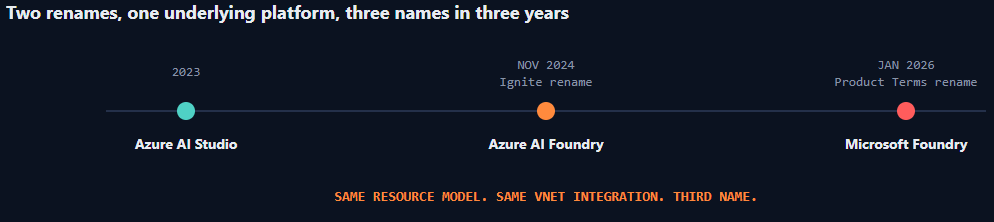
Microsoft’s enterprise AI surface has been renamed twice in under two years: Azure AI Studio became Azure AI Foundry at Ignite 2024, and Azure AI Foundry became Microsoft Foundry as of the January 2026 product terms update. Functionally, the underlying platform is largely unchanged — same resource model, same VNet integration and private endpoints, same billing. But the rebrand alone has procurement teams reconciling contracts against a product name that no longer officially exists, and engineers hitting naming-validation mismatches between the Foundry UI and the underlying Azure Resource Manager, because the two layers enforce different rules. There’s an entire genre of practitioner write-ups trying to untangle whether “Azure AI Services,” “Azure OpenAI Service,” and “Foundry” are the same thing, overlapping things, or sequential rebrands of the same thing — and the honest answer is: some of all three, depending on when you last looked.
That’s the pattern: ship the new name fast, let operational coherence catch up later. Engineers end up fascinated by what’s new rather than fluent in what’s underneath, because what’s underneath keeps getting repainted.
Networking: same physics, very different abstraction tax
The actual physics of routing and firewalling hasn’t changed. What’s changed is how many proprietary nouns sit on top of it.
| Function | Azure | AWS | GCP |
|---|---|---|---|
| Hub-and-spoke transit | Virtual WAN — managed hub, BGP for ExpressRoute/branch, opinionated route propagation | Transit Gateway — direct route-table and BGP control, or Cloud WAN | Network Connectivity Center |
| Static routing | User-Defined Routes (UDR) | VPC Route Tables | Custom static routes |
| Stateful filtering | NSG + Azure Firewall + ASG | Security Groups + NACLs | VPC Firewall Rules |
| Diagnostics | NSG Flow Logs + Network Watcher (separately enabled, separately licensed) | VPC Flow Logs + Reachability Analyzer | VPC Flow Logs + Connectivity Tests (simulates the actual packet path) |
Azure Virtual WAN is genuinely good at what it’s built for — automated branch connectivity at global scale. But it’s also the clearest example of abstraction-as-product: it manages routing for you, which is fine until you need it to interoperate with something it didn’t anticipate. Connecting multiple Azure vWAN hubs to a single AWS Transit Gateway, for example, runs into ASN/BGP limitations that force teams into per-hub TGW workarounds — added cost, fragmented routing logic, more moving parts, all to compensate for two “simplifying” services that don’t actually speak the same language to each other.
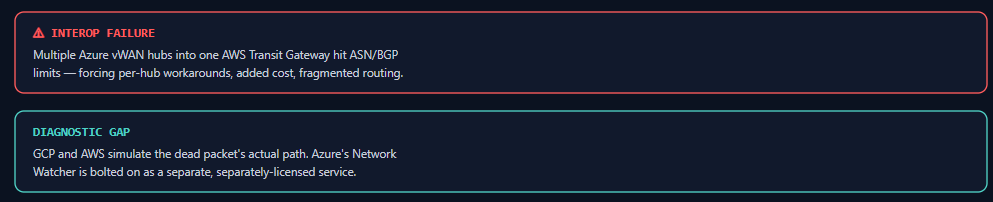
Compare that to how GCP and AWS handle the same underlying opacity: instead of just hiding the underlay, GCP’s Connectivity Tests will simulate a packet’s actual path and tell you exactly which rule or route killed it, and AWS’s Reachability Analyzer does the equivalent. Azure has Network Watcher, but it’s bolted on as a separate, separately-enabled service rather than baked into the core debugging experience — which is backwards for a platform whose core differentiator is supposed to be ease of operation.
AKS: four networking models, one ordinary cluster
Spinning up a single AKS cluster forces a routing decision before a single pod is scheduled, because Azure ships several distinct networking models with materially different routing behavior:
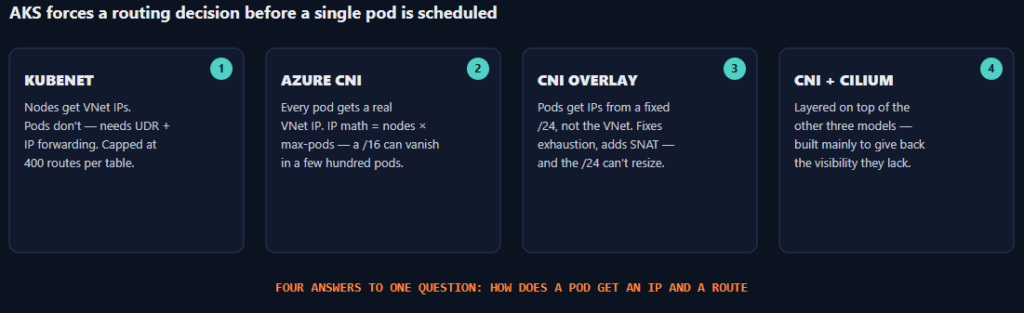
- Kubenet — only nodes get a real VNet IP; pods live on a separate address space, so a User-Defined Route table and IP forwarding have to exist just for pod-to-pod traffic to work. Azure caps a UDR at 400 routes, which becomes a real ceiling on cluster size.
- Azure CNI (traditional) — every pod gets a real VNet IP. Clean for direct addressability, brutal for IP planning: teams routinely burn through a /16 with only a few hundred pods running, because the IP math is nodes × max-pods-per-node, not actual pod count.
- Azure CNI Overlay — pods get IPs from a separate, fixed-size /24 CIDR instead of the VNet, which fixes the exhaustion problem but reintroduces SNAT for anything leaving the pod CIDR — and that /24 can’t be resized later.
- Azure CNI with Cilium / Advanced Container Networking Services — a newer option layered on top of the others, built largely to give back the diagnostics (DNS failures, packet drops, traffic imbalance) the first three modes don’t surface on their own.
Four answers to one question — how does a pod get an IP and a route — each trading one operational problem for a different one, and each requiring the engineer to already know which trade-off fits their VNet’s IP budget before the cluster exists.
The failure mode that catches the most teams off guard, though, is routing, not IP planning. Pair an AKS subnet’s default UDR with Azure Firewall for centralized egress, then expose a service through a public Standard Load Balancer. Inbound traffic arrives on the load balancer’s public IP, but the subnet’s default route sends return traffic back out through the firewall’s private IP instead of the path it came in on. Azure Firewall is stateful — it never saw the original inbound packet establish a session — so it silently drops the return traffic. Ingress just stops working, and nothing in the logs points at the UDR as the cause. Separately, Azure CNI auto-creates an NSG for the cluster that doesn’t necessarily include an allow rule for a new LoadBalancer service, and Standard SKU load balancers are deny-by-default — so a fresh service exposure can sit there serving nothing, for reasons that have nothing to do with the application at all.
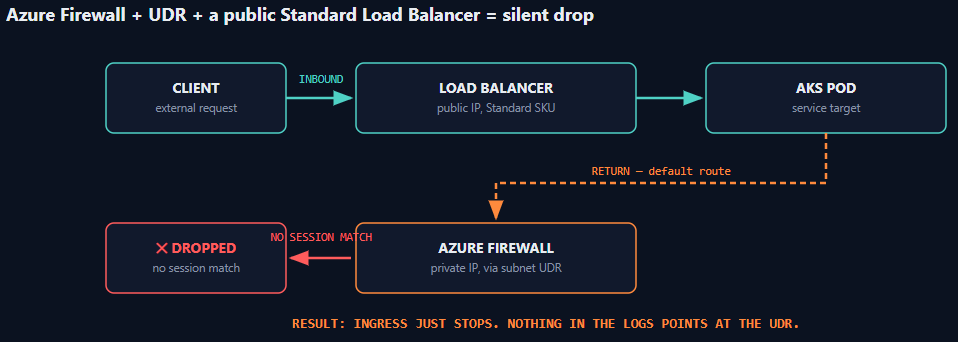
None of this is exotic. It’s basic asymmetric-routing and default-deny behavior — concepts every network engineer already understands — just relabeled across four product names and surfaced through error messages that describe Kubernetes symptoms, not the Azure routing decision underneath them.
Web apps: the same friction, one layer up
App Service was supposed to be the easy tier — push code, get a URL, skip the VM entirely. In practice, the friction just moved up a layer.
- 128 SNAT ports, by default. Every App Service instance starts with a pre-allocated quota of just 128 outbound SNAT ports. A burst of new connections — a downstream API, a few unpooled database calls — blows through that limit fast, producing intermittent 5xx errors and ETIMEDOUT exceptions that look exactly like application bugs and have nothing to do with the application.
- The fix is more abstraction, not less. Avoiding SNAT exhaustion means stacking Regional VNet Integration with Service Endpoints or Private Endpoints for Azure-native destinations, or bolting on a separate NAT Gateway for anything external. Three different networking primitives, each patching a sliver of a self-imposed 128-port default.
- VNet Integration itself is flaky enough that the standard fix is folklore, not engineering. The most common remedy in Microsoft’s own support threads is disconnect the integration, reconnect it, and the connectivity usually comes back — with no root cause ever surfacing to the team running it.
- DNS resolution depends on which door you walked through. An app can have a private endpoint correctly wired up, yet still resolve a dependency’s hostname to its public IP from one execution context (the Kudu/SCM console) while resolving to the private IP from another — a debugging trap with nothing to do with the code.
- Access restrictions go silent in the presence of private endpoints. The inbound counterpart to the SNAT story: access restriction policies are documented to be ignored entirely once a private endpoint exists, an exception easy to miss until traffic that should be blocked isn’t.
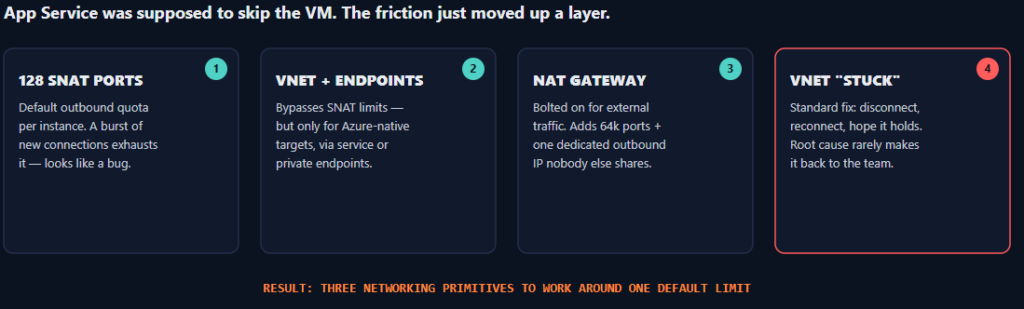
None of these are obscure edge cases — they’re top entries in Microsoft’s own troubleshooting docs. The pattern matches AKS and the networking layer above it exactly: the platform creates an artificial constraint, ships three new product surfaces to work around the constraint it created, and leaves the actual debugging signal — why did this fail, right now, for this app — thinner than the workaround tooling built around it.
Copilot, everywhere: a feature rollout out running its own governance
Microsoft’s instinct to wire Copilot into everything — Microsoft 365, the Azure portal, Security, GitHub, Teams meeting summaries, custom Copilot Studio agents — creates a risk that has nothing to do with the model itself and everything to do with what it sits on top of.
Copilot doesn’t introduce new access. It inherits whatever permissions the signed-in user already has across the tenant, then actively retrieves and surfaces anything reachable under those permissions — including the sensitive file an over-permissioned user technically could see but, before Copilot, would never have stumbled onto by navigating SharePoint manually. Industry research puts roughly 15–16% of business-critical files in the average enterprise tenant at risk from oversharing and stale or missing sensitivity labels, and a majority of enterprise security teams report explicit concern about AI tools exposing data this way. The U.S. House of Representatives went as far as banning staff from using Copilot entirely, citing exactly this leak risk.
It compounds in two more directions. Prompt injection — instructions hidden inside ordinary email or document content that get interpreted as commands — is especially dangerous for a tool whose entire job is ingesting email, documents, and chat by design. And Copilot Studio agents introduce their own misconfiguration class: makers can switch tool authentication from per-user credentials to hard-coded maker credentials, quietly bypassing Key Vault rotation and standard secret governance — something Microsoft’s own security team now publishes guidance on detecting.
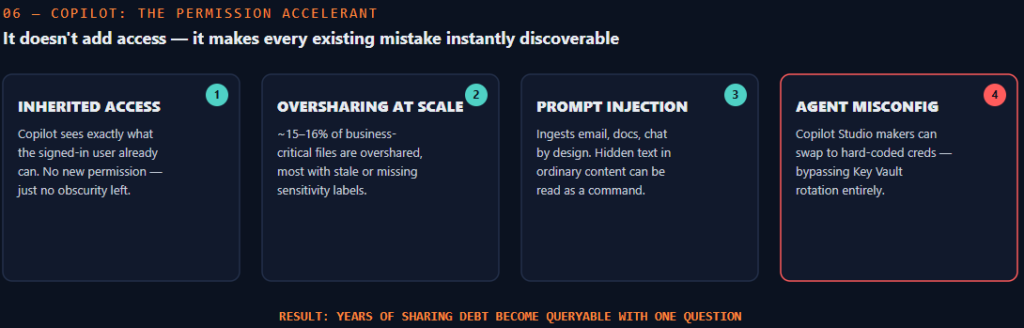
None of this means Copilot is uniquely insecure — it’s exactly as secure as the permission hygiene underneath it, which is the point. Years of SharePoint and Teams sharing debt, the kind every enterprise has, sat dormant because nobody went looking. Copilot makes every one of those mistakes instantly discoverable with a single natural-language question — and Microsoft shipped that capability tenant-wide faster than most governance teams could audit for it.
ExpressRoute: real BGP behind a “click to connect” button
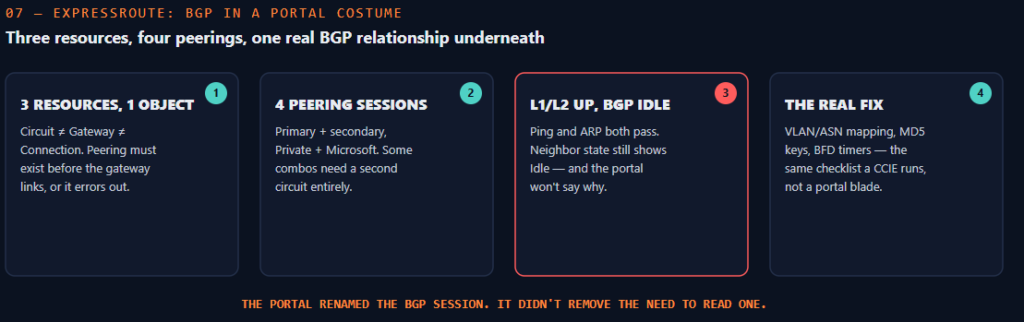
ExpressRoute is where Azure’s abstraction instinct collides hardest with the fact that a private connection to a cloud provider is, underneath, still a multi-AS BGP relationship — and the portal doesn’t make that fact go away, it just hides it until something breaks.
Start with the object model itself: a Circuit, a Gateway, and a Connection are three separate resources, not one. The circuit is the actual Layer 2 hand-off to Microsoft’s edge; the gateway lives inside your VNet; the connection is what links them — and peering has to be configured before the gateway is linked, or the provisioning step simply errors out. Each circuit then carries up to four possible BGP peering sessions (primary and secondary Private peering, primary and secondary Microsoft peering), and Private and Microsoft peering can’t always coexist on the same resource — sometimes the fix is standing up an entirely second circuit just to separate them. Microsoft peering only accepts public IP addresses, so an enterprise running private address space on-prem needs the provider to NAT translate before traffic is even eligible to land.
Then there’s what happens when it breaks. A circuit can show full Layer 1/2 health — ping and ARP both working between customer and Microsoft edge routers — while BGP itself sits stuck in Idle. The actual fix, documented in Microsoft’s own support threads, isn’t in a portal blade; it’s in validating VLAN ID and ASN mapping against what’s configured on the Microsoft edge router, checking MD5 authentication keys match on both sides, confirming BFD timers, and in some cases simply rebuilding the connection from scratch inside Virtual WAN because no diagnostic ever surfaced the actual mismatch. That’s a show ip bgp summary and neighbor-state problem wearing a cloud-portal costume.
This is exactly where the “Azure-certified engineer vs. CCIE/JNCIE” gap shows up in practice. An AZ-700 teaches which blade configures which resource. It doesn’t teach why a neighbor relationship sits Idle when Layer 2 is healthy, how AS-path and MD5 authentication interact, or how to design genuine redundancy — which, per Microsoft’s own guidance, still means dual circuits across physically diverse peering locations with independently redundant BGP sessions on each, the same discipline used to dual-home an MPLS L3VPN circuit twenty years ago. Azure didn’t remove the need for that expertise. It moved the underlying BGP relationship behind a UI, gave it new names, and left the diagnostics thinner than a router CLI — which means the engineer who can actually fix it is the one who never needed the portal’s vocabulary to begin with.
The actual point being missed
None of this is an argument that AWS or GCP are simple — they have their own sprawl, their own jargon, their own opaque managed layers. The difference is what gets prioritized when the abstraction leaks. Azure’s organizational instinct seems to be: ship the next feature, rename the platform, add another portal blade — and let operational transparency lag behind. The result is an engineer population that’s increasingly fluent in product names and less fluent in what’s actually happening to a packet or a token at 2 a.m. when something breaks.
Cloud’s founding promise wasn’t “infinite features.” It was “stop worrying about the infrastructure underneath and focus on the workload.” Every layer of renamed, overlapping, cross-team-gated abstraction is a small tax against that promise. Pay enough of those taxes, and you end up exactly where a lot of enterprise Azure teams are today: running a platform that’s supposed to remove friction, generating more of it than the data center it replaced.
vLLM Multi-Hardware Inference: NVIDIA vs AMD vs TPU vs Intel
DGX SuperPOD Deployment Guide: BCM, Kubernetes & Slurm

Retina Scanning and Biometric Security: What You Need to Know About Privacy and Data Protection
About Author

abhishek
Cloud Platform Lead and AI Infrastructure Architect at e& enterprise, with 12+ years in data center, virtualization, security and AI infrastructure. I design and build private cloud and sovereign AI platforms, working with VMware (NSX-T, vSphere, vSAN, HCX, AVS, SRM), Kubernetes, Terraform and GPU inference infrastructure for LLMs. Previously served Networkers Home (CCIE instructor, trained around 50 CCIEs), VCE/EMC2, Cisco, VMware and Arista across TAC, consulting, design and training. Certifications: CCIE#48639 (Data Center and R&S), VCIX-DCV and NV, CKA, NVIDIA AI Infrastructure, Azure Solutions Architect Expert, Terraform Associate, Palo Alto PCNSE. LinkedIn: https://www.linkedin.com/in/abhishekkunal51/