VMware NSX Security: Features, Use Cases & Analysis
As enterprise applications become increasingly distributed, securing communication between workloads has become a major challenge. Traditional perimeter firewalls remain important. However, they may not provide sufficient visibility and control over east-west traffic within modern data centers.
VMware NSX Security addresses this challenge through distributed firewall capabilities, microsegmentation, intrusion detection and prevention, and advanced threat protection.
Furthermore, VMware NSX enables organizations to enforce security policies closer to individual workloads. As a result, security teams can reduce unnecessary traffic redirection, improve application-level visibility, and limit opportunities for lateral movement.
In addition, NSX supports a Zero Trust security approach by allowing organizations to define and enforce granular access policies between applications and workloads.
In this VMware NSX Security solution analysis, we explore its major security capabilities, technical considerations, use cases, licensing factors, and deployment requirements. We also examine how NSX can support enterprise data center security strategies.
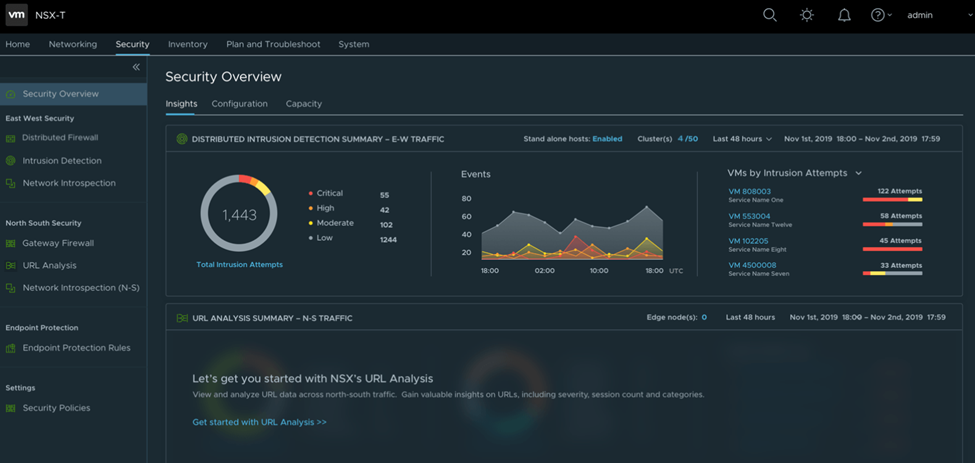
VMware NSX Security Solution Offerings
| Distributed Firewall: Complete L2-L7 capabilities | Distributed IDS/IPS | ATP | NSX Intelligence |
| Stateful Layer-4 Access Controls – Ability to write group-based policies between source and destination | Distributed & Built-in Analysis | NTA (Network Traffic Analysis) – Monitor east-west traffic and traffic flow records and flag traffic outside the norm as anomalies | Topology and Flow Visualizations – build topology maps, see them at the Data Center level, zoom into the Application level |
| Layer-7 Controls with AppID – ID-based policies, so you write them not based on port protocol, but on application traffic; can write a policy based on actual traffic you want to allow or deny as opposed to just the port protocol | Curated Signature Distribution – Fewer false positives, the lower computational overhead | Network Sandbox – used for emulating the operating environment, enabling organizations to probe suspicious files and other objectssnip | Automated Policy Recommendation – Discover the whole application, group similar services into a single application |
| Identity Firewall with UserID – for VDI micro-segmentation, when multiple users on a server with VDI desktop, you can create access policies based on user ID and not server ID | Context-Based Threat Detection – Reduce the need for signature tuning, better alert prioritization | NDR( Network Detection and Response) | |
| Policy & State Mobility – Simplify operations, eliminate stale/redundant policies |
Some Technical Considerations
Following are some of the key considerations
DFW and Edge VM:
- The same traffic can have distributed firewall, l7 app-id rules, and IDS/IPS rules
- Traffic needs to be allowed by DFW to be passed through to IDS/IPS
- No network overlay requirement if the customer wants to just use the security solutions
- NSX Gateway Firewall can now decrypt SSL traffic
IDS and IPS:
- The IDS/IPS engine is based on Suricata, a well-respected open-source project.
- IDS/IPS signatures come from Trustwave, a leader in managed security services
- The signature can be downloaded online to the NSX or can be uploaded offline
ATP (NTA, NDR, and Sandboxing):
- Sandboxing is based on Last-line solutions
Key Use Cases and Considerations
| Regulatory Compliance | Virtual Zones | Discrete Appliance Consolidation | Virtual patching |
| Enable software IDS/IPS for critical apps | Create zones in software without the cost/ complexity of air-gapped networks or physical separation | Replace discrete centralized appliances | Prevent lateral movement of attackers by blocking vulnerabilities |
| Easily achieve compliance requirements for PCI DSS, HIPAA, and SOX | Secure vendor-partner, provider-tenant traffic | Leverage native IDS/IPS implementation in NSX- simply turn it on | Combine signature-based detection, anomaly detection, and protocol conformance check |
| Eliminates blind spots |
Licensing types
Following are the stand-alone licenses specific to NSX-T security and there are add-on licenses available with the existing NSX bundle as well
- NSX Firewall
- NSX Firewall with Advanced Threat Prevention
- NSX Firewall with Bare Metal
Scale limits (NSX v4.0.1.1)
| Firewall | Distributed Firewall | Requirements |
| Logical Ports with Groups Applied | 25000 | |
| System-Wide Stateful Firewall Rules | 100000 | |
| Rules per Firewall Section | 1000 | |
| Rules per Group | 512 | |
| Firewall Section | 10000 | A Firewall Section equates to an OpenStack Security Group |
| Rules per Hypervisor Host | 120000 | Total rules across virtual NICs on a Hypervisor Host. |
| Rules per Virtual NIC | 4000 | |
| Saved Firewall Rule Configurations | 100 | Only for automatically created drafts configurations |
| Services | 8000 | |
| Objects per Firewall Rule | 128 | Total configuration objects or groups that can be used per rule inclusive of Source, Destination, Services, Context Profile and Apply To fields. |
| Firewall | Intrusion Detection | Requirements |
| Hypervisor Hosts | 512 | |
| IDS profile | 25 | Excluding the default |
| IDS Rules | 1000 | |
| Events recorded | 2000000 | Up to 14 Days |
| Firewall | Malware Protection | Requirements |
| Files Analyzed using Dynamic Analysis/Sandboxing per Day on Gateway Firewall | 15000 | Requires an Extra Large Edge Node |
| Files Analyzed using Static Analysis per Day on Gateway Firewall | 100,000 | Requires an Extra Large Edge Node |
| Malware Profles on Gateway Firewall | 50 | Requires an Extra Large Edge Node |
| Malware Detection Rules on Gateway Firewall | 500 | Requires an Extra Large Edge Node |
| Requires an Extra Large Edge Node | 100,000 | Up to 14 days of events stored. |
| Files Analyzed using Dynamic Analysis/Sandboxing per Day on Distributed Firewall | 30000 | |
| Files Analyzed using Static Analysis per Day on Distributed Firewall | 10000 | |
| Hypervisor Hosts | 512 | |
| Malware Profles on Distributed Firewall | 50 | |
| Malware Detection Rules on Distributed Firewall | 1000 | |
| File Events on Distributed Firewall | 700,000 | Up to 14 days of events stored. |
Competition
The competition for this solution is catered to two different target groups
| Firewall Vendors | Microsgementation Vendors |
| Checkpoint | Illumio |
| Cisco | Cisco Tetration |
| Fortinet | Guardicore |
Conclusion: Is VMware NSX Security Right for Your Enterprise?
As enterprise data centers become increasingly complex, traditional perimeter security alone is no longer sufficient to protect distributed workloads and east-west traffic.
VMware NSX Security provides a software-defined approach to workload protection through distributed firewall policies, microsegmentation, IDS/IPS, and advanced threat prevention capabilities.
Furthermore, its distributed architecture enables organizations to apply security controls closer to workloads. As a result, security teams can improve visibility, restrict unnecessary communication, and reduce opportunities for lateral movement.
In addition, VMware NSX supports Zero Trust security strategies by enabling granular access policies across supported environments.
However, selecting the right security platform requires careful evaluation. Organizations should consider workload compatibility, infrastructure architecture, licensing, operational complexity, and long-term costs.
Therefore, VMware NSX Security can be a strong option for enterprises with substantial VMware infrastructure that require granular workload protection and consistent security policy enforcement.
Ultimately, effective data center security depends not only on selecting the right technology but also on designing, implementing, and maintaining appropriate security controls.
For additional technical insights, explore our VMware NSX-T articles on NETWORK BACHELOR.
Strengthen Your Enterprise Data Center Security
Are you evaluating VMware NSX Security, microsegmentation, or Zero Trust architecture for your organization?
TREZBON TECHNOLOGIES helps enterprises assess cybersecurity requirements, evaluate security solutions, and plan secure, scalable IT infrastructure.
Whether you’re reviewing an existing security architecture or planning a new deployment, our consulting team can help you identify the right approach for your business.
Discuss your enterprise cybersecurity requirements with TREZBON TECHNOLOGIES.
Stay informed: Follow NETWORK BACHELOR for practical insights into enterprise networking, cybersecurity, and modern data center technologies.
Frequently Asked Questions About VMware NSX Security
What is VMware NSX Security?
VMware NSX Security provides software-defined security capabilities for protecting enterprise workloads. These include distributed firewall enforcement, microsegmentation, and supported threat detection and prevention features.
How does VMware NSX microsegmentation work?
VMware NSX microsegmentation applies granular security policies between workloads. Consequently, organizations can restrict unnecessary communication and reduce the risk of lateral movement.
What is the difference between VMware NSX Distributed Firewall and traditional firewalls?
Traditional firewalls commonly enforce security at network boundaries or centralized inspection points. In contrast, VMware NSX Distributed Firewall applies security policies closer to supported workloads, reducing the need for certain internal traffic flows to pass through centralized appliances.
Does VMware NSX support Zero Trust security?
Yes. VMware NSX supports Zero Trust principles through granular access controls, workload segmentation, and least-privilege policies. However, a complete Zero Trust strategy also requires appropriate identity, endpoint, monitoring, and governance controls.
What is VMware vDefend?
VMware vDefend is Broadcom’s security product portfolio for software-defined workload protection. It includes distributed and gateway firewall capabilities and, with appropriate entitlements, advanced threat prevention features.
Is VMware NSX Security suitable for every enterprise?
Not necessarily. Its suitability depends on workload platforms, existing infrastructure, licensing, security requirements, and operational capabilities. Therefore, organizations should assess their architecture before selecting a solution.
NSX Advanced Load Balancer: Features & Architecture
NSX-T T0 and T1 on Same Edge Cluster | Part 17
NSX-V to NSX-T Migration: vCloud Director Design | Part 2
About Author

Muhammad Marakkoottathil(MM)
Expert in the field of SDN, cloud computing, virtualization, active-active data center design & migration. Passionate about helping organizations to achieve their digital transformation objectives with strong 15+ years of experience in design, deployment, and managing heterogeneous network solutions across the industry verticals. Major Industry Certifications: Cisco CCIE, CCDP, VMware VCAP-NV_DESIGN, TOGAF, ITIL, NUTANIX NCSE, Google Cloud Architect, Azure Fundamentals More info please visit my page @ LinkedIn: https://www.linkedin.com/in/contactmm/
Thanks.