VMware NSX-T 3.0 Segmentation: Configuration & Verification Guide
NSX-T 3.0 segmentation helps administrators create and manage virtual networks across VMware environments. It separates workloads into logical network segments while reducing dependence on physical switching configurations.
In an NSX-T data center, segments function as virtual Layer 2 networks. VMware NSX-T supports two main segment types: VLAN-backed and overlay-backed segments.
VLAN-backed segments connect virtual workloads to VLAN-based networks. For example, organizations can use them to connect virtual machines to physical firewalls, gateways, or external networking devices.
Overlay-backed segments, in contrast, provide logical Layer 2 connectivity across transport nodes. When virtual machines reside on different hosts, NSX-T uses encapsulation to transport traffic across the underlying IP network.
As a result, administrators can create virtual networks without configuring a separate VLAN for every segment on the physical switches.
In this guide, we explain how to configure overlay-backed segments, connect virtual machines, and verify network connectivity using NSX-T 3.0.
Segmentation Considerations
Firstly, the default the maximum number of MAC addresses can learn on an overlay-backed segment is 2048. However this limit can be changed using API, moreover, usually, this limit is more than sufficient to address most of the enterprise need.
With segments, NSX-T also gives various profiles to address the QoS, IP discovery, and security, etc needs of LAN. For instance, you can have a specific QoS policy for preferred traffic to guarantee performance. Moreover, you can use IP discovery mechanisms such as DHCP snooping, ARP snooping, etc.
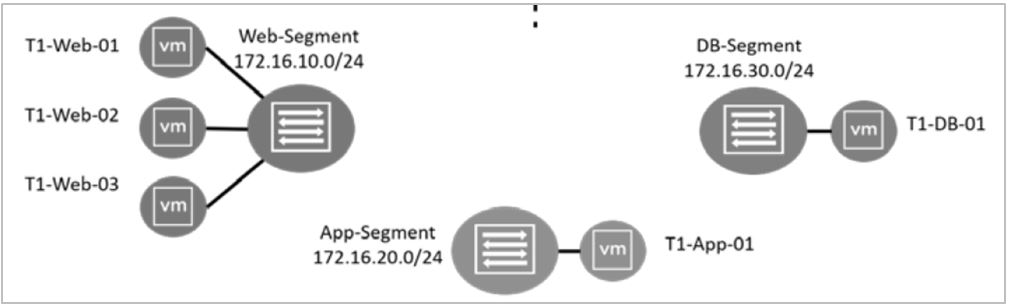
As shown in the above diagram, to demonstrate segmentation three segments are created. Those are Web, App, and DB segments. Each of these segments will have its own subnets and VMs will get assigned IP addresses from each subnet. Please note that the subnet assignment can be done using the static method or DHCP
Segments Configuration & Verification
The configuration of all three segments shown in the above topology can be done by following the below steps.
- On the NSX UI Home page, navigate to Networking – Connectivity – Segments.
- Click Add SEGMENT and configure the segment
| Option | Action |
| Segment Name | Enter Web-Segment |
| Connectivity | Select None(default) |
| Transport Zone | Select PROD-OVERLAY-TZ |
| Subnets | Enter 172.16.10.1/24 |
As shown above, leave the default values for all the other options
Finally, click save and exit out of the segment configuration window
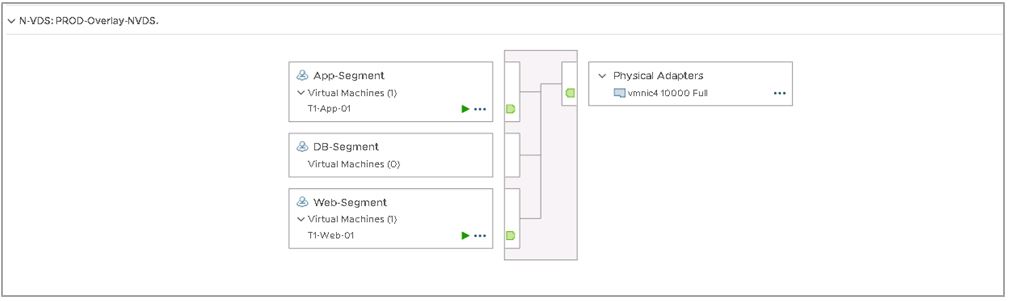
And once the segments are created you could easily verify them using the NSX-T and vCenter UI and also CLI

Indeed, you can also verify the created segments using CLI on NSX manager

As shown above, once the segments are created, it will be shown as a port-group on the vCenter. And the next step would be to map the appropriate VMs to the corresponding segments. Once the segment association to the VMs is done, you would be able to establish connectivity between the VMs in the same segments.
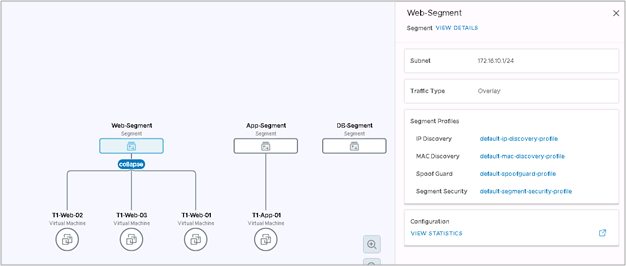
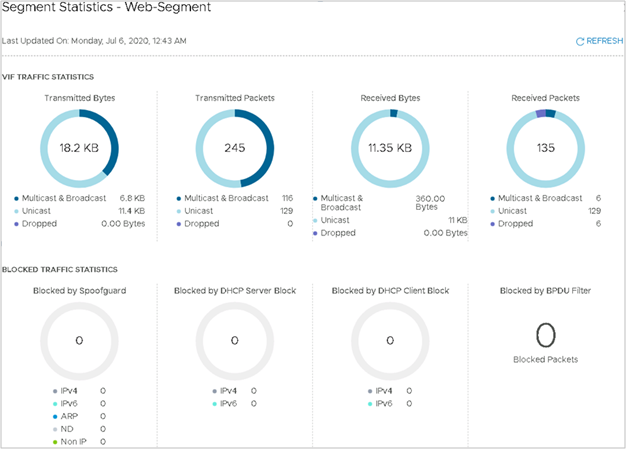
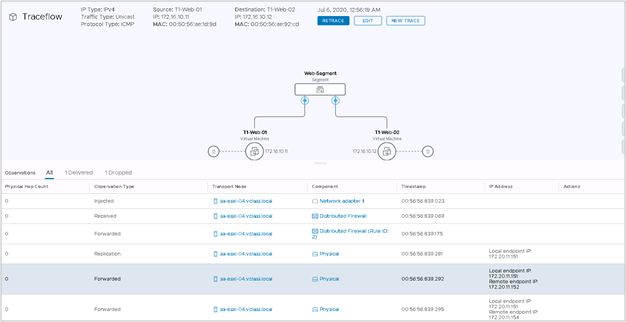
Furthermore, NSX-T also gives various UI options to verify the created segments. This includes information such as associated virtual machines, topology, and traffic seen in each of the segments. Additionally, the connectivity can also be verified using NSX-T trace flow features, which gives traffic trace for each of the touch-points in the path. Some of the screenshot on this is given below.
Conclusion: Simplifying Network Segmentation with NSX-T 3.0
NSX-T 3.0 segmentation provides a practical way to organize virtual workloads, simplify network management, and improve visibility across VMware environments.
By using overlay-backed segments, administrators can build logical networks without creating dedicated physical VLANs for every application tier.
Additionally, NSX-T Manager, vCenter, topology views, and Traceflow provide valuable tools for configuration verification and troubleshooting.
However, successful segmentation also depends on correct routing, firewall policies, and ongoing operational monitoring.
Ultimately, a well-planned NSX-T deployment helps administrators maintain consistent network connectivity while supporting secure and manageable application environments.
Continue Learning
Explore these related technical articles on NETWORK BACHELOR:
- NSX-T Distributed IDS
- NSX Microsegmentation and Traffic Management
- NSX-T-Based DMZ Rack Design for Banking
Need Expert Support with VMware NSX and Network Segmentation?
Designing secure virtual networks requires careful planning, reliable connectivity, and effective operational controls.
TREZBON TECHNOLOGIES helps organizations address enterprise networking, cybersecurity, and IT infrastructure challenges through practical consulting and technical expertise.
Whether you are evaluating segmentation strategies, improving network visibility, or reviewing your infrastructure architecture, connect with our team to discuss your requirements.
Explore our services: https://www.trezbon.com/
Contact TREZBON: https://trezbon.com/#contact
Follow NETWORK BACHELOR for more technical guides on enterprise networking, VMware NSX, and cybersecurity.
NSX-T Series: Part 17 – NSX-T Segment T1 and T0 on same Edge Cluster T0 as SR
Securing Internet Access with Cisco Umbrella and Cisco Secure Access
VMware Carbon Black Solution Analysis
About Author

Muhammad Marakkoottathil(MM)
Expert in the field of SDN, cloud computing, virtualization, active-active data center design & migration. Passionate about helping organizations to achieve their digital transformation objectives with strong 15+ years of experience in design, deployment, and managing heterogeneous network solutions across the industry verticals. Major Industry Certifications: Cisco CCIE, CCDP, VMware VCAP-NV_DESIGN, TOGAF, ITIL, NUTANIX NCSE, Google Cloud Architect, Azure Fundamentals More info please visit my page @ LinkedIn: https://www.linkedin.com/in/contactmm/