AI Infrastructure Engineer Workbook: 12-Stage Hands-On Guide
Becoming an AI infrastructure engineer requires more than understanding GPUs, Kubernetes, and model serving individually. You need to understand how these technologies work together to build, operate, secure, optimize, and scale production AI infrastructure.
This AI Infrastructure Engineer Workbook provides a practical, 12-stage learning path for infrastructure, network, cloud, and platform engineers moving into AI and GPU infrastructure.
Instead of simply reading about the technology, you will build it.
Throughout the workbook, you will work through Linux and networking foundations, Kubernetes GPU scheduling, NVIDIA GPU fundamentals, LLM model serving, inference optimization, GPU autoscaling, distributed training, AI gateways, observability, FinOps, security, and multi-tenancy.
Most importantly, every stage ends with a measurable checkpoint or working artifact.
Therefore, by the end of the 12 stages, you will have moved from foundational infrastructure skills to a working multi-tenant GPU inference platform, complete with benchmarks, monitoring, security controls, and a portfolio-ready architecture.
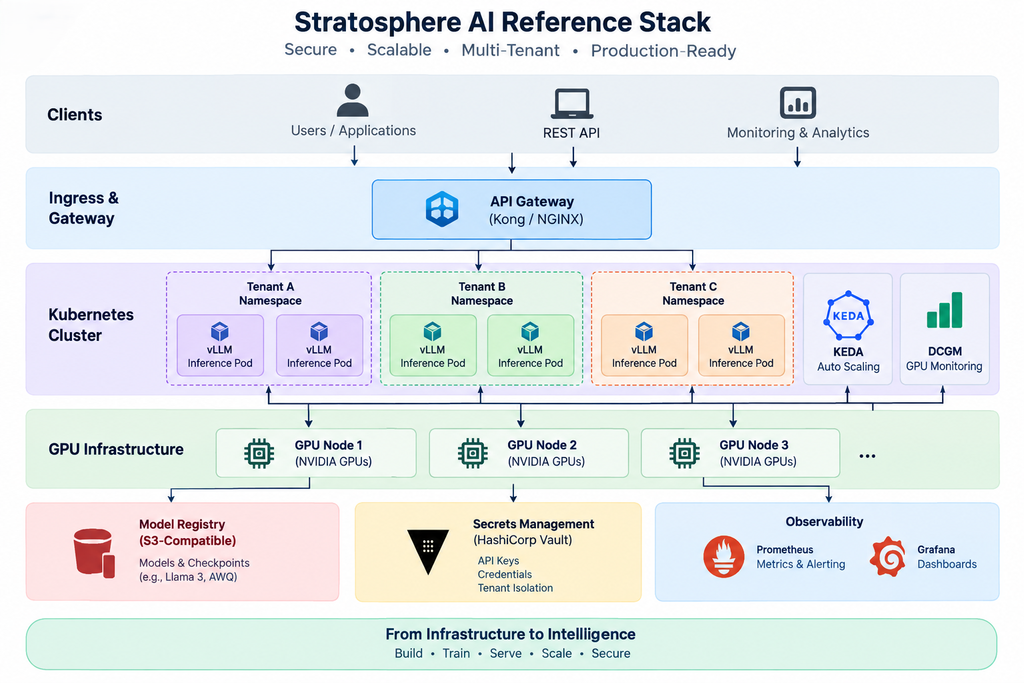
Why a Workbook Instead of Another AI Course?
Tutorials usually teach you to follow instructions. This workbook requires you to build something.
For example, you will create a cluster that schedules GPUs, deploy a server that serves tokens, measure inference performance, monitor GPU utilization, calculate cost per token, and validate tenant isolation.
As a result, every stage produces evidence of practical engineering experience rather than simply adding another technology to your reading list.
Why a workbook, not a course
Tutorials teach you to follow along. A workbook forces you to produce an artifact — a cluster that schedules GPUs, a server that serves tokens, a dashboard that shows cost per token — that you can point to and say “I built this.” Each stage below now includes the actual commands and process Stratosphere AI’s platform team would run to get there, so you can run them yourself against your own lab.
Stage 1 — Linux, Networking, and Python Foundations
Covers: Linux fundamentals, bash, SSH, TCP/HTTP internals, DNS, Python, async programming, systemd.
Why it matters: Every layer above this is Linux processes talking over sockets. If you can’t read a trace or diagnose a DNS failure inside a pod, the layers above are magic you can’t debug at 2am.
Stratosphere AI process: the platform team provisions a bare bones GPU node, verifies base connectivity, then deploys a small async service as a smoke test before anything containerized touches it.
Flow:
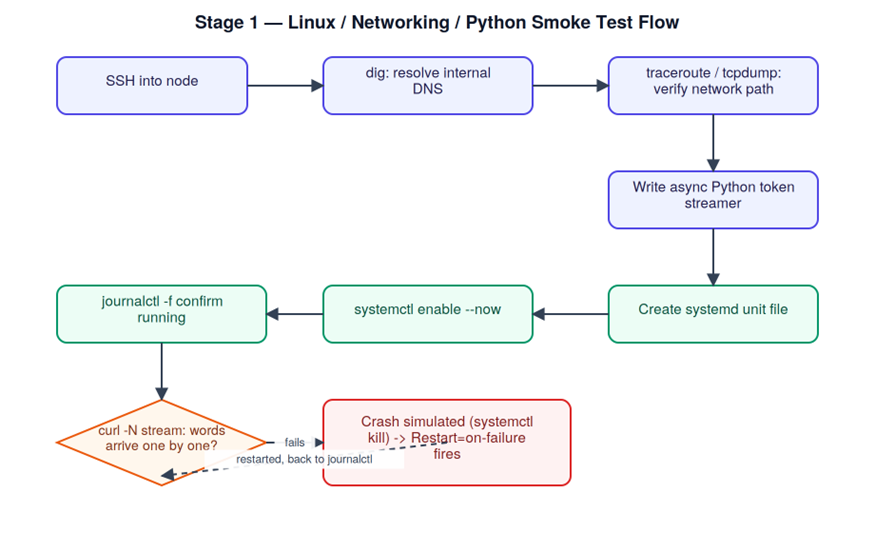
First, connect to the server and verify that the host is reachable.
ssh -i ~/.ssh/stratosphere-lab.pem ops@10.20.1.15
Next, verify that internal DNS can resolve the model registry.
dig +short registry.stratosphere-ai.internal
After DNS is confirmed, inspect the network path.
This baseline becomes useful later when troubleshooting latency or RDMA fabric issues.
traceroute registry.stratosphere-ai.internal
In addition, capture a small sample of HTTPS traffic for later analysis.
tcpdump -i eth0 port 443 -c 20 -w /tmp/smoke_test.pcap
Finally, create an asynchronous token-streaming smoke test.
The service confirms that Python networking and application-level streaming work correctly.
cat <<‘PY’ > /opt/stratosphere/token_streamer.py
import asyncio
from aiohttp import web
async def stream_tokens(request):
resp = web.StreamResponse(headers={“Content-Type”: “text/plain”})
await resp.prepare(request)
for word in “the quick brown fox jumps”.split():
await resp.write(f”{word} “.encode())
await asyncio.sleep(0.05)
return resp
app = web.Application()
app.add_routes([web.get(“/stream”, stream_tokens)])
web.run_app(app, port=8080)
PY
# Register it as a managed service so it survives a crash/reboot
cat <<‘UNIT’ | sudo tee /etc/systemd/system/token-streamer.service
[Unit]
Description=Stratosphere AI token streaming smoke test
After=network.target
[Service]
ExecStart=/usr/bin/python3 /opt/stratosphere/token_streamer.py
Restart=on-failure
User=ops
[Install]
WantedBy=multi-user.target
UNIT
sudo systemctl daemon-reload
sudo systemctl enable –now token-streamer
journalctl -u token-streamer -f
curl -N http://localhost:8080/stream
Checkpoint: the unit restarts automatically after sudo systemctl kill token-streamer, and curl -N visibly streams word-by-word rather than returning one blob.
Stage 1 → Stage 2: “Now that the underlying Linux and network environment is validated, the next step is to containerize the workload and introduce GPU-aware orchestration.”
Stage 2 — Containers and Orchestration
Covers: Docker, Kubernetes, Helm, GPU scheduling, resource limits, multi-node clusters.
Stratosphere AI process: build the CUDA base image, push it to the internal registry, stand up a GPU-aware namespace, and prove the scheduler can actually place a pod on a GPU node.
Architecture:
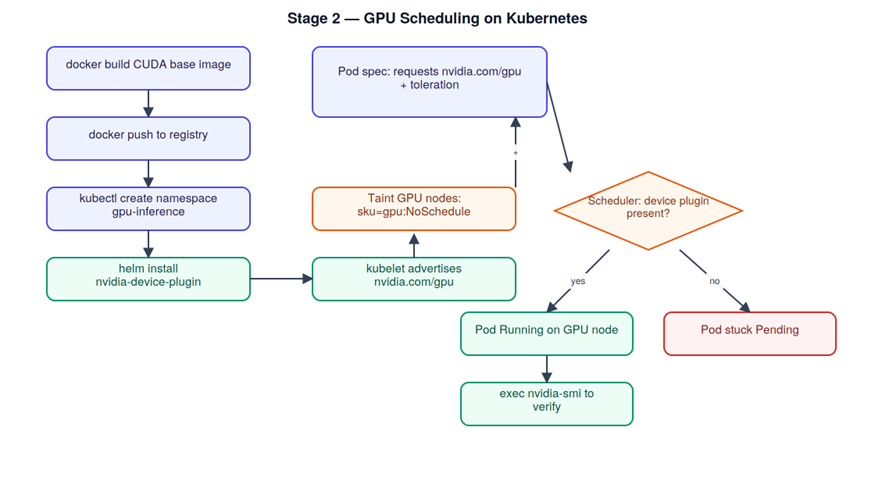
First, build the base serving image and push it to the internal registry.
docker build -t registry.stratosphere-ai.internal/vllm-base:1.0 .
docker push registry.stratosphere-ai.internal/vllm-base:1.0
Next, create a dedicated namespace to isolate GPU inference workloads.
kubectl create namespace gpu-inference
With the namespace ready, install the NVIDIA device plugin.
This allows kubelet to advertise nvidia.com/gpu resources to Kubernetes.
helm repo add nvdp https://nvidia.github.io/k8s-device-plugin
helm repo update
helm install nvdp nvdp/nvidia-device-plugin -n gpu-inference –set gfd.enabled=true
After installation, verify that the nodes are reporting available GPU capacity.
kubectl get nodes -o json | jq ‘.items[].status.allocatable.”nvidia.com/gpu”‘
Then, taint the GPU node so ordinary workloads cannot schedule there.
kubectl taint nodes gpu-node-01 sku=gpu:NoSchedule
Finally, deploy a smoke-test pod that requests one GPU.
The matching toleration allows this workload to schedule on the tainted GPU node.
cat <<‘YAML’ | kubectl apply -n gpu-inference -f –
apiVersion: v1
kind: Pod
metadata:
name: gpu-smoke-test
spec:
tolerations:
name: cuda-check
image: registry.stratosphere-ai.internal/vllm-base:1.0
resources:
limits:
nvidia.com/gpu: 1
command: [“sleep”, “3600”]
YAML
YAML
kubectl -n gpu-inference get pod gpu-smoke-test -w
kubectl -n gpu-inference exec -it gpu-smoke-test — nvidia-smi
key: “sku”
operator: “Equal”
value: “gpu”
effect: “NoSchedule”
containers:
Checkpoint: the pod moves from Pending to Running only once the device plugin is installed — kill the daemonset and redeploy to see it stick at Pending, which is the failure mode you’ll be diagnosing in production.
Stage 2 → Stage 3: “At this point, Kubernetes can schedule a GPU workload. However, successful scheduling does not prove that the GPU itself is correctly sized, connected, or healthy. Therefore, Stage 3 moves deeper into GPU fundamentals.”
Stage 3 — GPU Fundamentals
Covers: CUDA basics, nvidia-smi, VRAM math, NVLink/InfiniBand, MIG partitioning.
Stratosphere AI process: before committing capacity to a customer workload, the team profiles the GPU, verifies the fabric topology, and calculates whether the requested model actually fits.
Fabric topology + VRAM decision path:
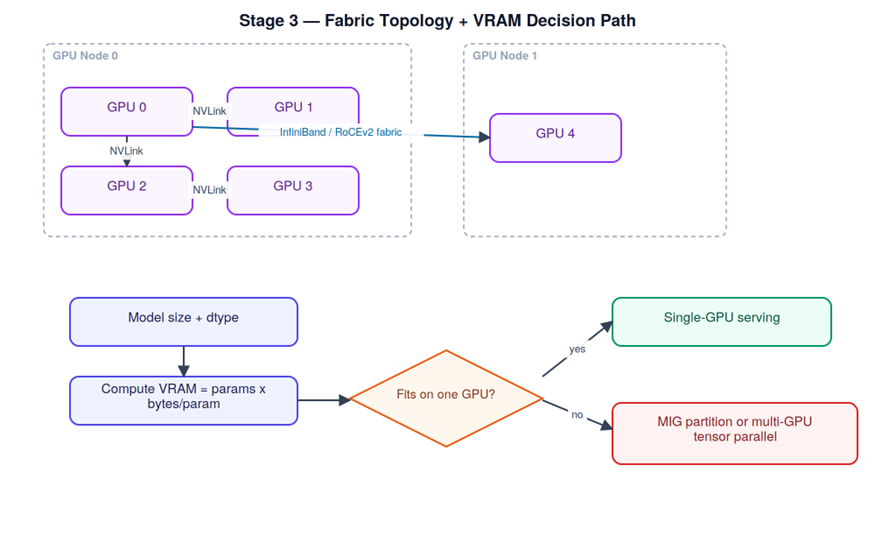
First, monitor live GPU utilization, memory usage, and power consumption.
nvidia-smi –query-gpu=timestamp,utilization.gpu,memory.used,memory.total,power.draw –format=csv -l 1
Next, inspect the NVLink and PCIe topology between GPUs on the node.
nvidia-smi topo -m
Before assigning a customer workload, check the GPU for ECC errors.
nvidia-smi -q -d ECC
Finally, calculate the VRAM requirement.
This comparison helps determine whether an 8B-parameter model fits using FP16 or AWQ.
python3 – <<‘PY’
params = 8_000_000_000
fp16_gb = params * 2 / 1e9
awq_gb = params * 0.6 / 1e9 # ~4-bit AWQ overhead-adjusted
print(f”FP16: {fp16_gb:.1f} GB, AWQ: {awq_gb:.1f} GB”)
PY
# List available MIG profiles and partition an A100 for multi-tenant isolation
nvidia-smi mig -lgip
sudo nvidia-smi mig -cgi 19,19 -C # create two 3g.40gb-class instances
nvidia-smi -L
Checkpoint: your calculated VRAM figure and nvidia-smi –query-gpu=memory.used after actually loading the model agree within ~10%.
Stage 3 → Stage 4: “Once the GPU hardware and memory requirements are understood, the next challenge is turning that capacity into a usable AI service.”
Stage 4 — Model Serving
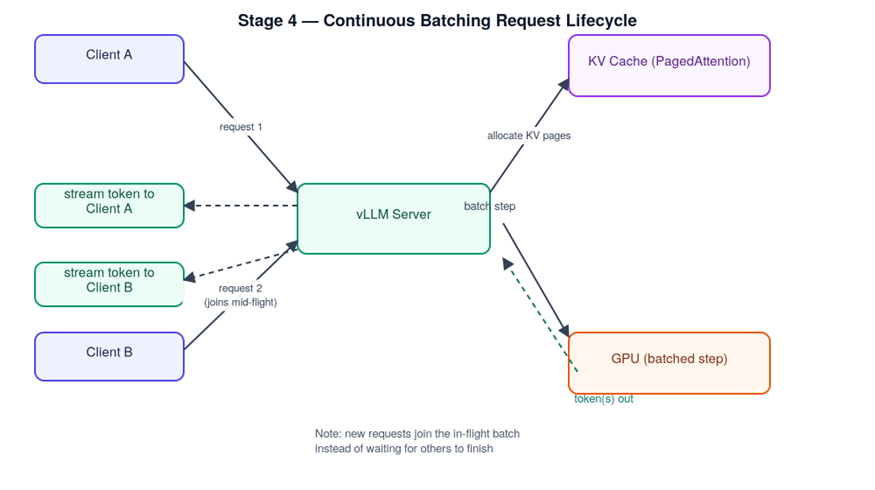
Covers: vLLM, SGLang, TGI, continuous batching, KV cache management, quantization (AWQ, FP8).
Stratosphere AI process: deploy the baseline server, hit it with real traffic, then swap in a quantized checkpoint and compare.
Continuous batching / request lifecycle:
pip install vllm
First, launch the baseline FP16 model server with vLLM.
python -m vllm.entrypoints.openai.api_server
–model meta-llama/Meta-Llama-3-8B-Instruct
–port 8000 –max-num-seqs 32 –gpu-memory-utilization 0.9
Once the server is running, send a test request to verify inference.
curl http://localhost:8000/v1/completions
-H “Content-Type: application/json”
-d ‘{“model”:”meta-llama/Meta-Llama-3-8B-Instruct”,”prompt”:”Explain RDMA in one sentence.”,”max_tokens”:60}’
Next, measure throughput while increasing request concurrency.
python3 -m vllm.entrypoints.openai.api_server –model … &
python3 benchmarks/benchmark_serving.py
–backend vllm –model meta-llama/Meta-Llama-3-8B-Instruct
–num-prompts 200 –request-rate 8
For comparison, switch to an AWQ-quantized checkpoint.
Then, repeat the same benchmark to compare inference performance.
python -m vllm.entrypoints.openai.api_server
–model TheBloke/Llama-3-8B-Instruct-AWQ –quantization awq –port 8001
python3 benchmarks/benchmark_serving.py –backend vllm –port 8001 –num-prompts 200 –request-rate 8
Checkpoint: a side-by-side table of tokens/sec and p50/p99 latency for FP16 vs AWQ, at batch sizes 1/8/32 — generated from your own runs, not vendor numbers.
Stage 5 — Inference Optimization
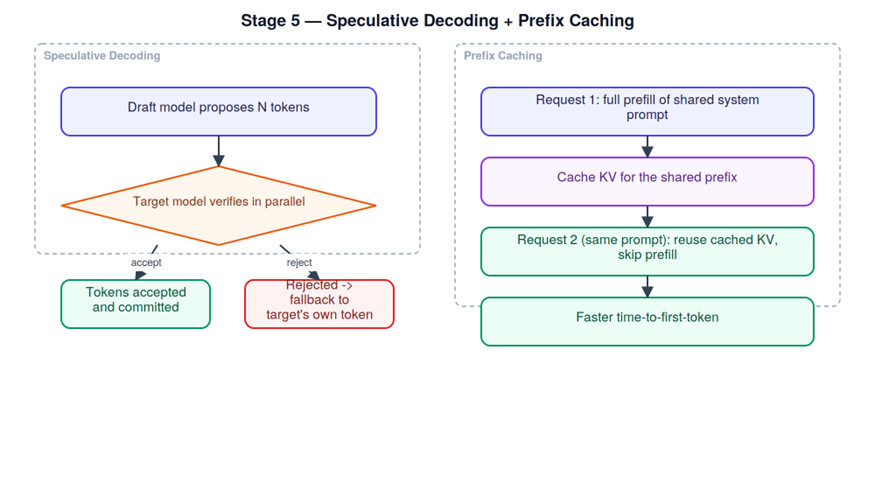
Covers: Speculative decoding, prefix caching, chunked prefill, TensorRT-LLM, Triton kernels.
Stratosphere AI process: the platform team enables prefix caching for the shared-system-prompt chatbot workload, then evaluates speculative decoding for latency-critical customers.
Speculative decoding + prefix caching:
# Enable prefix caching + speculative decoding on vLLM
python -m vllm.entrypoints.openai.api_server \
–model meta-llama/Meta-Llama-3-8B-Instruct \
–enable-prefix-caching \
–speculative-model meta-llama/Llama-3-1B \
–num-speculative-tokens 5
# Measure time-to-first-token before/after prefix caching using the same system prompt
python3 – <<‘PY’
import time, requests
prompt = {“model”:”meta-llama/Meta-Llama-3-8B-Instruct”,
“prompt”:”<shared 400-token system prompt>\nUser: hi”,”max_tokens”:1}
for i in range(3):
t0 = time.time()
requests.post(“http://localhost:8000/v1/completions”, json=prompt)
print(f”request {i}: {time.time()-t0:.3f}s TTFT-proxy”)
PY
# Build a TensorRT-LLM engine for the last-mile latency squeeze
trtllm-build –checkpoint_dir ./llama3-8b-ckpt \
–output_dir ./trt-engines/llama3-8b \
–gemm_plugin float16 –max_batch_size 32
Checkpoint: request 2 and 3 in the prefix-caching test show a clearly lower TTFT-proxy than request 1 — that delta is the artifact.
Stage 6 — Model Distribution and Storage
Covers: Weight sharding, safetensors, model registries, CDN for weights, lazy loading.
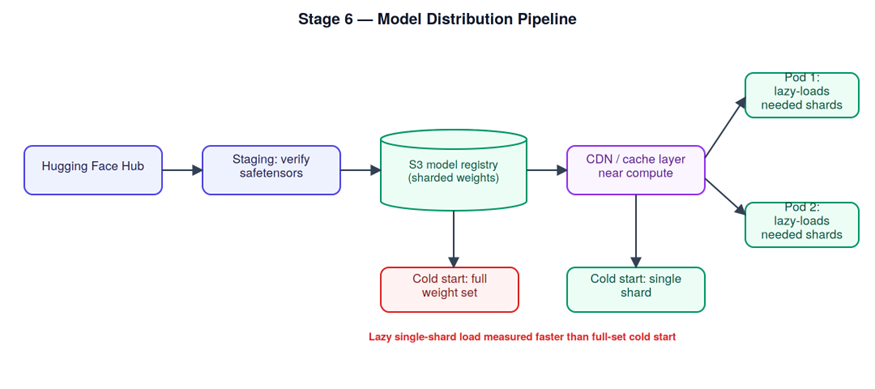
Stratosphere AI process: weights are pulled from Hugging Face once, converted/verified as safetensors, pushed to internal object storage, then lazy-loaded on pod startup.
Distribution pipeline:
First, download the model and stage it in the local directory.
huggingface-cli download meta-llama/Meta-Llama-3-8B-Instruct
–local-dir /staging/llama3-8b-instruct
Once the download is complete, copy the model to the internal S3-compatible registry.
aws s3 cp /staging/llama3-8b-instruct
s3://stratosphere-ai-models/llama3-8b-instruct/v1/ –recursive
Before deployment, verify the Safetensors file without executing arbitrary pickle code.
python3 – <<‘PY’
from safetensors import safe_open
with safe_open(“/staging/llama3-8b-instruct/model-00001-of-00004.safetensors”, framework=”pt”) as f:
print(list(f.keys())[:5])
PY
Next, measure startup time by loading only the shard required by the inference pod.
time aws s3 cp s3://stratosphere-ai-models/llama3-8b-instruct/v1/model-00001-of-00004.safetensors /models/
For comparison, measure the time required to cold-load the complete four-shard model.
time aws s3 cp s3://stratosphere-ai-models/llama3-8b-instruct/v1/ /models/ –recursive
Checkpoint: documented cold-start time for lazy single-shard load vs. full-set load, with the delta explained.
Stage 7 — GPU Autoscaling
Covers: KEDA, queue-based scaling, cold start mitigation, spot instances, multi-region failover.
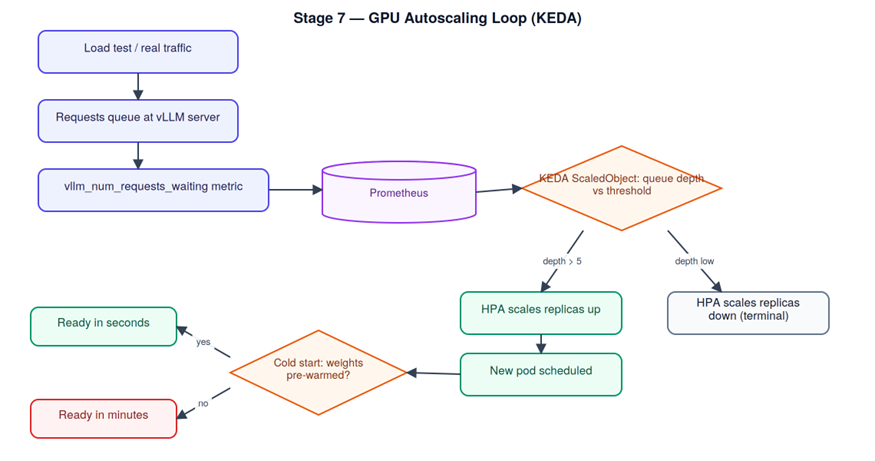
Stratosphere AI process: install KEDA, scale the inference deployment on request-queue depth rather than CPU, and load-test the behavior.
Autoscaling loop:
helm repo add kedacore https://kedacore.github.io/charts
helm install keda kedacore/keda -n keda –create-namespace
cat <<‘YAML’ | kubectl apply -n gpu-inference -f –
apiVersion: keda.sh/v1alpha1
kind: ScaledObject
metadata:
name: vllm-scaler
spec:
scaleTargetRef:
name: vllm-deployment
minReplicaCount: 1
maxReplicaCount: 6
triggers:
– type: prometheus
metadata:
serverAddress: http://prometheus.monitoring:9090
metricName: vllm_queue_depth
query: sum(vllm_num_requests_waiting)
threshold: “5”
YAML
kubectl -n gpu-inference get hpa -w
# Load test to trigger a scale event
hey -z 60s -c 50 http://vllm-gateway.stratosphere-ai.internal/v1/completions
kubectl -n gpu-inference get pods -w
Checkpoint: a recorded timeline showing pod count rising within your load-test window and falling back down afterward, plus the measured cold-start latency for the newly scheduled pod.
Stage 8 — Training Infrastructure
Covers: Ray and Slurm, FSDP and tensor parallelism, checkpointing, fault tolerance, gradient accumulation.
Stratosphere AI process: a small multi-GPU fine-tune is launched via Ray, checkpointed regularly, and deliberately interrupted to prove fault tolerance.
Distributed training + fault tolerance:
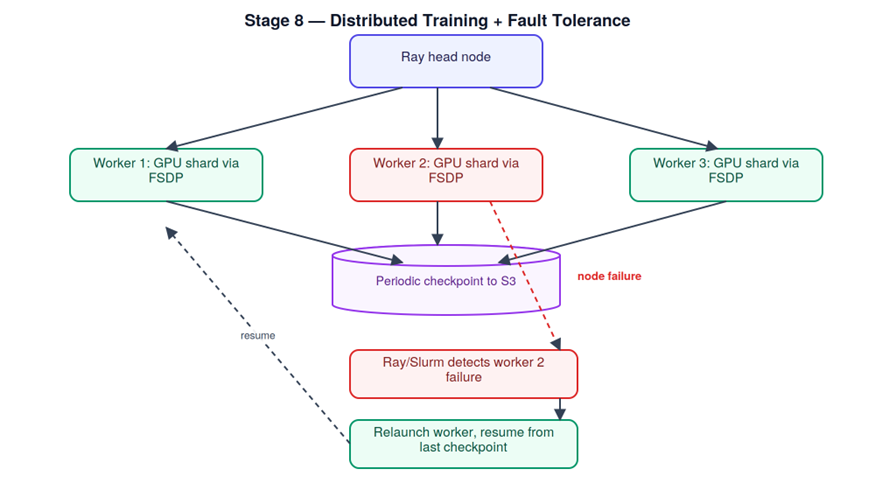
First, launch the Ray cluster across the available GPU nodes.
ray up cluster.yaml
ray submit cluster.yaml train_fsdp.py –num-gpus 8 –checkpoint-dir s3://stratosphere-ai-checkpoints/run-001/
For comparison, submit the same training workload through Slurm for HPC-style scheduling.
sbatch –gres=gpu:8 –job-name=llama3-finetune train_job.slurm
squeue -u abhishek
Once training is running, simulate a node failure to test fault tolerance.
ray kill-worker # or: sudo systemctl stop ray-worker on that node
Finally, recover the interrupted workload by resuming from the latest checkpoint.
python train_fsdp.py –resume-from s3://stratosphere-ai-checkpoints/run-001/checkpoint-step-1500/
Checkpoint: the resumed run’s loss curve picks up from the last checkpoint step, not from scratch — screenshot the loss log as proof.
Stage 9 — AI Gateway Layer
Covers: Routing, load balancing, fallback chains, rate limiting, per-tenant token budgets.
Stratosphere AI process: a lightweight FastAPI gateway sits in front of two backends, enforcing per-tenant token budgets and failing over on backend health.
Gateway routing:
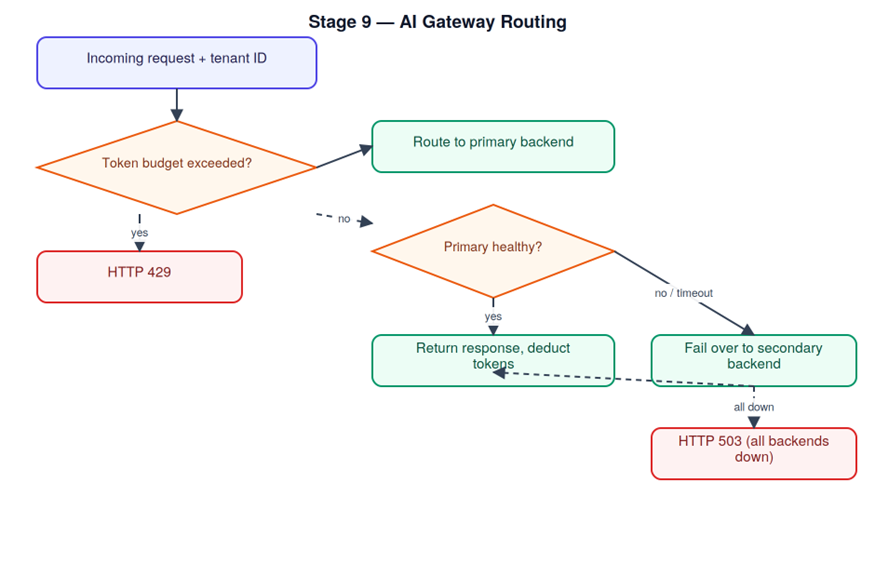
# gateway.py (excerpt)
from fastapi import FastAPI, HTTPException
import httpx, time
app = FastAPI()
TENANT_BUDGETS = {“tenant-a”: 100_000, “tenant-b”: 250_000}
TENANT_USAGE = {“tenant-a”: 0, “tenant-b”: 0}
BACKENDS = [“http://vllm-primary:8000”, “http://vllm-secondary:8000”]
@app.post(“/v1/completions”)
async def route(request: dict, tenant: str):
if TENANT_USAGE[tenant] >= TENANT_BUDGETS[tenant]:
raise HTTPException(429, “token budget exceeded”)
for backend in BACKENDS:
try:
async with httpx.AsyncClient(timeout=2) as client:
resp = await client.post(f”{backend}/v1/completions”, json=request)
TENANT_USAGE[tenant] += resp.json().get(“usage”, {}).get(“total_tokens”, 0)
return resp.json()
except httpx.RequestError:
continue # fail over to next backend
raise HTTPException(503, “all backends unavailable”)
uvicorn gateway:app –host 0.0.0.0 –port 9000
# Exercise the budget limit
for i in {1..50}; do
curl -s -X POST “http://localhost:9000/v1/completions?tenant=tenant-a” \
-d ‘{“model”:”llama3-8b”,”prompt”:”test”,”max_tokens”:2000}’
done
# Kill the primary backend to prove failover
kubectl -n gpu-inference scale deployment vllm-primary –replicas=0
curl -X POST “http://localhost:9000/v1/completions?tenant=tenant-b” -d ‘{“prompt”:”still works?”}’
Checkpoint: request 30-something for tenant-a returns HTTP 429, and tenant-b’s request still succeeds after the primary backend is scaled to zero.
Stage 9 → Stage 10: “The AI gateway now controls how requests reach the inference platform. Next, we need visibility into what those requests cost and how the underlying GPUs perform.”
Stage 10 — Observability and FinOps
Covers: GPU utilization (DCGM), TTFT/ITL metrics, cost per token, tenant dashboards, alerting.
Stratosphere AI process: DCGM feeds Prometheus, Grafana visualizes it, and a PromQL query converts GPU-hour cost into cost-per-token.
Observability pipeline:
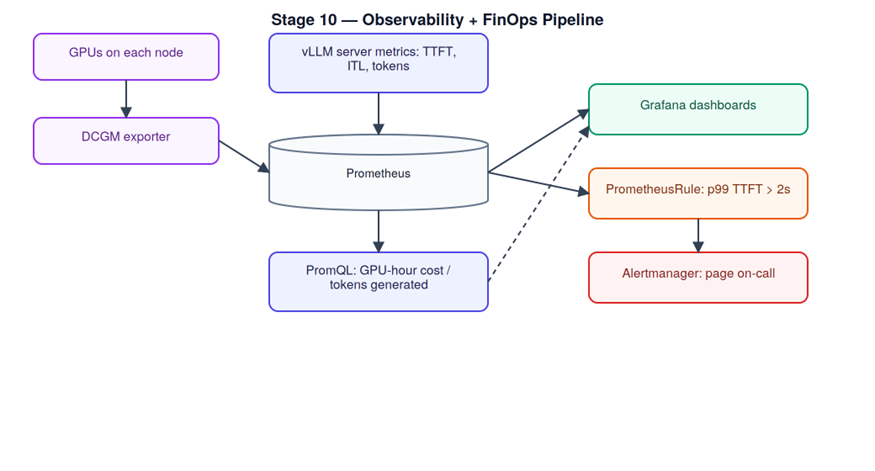
helm repo add gpu-helm-charts https://nvidia.github.io/dcgm-exporter/helm-charts
helm install dcgm-exporter gpu-helm-charts/dcgm-exporter -n monitoring –create-namespace
kubectl -n monitoring port-forward svc/prometheus-server 9090:80
First, launch the Ray cluster across the available GPU nodes.
ray up cluster.yaml
ray submit cluster.yaml train_fsdp.py –num-gpus 8 –checkpoint-dir s3://stratosphere-ai-checkpoints/run-001/
For comparison, submit the same training workload through Slurm for HPC-style scheduling.
sbatch –gres=gpu:8 –job-name=llama3-finetune train_job.slurm
squeue -u abhishek
Once training is running, simulate a node failure to test fault tolerance.
ray kill-worker # or: sudo systemctl stop ray-worker on that node
Finally, recover the interrupted workload by resuming from the latest checkpoint.
python train_fsdp.py –resume-from s3://stratosphere-ai-checkpoints/run-001/checkpoint-step-1500/
Checkpoint: a Grafana dashboard with live GPU utilization, TTFT/ITL, and a computed cost-per-token panel — screenshot it, this doubles as a portfolio artifact.
Stage 11 — Security and Multi-Tenancy
Covers: Tenant isolation, secrets management, sandboxed execution, audit logs, compliance controls.
Stratosphere AI process: network policies enforce tenant isolation at the namespace level, secrets live in Vault rather than plaintext manifests, and a deliberate cross-tenant request proves the boundary holds.
Tenant isolation boundary:
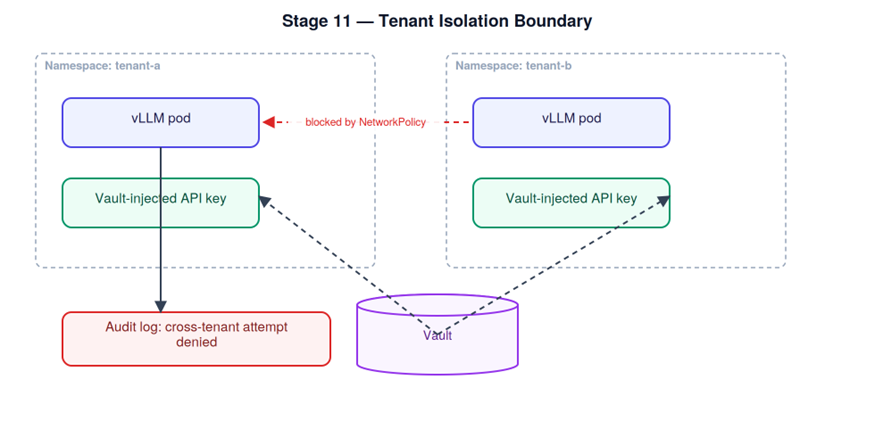
First, establish tenant isolation by denying cross-namespace traffic except where explicitly allowed.
cat <<‘YAML’ | kubectl apply -n tenant-a -f –
apiVersion: networking.k8s.io/v1
kind: NetworkPolicy
metadata:
name: deny-cross-tenant
spec:
podSelector: {}
policyTypes: [“Ingress”]
ingress:
from: namespaceSelector:
matchLabels:
name: tenant-a
YAML
Next, protect the model API key by storing it in Vault instead of plaintext Kubernetes YAML.
vault kv put secret/stratosphere-ai/tenant-a/llm-api-key value=”sk-••••••••”
vault kv get secret/stratosphere-ai/tenant-a/llm-api-key
To validate access control, confirm that tenant-b cannot read pods belonging to tenant-a.
kubectl auth can-i get pods -n tenant-a –as=system:serviceaccount:tenant-b:default
After RBAC validation, attempt a cross-tenant request and verify that the connection is blocked.
kubectl -n tenant-b run curl-test –rm -it –image=curlimages/curl —
curl -m 3 http://vllm-svc.tenant-a.svc.cluster.local:8000/v1/completions
Finally, inspect the audit-related logs for evidence of the denied attempt.
kubectl -n tenant-a logs -l app=vllm –since=5m | grep -i denied
Stage 11 → Stage 12: “With isolation, secrets, and tenant boundaries validated, the infrastructure is technically complete. The final stage turns that engineering work into reproducible benchmarks and a portfolio-ready project.”
Checkpoint: the kubectl auth can-i check returns no, and the cross-namespace curl attempt times out rather than connecting — both captured as evidence in your writeup.
Stage 12 — Portfolio and Public Benchmarks
Covers: Shipping a self-hosted inference cluster, publishing latency and cost benchmarks, writing architecture teardowns.
Stratosphere AI process (your process, really): package everything above into one running stack, document the benchmark methodology so it’s reproducible, and publish the teardown.
Portfolio pipeline:
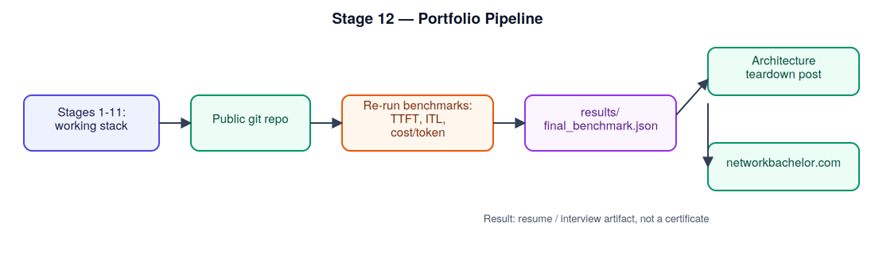
First, package the complete stack configuration as a portfolio-ready Git repository.
git init stratosphere-ai-reference-stack
git add k8s/ helm/ gateway/ dashboards/ benchmarks/
git commit -m “Reference multi-tenant GPU inference stack: K8s + vLLM + KEDA + DCGM + Vault”
git remote add origin git@github.com:/stratosphere-ai-reference-stack.git
git push -u origin main
Next, repeat the Stage 4 and Stage 5 benchmarks and export the final results for analysis.
python3 benchmarks/benchmark_serving.py –backend vllm –num-prompts 500 –request-rate 16
–output-json results/final_benchmark.json
Finally, create the architecture diagram in Mermaid or draw.io for the technical teardown post.
Checkpoint: a public repo, a benchmark results file with your own numbers, and a published writeup — the single artifact set that does the most work in an interview.
Using this as a workbook, not a reading list
For each stage: read the concepts, run the commands against your own lab (swap Stratosphere AI’s names for your own registry/namespace/models), and write two or three paragraphs on what broke and what surprised you. Those paragraphs are the raw material for Stage 12 — you’re not writing the capstone from scratch, you’re assembling eleven stages of notes you already took.
Most people stay stuck watching tutorials. Builders get hired.
Conclusion: From Infrastructure Engineer to AI Infrastructure Engineer
AI infrastructure engineering is not about learning one product or mastering a single GPU platform. Instead, it requires understanding how Linux, networking, Kubernetes, NVIDIA GPUs, model serving, distributed training, observability, security, and FinOps work together as one production system.
That is why this workbook follows a build-first approach.
You begin with Linux and networking fundamentals. Next, you move into containers, Kubernetes, GPU scheduling, and GPU architecture. From there, the workbook progresses into LLM model serving, inference optimization, model distribution, GPU autoscaling, and distributed training.
Finally, you bring those components together with an AI gateway, GPU observability, cost monitoring, security, multi-tenancy, and reproducible performance benchmarks.
The goal is not simply to say that you understand AI infrastructure. The goal is to build something that demonstrates it.
Therefore, treat every checkpoint as part of your engineering portfolio. Save your configurations, benchmark results, architecture diagrams, troubleshooting notes, dashboards, and lessons learned. By Stage 12, those individual artifacts become a complete AI infrastructure engineering portfolio project.
Ready to Build Your AI Infrastructure Skills?
Don’t just read about GPU infrastructure, Kubernetes, and LLM inference—build the complete stack.
Follow all 12 stages of the AI Infrastructure Engineer Workbook, complete each hands-on checkpoint, and turn your work into a portfolio-ready AI infrastructure project.
👉 Start the AI Infrastructure Engineer Workbook:
https://www.networkbachelor.com/the-ai-infrastructure-engineer-workbook-12-stages-from-zero-to-shipped/
Build it. Test it. Measure it. Secure it. Ship it.
vCloud Director: NSX-V to NSX-T Migration Part-2
DGX SuperPOD Deployment Guide: BCM, Kubernetes & Slurm
NSX-T Series: Part 16 – NSX-T Segment T1 Gateway with EDGE Cluster(SR)
About Author

abhishek
Expert in Network, Virtualization and Security field in On-Prem and Public Cloud. Passionate about new technology and consult the best solution to business organisation.Previously served Networkershome, EMC2, Cisco, VMware and Arista in different fields of Engineering, TAC, Consulting, Designing and Training. Certification : CCIE#48639, VCIX DCV and NV, Aviatrix Multi Cloud, SD-WAN Specialist, Palo Alto PCNSE, Amazon Cloud, Docker Certified Engineer. LinkedIn : https://www.linkedin.com/in/abhishekkunal51/