VMware NSX-T and AVI Load Balancer: Architecture & Use Cases
Modern businesses depend on applications to deliver services, support customers, and maintain daily operations. Therefore, organizations need infrastructure that can scale quickly and support changing application requirements.
However, traditional data center networks often contain technologies from multiple vendors. Although these solutions may provide excellent performance, managing them together can increase operational complexity.
VMware NSX-T and AVI Load Balancer integration offers a software-defined approach to networking, security, and application delivery.
By combining network virtualization with advanced load balancing, organizations can simplify infrastructure management and improve application availability.
This fourth article in our VMware Design Bootcamp series explores the architecture, integration, and key use cases of NSX-T and Avi Load Balancer.
Technology note: NSX-T is the historical product name used in this architecture. Current documentation generally refers to VMware NSX. Similarly, the application delivery platform is now branded VMware Avi Load Balancer.
1. Understanding VMware NSX-T and AVI Load Balancer Architecture
Software-Defined Networking (SDN) separates network management and control functions from packet forwarding.
As a result, organizations can automate network provisioning and manage infrastructure through centralized interfaces.
VMware NSX-T and Avi Load Balancer follow complementary software-defined architectural principles.
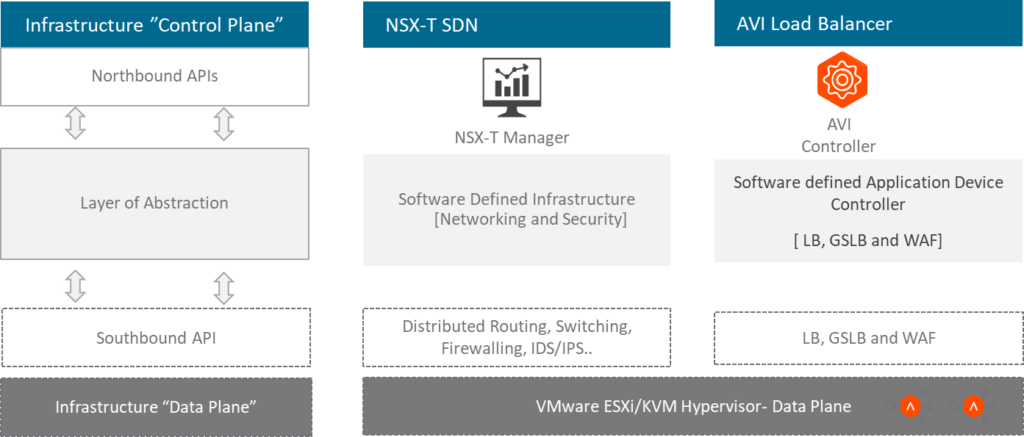
VMware NSX-T: Network Virtualization and Security
VMware NSX-T provides software-defined networking and security capabilities for virtualized environments.
NSX Manager supports centralized management and policy configuration. Meanwhile, NSX transport nodes and Edge nodes perform the relevant data-plane functions.
Its core capabilities include:
- Logical switching and network segmentation
- Tier-0 and Tier-1 routing
- Distributed firewalling and security policies
- Network automation and centralized management
- Connectivity between virtual and physical networks
Consequently, organizations can reduce their dependence on manual network configuration.
VMware AVI Load Balancer: Application Delivery
VMware Avi Load Balancer provides software-defined application delivery services.
The Avi Controller manages application delivery configurations and coordinates Service Engines. In contrast, Service Engines process application traffic.
Depending on the deployed edition and configuration, Avi supports capabilities such as:
- Layer 4–7 load balancing
- Global Server Load Balancing (GSLB)
- Web Application Firewall (WAF)
- Application health monitoring
- Traffic analytics and performance visibility
- Automated Service Engine scaling
Together, NSX and Avi can support a more integrated data center architecture.
2. NSX-T and AVI Integration: An Architectural Perspective
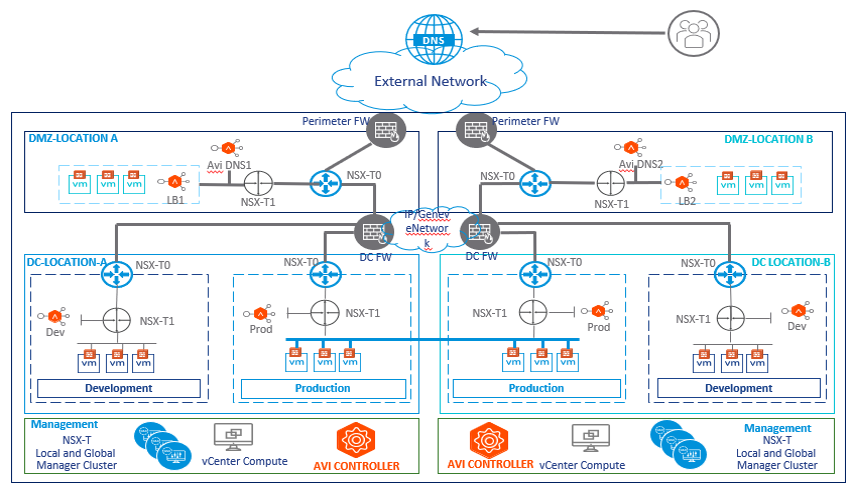
Enterprise data centers commonly contain several network zones.
For example, organizations may separate production, development, testing, and DMZ workloads.
Each environment requires appropriate connectivity and security controls.
VMware NSX-T supports this design through logical network segments and gateway services.
Tier-1 Gateway: Internal Workload Connectivity
A Tier-1 gateway provides routing services for connected logical segments.
For example, an enterprise may use separate Tier-1 gateways for production and development environments.
This approach helps organize network connectivity and supports policy separation.
Furthermore, distributed firewall rules can control communication between workloads.
Tier-0 Gateway: External Network Connectivity
The Tier-0 gateway connects the NSX environment to external networks.
These networks may include physical routers, upstream firewalls, and other infrastructure.
Therefore, Tier-0 gateways play an important role in north-south connectivity.
AVI Load Balancer in the DMZ
Organizations commonly deploy public-facing applications within a DMZ or another appropriately isolated application zone.
These applications require reliable traffic distribution and strong security controls.
Avi Load Balancer can provide application load balancing and health monitoring. Additionally, supported WAF capabilities can help protect HTTP and HTTPS applications.
For multi-site deployments, GSLB can distribute application access between available locations.
However, GSLB and NSX Federation serve different purposes. GSLB manages application-level site selection, while NSX Federation supports centralized management of supported networking and security configurations across locations.
3. Use Case 1: Integrated Networking and Layer 4–7 Services
Modern data centers need coordinated networking, security, and application delivery.
VMware NSX-T provides logical connectivity, routing, and distributed security capabilities.
Meanwhile, Avi Load Balancer handles application traffic distribution and related delivery services.
How NSX-T and AVI Work Together
First, administrators configure the supported NSX integration within Avi Controller.
Next, Avi discovers relevant networking resources according to the integration configuration and permissions.
The administrator can then configure virtual services, application pools, and supporting network connectivity.
As a result, the environment can combine:
- Software-defined networking
- Application load balancing
- Network security policies
- Application health monitoring
- Centralized operational visibility
However, the exact integration workflow depends on the deployed product versions and supported integration model.
Key benefit: Organizations can coordinate networking and application delivery while reducing manual configuration.
Use Case 2: Scalable Application Delivery Infrastructure
Currently, most of the company runs their business on the internet. Depends on the nature of the business you may see there is a huge spike during some festive seasons like Christmas and Eid. The infrastructure should be able to scale out and scale in according to the demand. With AVI you can easily set a threshold, such as if the resource utilization reaches a certain level, let’s say 70 or 80% it can scale out and automatically provision additional service engine to support the extra traffic load.
4. Use Case 2: Scalable Application Delivery Infrastructure
Application traffic can change significantly throughout the year.
For example, e-commerce platforms may experience increased demand during major shopping events, Christmas, or Eid.
Without sufficient capacity, applications may experience slow response times or service interruptions.
Therefore, enterprises need scalable application delivery infrastructure.
How AVI Supports Application Scaling
Avi Load Balancer uses Service Engines to process application traffic.
Depending on the deployment configuration, the platform can add or remove Service Engine capacity based on defined scaling policies.
For instance, administrators may configure scaling thresholds using resource utilization or other supported metrics.
When demand increases, the platform can provision additional capacity where the infrastructure and configuration permit it.
Similarly, capacity can decrease when traffic returns to normal.
This approach helps organizations:
- Support changing application demand
- Reduce manual scaling activities
- Maintain application availability
- Improve resource utilization
- Support consistent application performance
Key benefit: Automated scaling can help applications handle changing traffic patterns more efficiently.
5. Use Case 3: End-to-End Monitoring and Application Visibility
Application performance directly affects user experience.
However, identifying the source of a performance issue can be difficult.
For example, slow application responses may result from network latency, overloaded servers, application processing delays, or backend dependencies.
Therefore, administrators need visibility into multiple stages of application delivery.
Application Analytics with AVI
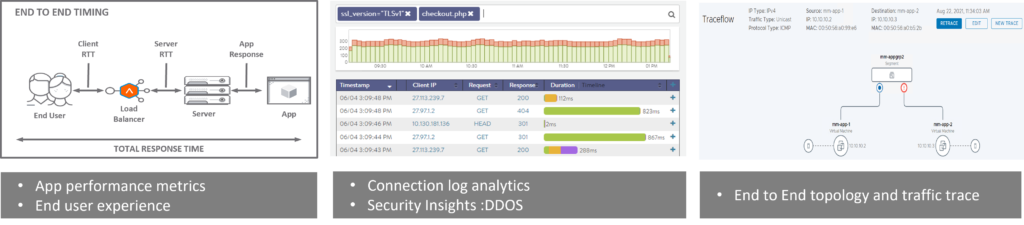
Avi Load Balancer provides application analytics and monitoring capabilities.
Depending on the enabled features and logging configuration, administrators can examine metrics such as:
- Application response times
- Client-side and server-side latency
- Connection statistics
- Application health
- Traffic distribution
- HTTP request information
- Supported client and connection metadata
These insights help teams investigate performance problems.
For example, administrators can compare client-side latency with backend server response times.
Consequently, they can narrow down whether an issue is more likely to involve network connectivity or application processing.
Network Troubleshooting with NSX-T
VMware NSX provides tools for investigating network connectivity and traffic behavior.
Administrators can examine logical paths, firewall rules, and relevant forwarding information.
Furthermore, supported diagnostic tools can help identify connectivity failures or policy-related problems.
Together, NSX and Avi provide complementary visibility into network and application delivery operations.
Key benefit: Better troubleshooting information can reduce investigation time and support faster problem resolution.
6. Security and Operational Considerations
Although NSX-T and Avi offer valuable capabilities, successful deployment requires careful architectural planning.
Organizations should evaluate several factors before implementation.
Security Policy Design
First, define appropriate segmentation boundaries for production, development, and DMZ workloads.
Next, apply least-privilege security policies and review application communication requirements.
High Availability
Deploy management and data-plane components according to supported availability designs.
Additionally, test failover behavior and application recovery procedures.
Capacity Planning
Estimate application traffic, concurrent connections, and expected growth.
Then, size Service Engines and supporting infrastructure according to vendor recommendations.
Monitoring and Governance
Enable appropriate monitoring, access controls, and audit logging.
Furthermore, review security and application performance metrics regularly.
Product Compatibility and Licensing
Finally, validate the supported NSX and Avi versions, integration requirements, and licensing entitlements.
This step is particularly important when modernizing older NSX-T deployments.
Conclusion: Simplifying Data Center Networking and Application Delivery
Modern applications require networking infrastructure that is secure, scalable, and easier to manage.
However, disconnected networking, security, and application delivery solutions can increase operational complexity.
VMware NSX-T and AVI Load Balancer integration provides an architectural approach to addressing these challenges.
NSX supports software-defined connectivity, segmentation, and network security. Meanwhile, Avi delivers advanced load balancing, application analytics, and supported application security capabilities.
Together, these technologies can help organizations improve application availability, simplify operational workflows, and gain better visibility into application traffic.
Nevertheless, successful implementation depends on proper network design, product compatibility, capacity planning, and security policies.
Organizations should therefore evaluate their existing infrastructure before selecting an integration strategy.
Ready to Optimize Your Data Center Architecture?
Are complex network configurations, application performance issues, or fragmented security policies affecting your infrastructure?
TREZBON TECHNOLOGIES helps organizations assess networking and security requirements, evaluate infrastructure designs, and plan practical modernization strategies.
Whether you are reviewing an existing VMware environment or exploring software-defined networking, our consultants can help identify suitable architectural improvements.
Discuss your requirements with TREZBON TECHNOLOGIES.
Contact our team: https://trezbon.com/#contact
Website: https://www.trezbon.com
Continue Learning
Explore more technical articles on NETWORK BACHELOR:
- VMware NSX-T Design Bootcamp: https://www.networkbachelor.com/nsx-t-design-bootcamp-part-1-overview/
- Data Center Networking and Security: https://www.networkbachelor.com/category/datacenter-networking/
Follow NETWORK BACHELOR for practical insights into enterprise networking, virtualization, cybersecurity, and application delivery architecture.
How to Build a Sovereign LLM Inference Platform with vLLM, NIM & H200 GPUs
Securing Internet Access with Cisco Umbrella and Cisco Secure Access
NSX-T Series: Part 16 – NSX-T Segment T1 Gateway with EDGE Cluster(SR)
About Author

Muhammad Marakkoottathil(MM)
Expert in the field of SDN, cloud computing, virtualization, active-active data center design & migration. Passionate about helping organizations to achieve their digital transformation objectives with strong 15+ years of experience in design, deployment, and managing heterogeneous network solutions across the industry verticals. Major Industry Certifications: Cisco CCIE, CCDP, VMware VCAP-NV_DESIGN, TOGAF, ITIL, NUTANIX NCSE, Google Cloud Architect, Azure Fundamentals More info please visit my page @ LinkedIn: https://www.linkedin.com/in/contactmm/