vLLM in 2026: Infrastructure Engineer’s Guide to LLM Inference
A six-part series for the people who have to make LLM serving actually run: on real GPUs, over real fabrics, at a real cost.
Why this series exists
Most vLLM content is written by and for ML engineers: model quality, sampling parameters, prompt tricks. But if you run the platform underneath, the questions you get are different:
- Why did p99 latency triple when the agent workload arrived?
- Why is one expert-parallel rank at 100% and the rest idle?
- Can we run this on AMD, TPU, or Gaudi, or are we locked in?
- How much of our fabric budget goes to KV cache transfers?
- What does “just quantize it” really cost in quality?
The vLLM ecosystem has grown from a single fast inference engine into a full serving stack with multiple hardware backends, disaggregated serving, agent-aware routing, quantization pipelines, and a tight loop with RL training. This series walks through that stack with one lens: where do tokens get computed, how does state move, and what does it cost?
The three questions
Every topic in the series maps to one of these:
| Question | What it covers | Posts |
|---|---|---|
| Where does compute happen? | Engine internals, hardware backends, parallelism | 1, 2, 3 |
| How does state move? | KV cache, weights, activations across GPUs and nodes | 3, 4, 6 |
| What does it cost? | Quantization, caching, speculative decoding, utilization | 4, 5, 6 |
The series
- Inside the Engine: PagedAttention, the scheduler, model loading, and how
torch.compilefits in. - One API, Four Silicon Families: NVIDIA, AMD, Google TPU, and Intel behind the same
vllm serve. - Distributed Inference Is a Network Problem: TP, PP, DP, EP, prefill/decode disaggregation, and llm-d.
- Agentic Workloads Break Your Capacity Model: long contexts, prefix caching, KV offload, and the right metrics.
- Compression Without Regret: PTQ vs QAT, FP8/INT4/FP4, and how to evaluate before you ship.
- Where Training Meets Serving: RL rollouts with vLLM and speculative decoding draft training.
Every post ends with a short checklist you can take into a design review.
A note on versions
vLLM moves quickly. Flags, defaults, and metric names change between releases. Every command in this series is meant to illustrate a concept; check it against the docs for the version you run before you paste it into production.
Inside the vLLM Engine: PagedAttention, KV Cache and Continuous Batching
Part 1 of “vLLM in 2026: An Infrastructure Engineer’s Field Guide”
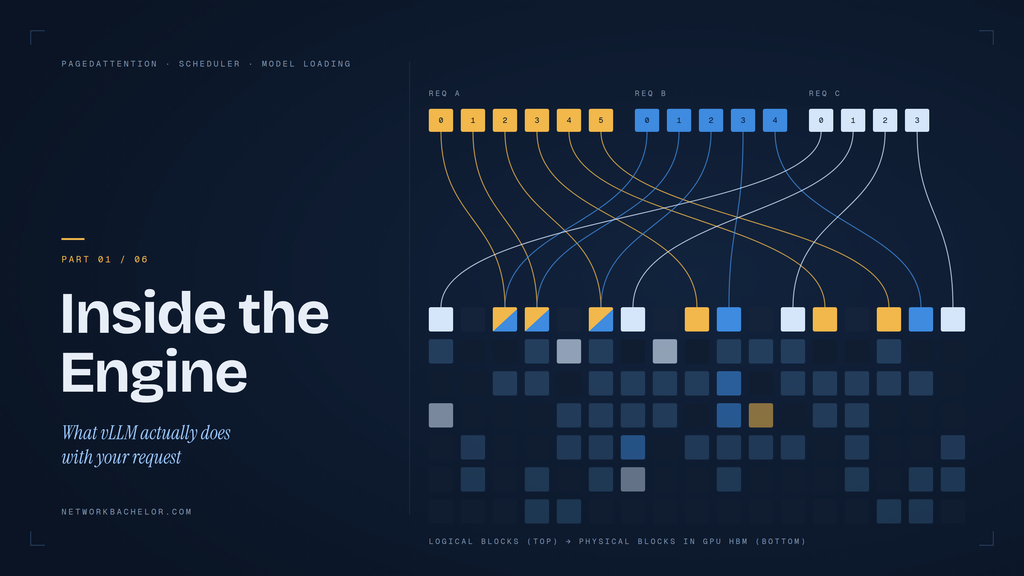
If you operate an LLM platform, you don’t need to write attention kernels. But you do need a mental model of what happens between POST /v1/chat/completions and the first token, because almost every production problem (OOM, latency spikes, slow cold starts) traces back to one of a handful of engine mechanisms.
This post covers those mechanisms: the memory model, the scheduler, how a checkpoint becomes a running model, and how PyTorch’s compiler stack fits in.
[Add from talk: “State of vLLM 2026”, “PyTorch <3 vLLM”, “How a Transformers Model Loads in vLLM”: headline roadmap items, project stats, new defaults, anything announced.]
1. The problem: the KV cache eats your GPU
If you operate LLM inference infrastructure, understanding how vLLM works is essential. You do not need to write attention kernels. However, you should understand what happens between an API request and the first generated token.
That knowledge becomes especially important in production. GPU out-of-memory errors, high time to first token (TTFT), latency spikes, and slow model startup often trace back to a few core mechanisms inside the vLLM engine.
First, vLLM must manage the KV cache efficiently. Next, its scheduler must balance prefill and decode workloads. Meanwhile, techniques such as PagedAttention, continuous batching, chunked prefill, prefix caching, torch.compile, and CUDA graphs help improve GPU utilization and inference performance.
Therefore, infrastructure teams need more than a basic understanding of model serving. They need to know where GPU memory goes, how requests compete for compute, and which metrics reveal capacity problems before users experience them.
In Part 1 of our vLLM infrastructure guide, we examine how vLLM manages GPU memory, schedules inference requests, loads models, optimizes execution, and exposes the metrics needed for production monitoring.
2. PagedAttention: virtual memory for the KV cache
Early serving systems reserved one contiguous slab per request sized for the maximum length. Most of it went unused, and fragmentation wasted more.
vLLM’s core idea, PagedAttention, borrows from OS virtual memory:
- The KV cache is split into fixed-size blocks (a block holds a small number of tokens).
- Each request has a block table mapping its logical token positions to physical blocks.
- Blocks are allocated on demand as a sequence grows and freed when it ends.
- Identical prefixes can share physical blocks between requests.
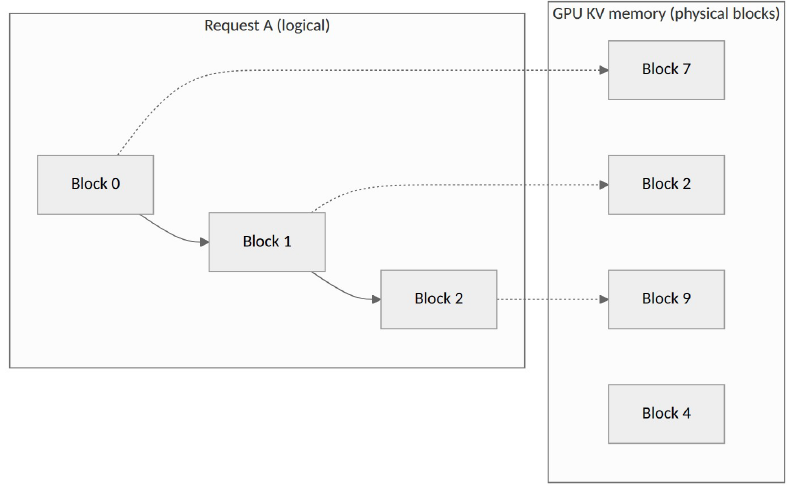
Consequences you can observe in production:
- Near-zero internal fragmentation, so far higher batch sizes for the same memory.
- Prefix caching falls out naturally: if two requests share a system prompt, they point at the same blocks.
- Preemption is possible: blocks can be evicted and recomputed (or swapped) under pressure.
3. Continuous batching and the vLLM scheduler
Traditional static batching introduces an important limitation. The system waits for a batch to fill, and faster requests may remain blocked by slower sequences.
Instead, vLLM uses continuous batching. At every engine step, the scheduler determines which sequences should run. As a result, new requests can enter the workload without waiting for the entire previous batch to finish.
However, not every inference operation behaves the same way. LLM inference has two main phases: prefill and decode.
During prefill, the model processes the input prompt in parallel. Therefore, this phase is typically compute-intensive. During decode, the model generates tokens incrementally. Consequently, memory bandwidth and KV cache efficiency become increasingly important.
Long prompts can create another problem. For example, a large prefill request may consume a significant part of the available token budget and affect other requests.
Each step mixes two kinds of work:
| Phase | What it does | Bottleneck |
|---|---|---|
| Prefill | Processes the whole prompt in parallel | Compute-bound |
| Decode | Generates one token per running sequence | Memory-bandwidth-bound |
To address this issue, vLLM supports chunked prefill. Instead of processing an entire long prompt at once, the scheduler can divide the prefill workload into smaller chunks. This approach helps balance long prompts with active decode requests and improves scheduling fairness.
The knobs that matter most:
vllm serve meta-llama/Llama-3.1-8B-Instruct \
  --max-model-len 16384 \
  --max-num-seqs 256 \
  --max-num-batched-tokens 8192 \
--gpu-memory-utilization 0.90--max-model-len: caps context; directly sets worst-case KV per request.--max-num-seqs: caps concurrent sequences per step.--max-num-batched-tokens: the per-step token budget (prefill chunk size vs decode fairness).--gpu-memory-utilization: the fraction of GPU memory vLLM may claim; the remainder after weights and activations becomes KV cache.
At startup, vLLM profiles a forward pass, subtracts weights and peak activations from the allowed memory, and logs how many KV cache blocks it can hold. Read that log line: it is your real capacity number.
4. From checkpoint to running model
A Hugging Face checkpoint is a config plus a set of weight shards. Getting from that to a serving-ready model involves several steps:
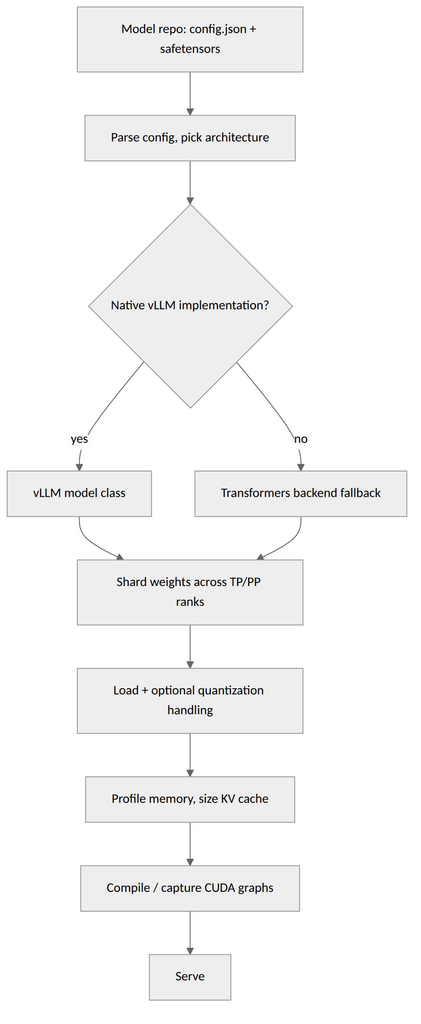
Key points:
- Native implementations are hand-tuned for speed and support features like tensor parallelism, quantization, and fused kernels.
- The Transformers backend lets vLLM run architectures that don’t yet have a native implementation, trading peak performance for day-one coverage. You can force it with
--model-impl transformers, which is useful for testing new models. - Sharding happens at load time: with tensor parallelism, each rank loads only its slice of each weight matrix.
- Load time is often dominated by I/O. Pulling hundreds of GB from network storage on every pod start is a platform problem: cache weights on local NVMe, or use a fast shared filesystem or object-store cache.
[Add from talk: Harry Mellor’s specifics: how the Transformers backend is wired, what’s supported, performance gap versus native.]
5. torch.compile and CUDA graphs
Two mechanisms explain why vLLM’s first start is slow and later starts are faster:
torch.compile: vLLM compiles the model graph to fuse operations and generate optimized kernels. Compilation takes time, so results are cached on disk. Persist that cache (a volume or baked image layer) or every new pod pays the cost again.- CUDA graphs: decode steps launch many tiny kernels. Capturing them as a graph and replaying it removes launch overhead, which matters most at small batch sizes. Graphs are captured for a set of batch sizes at startup, which adds to warmup time and some memory.
The operational takeaway: cold-start time is the sum of weight load + compile + graph capture. When autoscaling matters, measure all three separately.
[Add from talk: Richard Zou’s PyTorch integration details: compile-cache improvements, custom-op registration, anything that changes these numbers.]
6. What to Monitor in a Production vLLM Deployment
Deploying vLLM is only the first step. Once the service reaches production, infrastructure teams need visibility into latency, queue pressure, GPU memory, and cache efficiency.
Start with time to first token (TTFT). This metric helps identify delays caused by queueing and prompt processing. Next, monitor inter-token latency (ITL) and time per output token to understand decode performance.
Queue depth is equally important. A growing number of waiting requests may indicate that demand is exceeding available inference capacity. Therefore, queue pressure can be a more useful autoscaling signal than traditional CPU utilization.
KV cache utilization should also remain visible. Sustained high cache usage increases memory pressure and can contribute to preemption. In addition, prefix cache statistics help determine whether repeated prompts are benefiting from cached KV blocks.
Useful vLLM production metrics include:
vllm:time_to_first_token_secondsvllm:inter_token_latency_secondsvllm:num_requests_runningvllm:num_requests_waitingvllm:kv_cache_usage_percvllm:num_preemptionsvllm:prefix_cache_queriesvllm:prefix_cache_hits
Together, these metrics provide a clearer picture of LLM inference performance, GPU utilization, request pressure, and KV cache efficiency.
Conclusion: Efficient LLM Serving Starts with Infrastructure
vLLM performance is not determined by GPU specifications alone. In production, performance depends on how effectively the platform manages GPU memory, KV cache capacity, request scheduling, model loading, compilation, and inference workloads.
PagedAttention helps vLLM manage KV cache memory efficiently. Meanwhile, continuous batching keeps the GPU productive as requests enter and leave the system. Chunked prefill helps balance long prompts against active decode workloads. Finally, torch.compile and graph-based execution can reduce execution overhead.
For infrastructure teams, the key lesson is simple: capacity planning should begin with tokens, memory, latency, and workload behavior—not just GPU count.
Before moving a vLLM deployment into production, measure your real context-length distribution, calculate KV cache requirements, benchmark TTFT and decode latency, monitor queue pressure, and test cold-start behavior under realistic traffic.
Need Help Designing Production AI Infrastructure?
Building an enterprise LLM platform requires more than deploying a model server. GPU infrastructure, high-performance networking, security, observability, scalability, and capacity planning must work together.
TREZBON helps organizations design and implement secure, scalable infrastructure for modern enterprise and AI workloads.
Explore our technology and consulting services or discuss your infrastructure requirements with our team:
Next in the series: One API, Four Silicon Families — NVIDIA, AMD, Google TPU and Intel behind vLLM serving.
AI Infrastructure Engineer Workbook: 12-Stage Hands-On Guide
Public Cloud Security: Challenges, Solutions, and Security Appliances

NVIDIA DGX SuperPOD: Build a Mini SuperPOD Lab Step by Step
About Author

abhishek
Cloud Platform Lead and AI Infrastructure Architect at e& enterprise, with 12+ years in data center, virtualization, security and AI infrastructure. I design and build private cloud and sovereign AI platforms, working with VMware (NSX-T, vSphere, vSAN, HCX, AVS, SRM), Kubernetes, Terraform and GPU inference infrastructure for LLMs. Previously served Networkers Home (CCIE instructor, trained around 50 CCIEs), VCE/EMC2, Cisco, VMware and Arista across TAC, consulting, design and training. Certifications: CCIE#48639 (Data Center and R&S), VCIX-DCV and NV, CKA, NVIDIA AI Infrastructure, Azure Solutions Architect Expert, Terraform Associate, Palo Alto PCNSE. LinkedIn: https://www.linkedin.com/in/abhishekkunal51/