NSX-T T0 and T1 on Same Edge Cluster: Routing Guide
NSX-T Series : Part 1 -Architecture and Deploy
Topology:
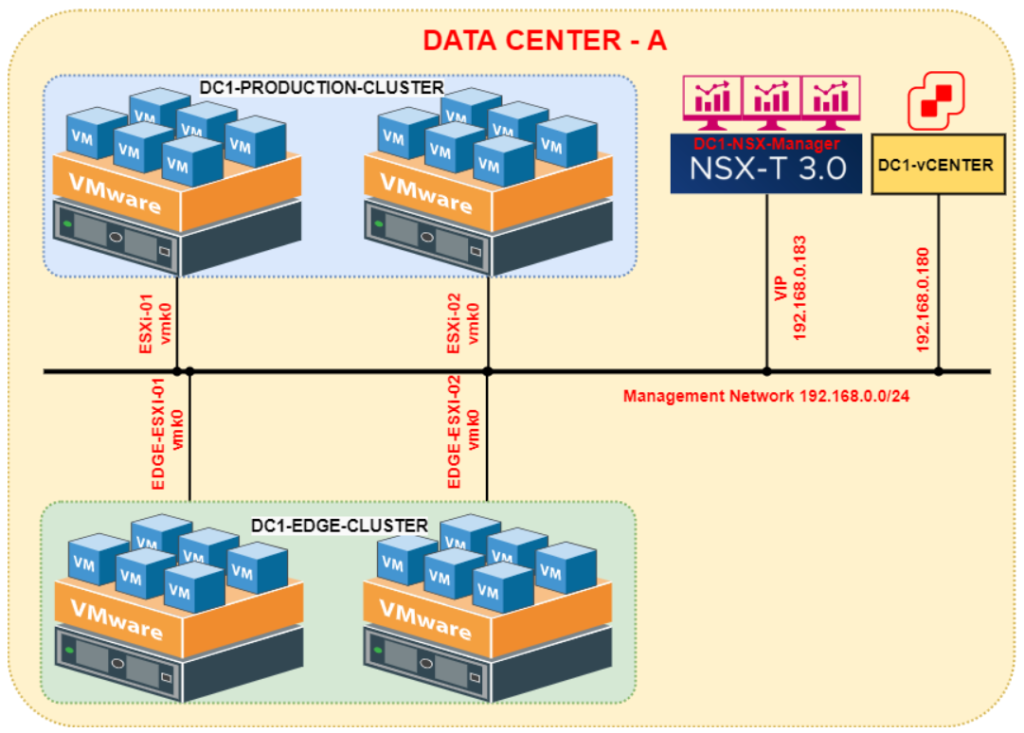
Introduction
Understanding how network traffic moves between virtual machines and the physical network is an important part of designing a VMware NSX-T environment.
However, routing becomes more complex when Tier-0 (T0) and Tier-1 (T1) gateways share the same NSX Edge Cluster. Network administrators must understand where routing decisions occur, how traffic reaches the Edge nodes, and which gateway components handle external connectivity.
In this part of our NSX-T series, we explore a routing scenario where Tier-0 and Tier-1 gateways share the same Edge Cluster. In this design, Tier-0 provides the Service Router (SR), while Tier-1 uses distributed routing without a separate Service Router.
First, we will explain how Distributed Routers (DR) and Service Routers work together. Next, we will examine northbound and southbound traffic flows between ESXi hosts, Edge nodes, and the physical network.
Additionally, we will discuss how Active-Active and Active-Standby configurations affect routing performance, high availability, and network resilience.
By the end of this guide, you will have a clearer understanding of NSX-T Tier-0 and Tier-1 routing, traffic forwarding, and the design considerations involved in deploying both gateways on the same Edge Cluster.
If you are new to VMware NSX-T, consider reviewing the previous articles in this series before continuing.
Understanding NSX-T Tier-0 and Tier-1 Routing on the Same Edge Cluster
In this scenario, both Tier-0 and Tier-1 gateways share the same NSX Edge Cluster. However, only the Tier-0 gateway has a Service Router.
The Tier-0 gateway provides connectivity between the NSX-T environment and the external physical network. Depending on the deployment, it can use static routes or supported dynamic routing protocols, such as BGP.
Meanwhile, the Tier-1 gateway provides routing for connected workload segments.
Both gateways have Distributed Router components. These components support distributed routing across participating transport nodes. In addition, the Tier-0 Service Router runs on the Edge nodes to provide centralized routing services.
As a result, the architecture combines distributed workload routing with centralized external connectivity.
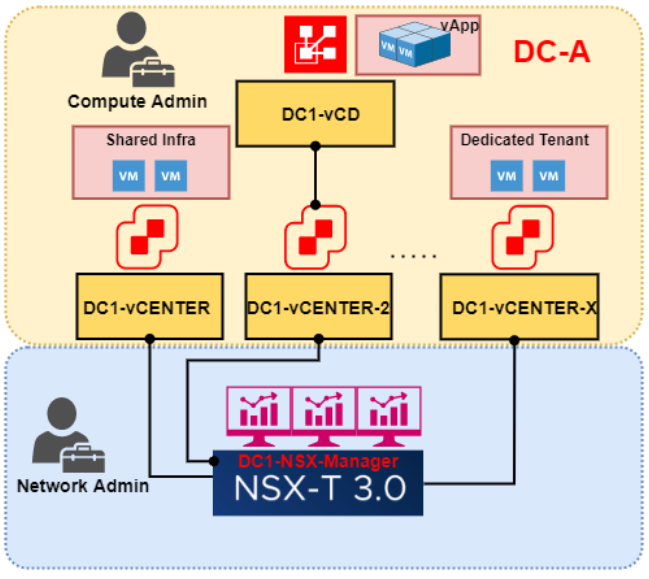
How Distributed Routers and Service Routers Work Together
A Distributed Router processes traffic close to the workload. Therefore, traffic between supported internal network segments can be routed without unnecessarily passing through an Edge node.
The Service Router, on the other hand, handles services that require centralized processing on an Edge node.
In this design, the Tier-0 Service Router provides external routing connectivity.
Furthermore, NSX-T establishes the required internal connectivity between the routing components. Consequently, administrators do not need to configure every internal routing connection manually.
The main objective is to route traffic efficiently while maintaining reliable connectivity between virtual workloads and external networks.
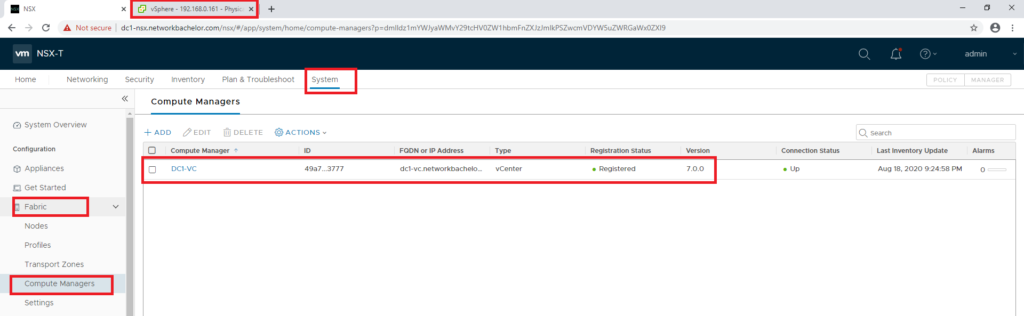
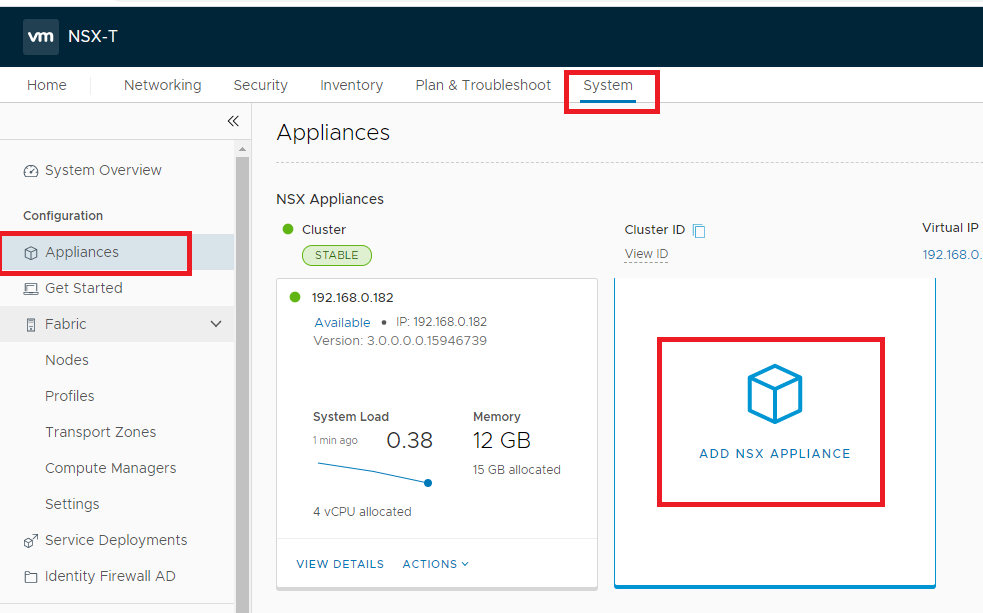
Ideally, the computer manager needs to be added, before attaching the additional instances to the cluster.
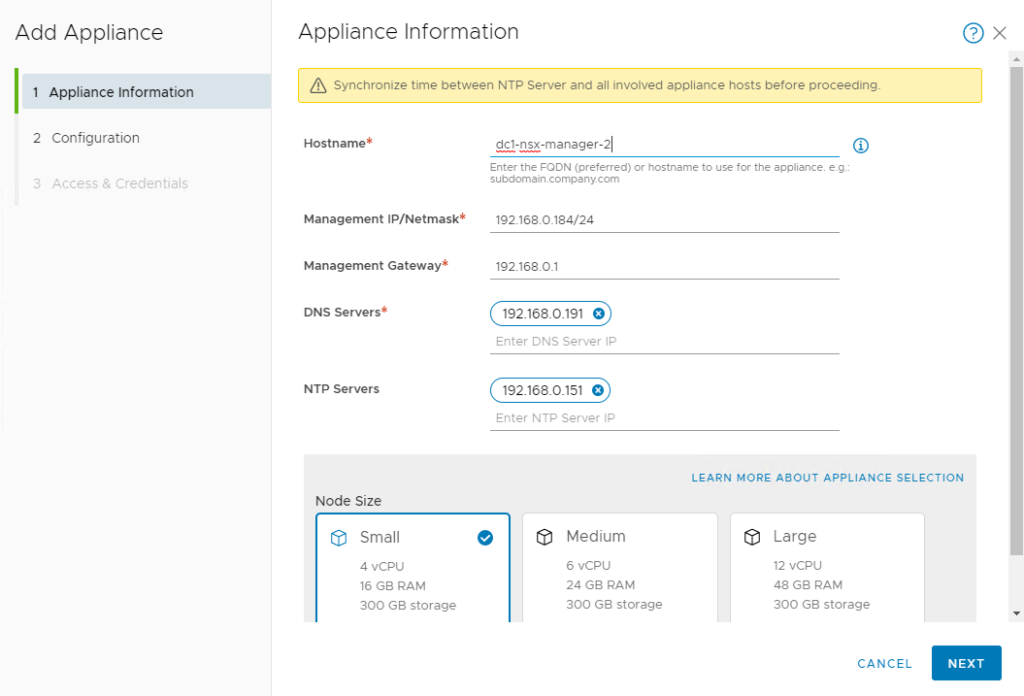
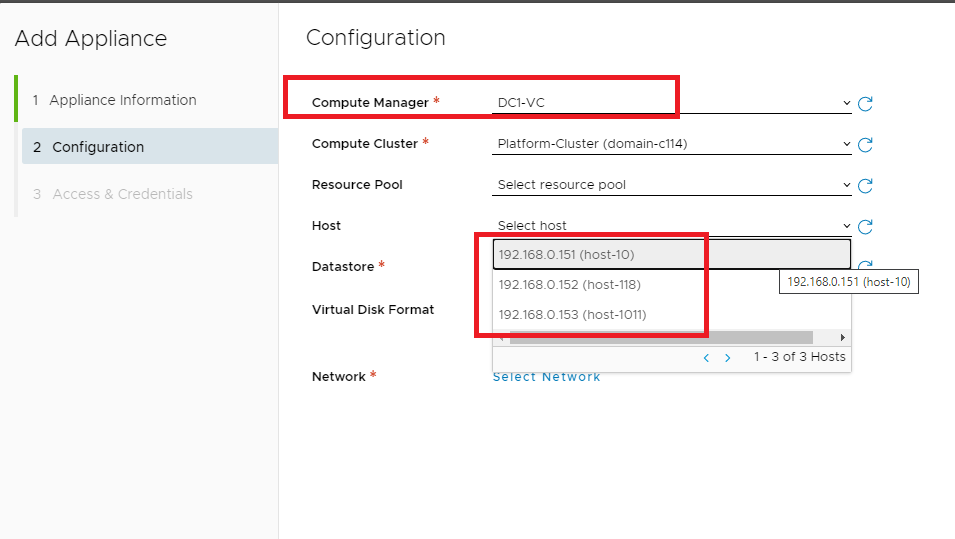
NSX-T Northbound Traffic Flow
Northbound traffic moves from a virtual machine toward the external physical network.
In this scenario, the traffic follows these steps:
- A virtual machine sends traffic to its default gateway.
- The Tier-1 Distributed Router processes the traffic on the ESXi host.
- Next, the traffic reaches the Tier-0 Distributed Router.
- The ESXi host forwards the traffic through the NSX overlay toward the appropriate Edge node.
- Finally, the Tier-0 Service Router forwards the traffic to the physical uplink router.
Therefore, NSX-T uses distributed routing until traffic requires external connectivity through the Tier-0 Service Router.
This design allows the network to maintain distributed routing while providing a connection to the physical infrastructure.
NSX-T Southbound Traffic Flow
Southbound traffic travels in the opposite direction. It enters the NSX-T environment from the physical network and moves toward a destination virtual machine.
The traffic follows these steps:
- The physical uplink router forwards traffic to the Tier-0 Service Router on an Edge node.
- Next, traffic passes through the Tier-0 Distributed Router.
- The Tier-1 Distributed Router then processes the traffic on the Edge node.
- After routing, the Edge node forwards the traffic through the NSX overlay.
- Finally, the destination ESXi host delivers the traffic to the virtual machine.
Unlike the northbound path described earlier, the southbound path can perform the Tier-1 routing decision on the Edge node.
As a result, the Edge node plays an important role in forwarding incoming traffic toward the destination workload.
Understanding these traffic paths is useful when investigating connectivity problems and analyzing NSX-T routing behavior.
NSX-T Edge Cluster Design Considerations
Choosing the correct high-availability configuration is essential for network performance and resilience.
Before selecting a design, administrators should evaluate routing requirements, gateway services, Edge node capacity, and expected traffic volume.
Active-Active Tier-0 Routing
Active-Active Tier-0 routing is suitable for supported routing-only deployments.
In this configuration, multiple Edge nodes can participate in forwarding north-south traffic.
As a result, the network can distribute routing workloads across available paths.
However, administrators must also consider network resilience. Dynamic routing, Bidirectional Forwarding Detection (BFD), and supported failover mechanisms can help improve convergence.
Additionally, the physical network must support the selected routing design.
Active-Standby Tier-0 Routing
Active-Standby Tier-0 routing is commonly used when supported stateful gateway services require a highly available service instance.
For example, certain NAT, firewall, and VPN configurations require stateful processing and an appropriate high-availability design.
In this configuration, the active Service Router processes traffic, while the standby instance provides failover capability.
Consequently, Edge node sizing becomes particularly important.
Administrators must ensure that the active Edge node has sufficient capacity to handle the expected network traffic and gateway services.
Additional Network Design Considerations
Before deploying Tier-0 and Tier-1 gateways on the same Edge Cluster, review the following requirements:
- Expected north-south traffic volume
- Required routing and gateway services
- Edge node sizing and performance
- Physical network connectivity
- High-availability requirements
- Routing convergence and failover behavior
- NSX-T software version and supported features
Finally, validate the proposed design against the documentation for your deployed NSX-T version.
This helps ensure that the architecture supports the required services, operational needs, and future network growth.
Conclusion: Building a Reliable NSX-T Routing Architecture
Designing a reliable VMware NSX-T environment requires more than configuring Tier-0 and Tier-1 gateways. Network administrators must understand how routing components interact, where traffic is processed, and how the Edge Cluster connects virtual workloads to the physical network.
In this guide, we explored an NSX-T routing scenario where Tier-0 and Tier-1 gateways share the same Edge Cluster. While Tier-0 provides the Service Router, Tier-1 uses distributed routing to support workload connectivity.
We also examined how northbound and southbound traffic travels through Distributed Routers, Service Routers, ESXi hosts, and NSX Edge nodes. Understanding these traffic paths helps engineers identify potential connectivity issues and troubleshoot routing behavior more effectively.
Furthermore, we discussed the importance of choosing the right high-availability configuration. Active-Active routing can support distributed forwarding across multiple Edge nodes in suitable deployments. Meanwhile, Active-Standby designs can support gateway services that require stateful processing.
Ultimately, the right architecture depends on traffic requirements, supported services, network resilience, and Edge node capacity.
The key takeaway is simple: Successful NSX-T routing starts with understanding the traffic path and selecting an Edge Cluster design that matches your network requirements.
What’s Next in the NSX-T Series?
In the next part of our series, we will explore a different routing scenario where the Tier-1 gateway also has a Service Router on the same Edge Cluster.
Continue following Network Bachelor for practical VMware NSX-T tutorials, enterprise routing concepts, and real-world network architecture examples.
Have you deployed Tier-0 and Tier-1 gateways on the same Edge Cluster?
Share your routing challenges, design decisions, or troubleshooting experiences in the comments. Your insights could help other network engineers working with similar environments.
Master VMware NSX-T Routing, One Scenario at a Time
Are you planning an NSX-T deployment or trying to understand how Tier-0 and Tier-1 gateways handle network traffic?
Explore our practical NSX-T tutorials to learn about Distributed Routers, Service Routers, Edge Cluster design, high availability, and enterprise routing architecture.
Explore the VMware NSX-T Tutorial Series
From network architecture fundamentals to advanced routing scenarios, Network Bachelor provides practical technical guidance for VMware administrators and network engineers.
Follow Network Bachelor for more hands-on tutorials, troubleshooting guides, and enterprise networking insights.
Have a question about NSX-T routing? Share it in the comments and join the discussion.
Bare Metal GPU Cloud for NVIDIA DGX SuperPOD: vMetal Workbook

How to Build a Sovereign LLM Inference Platform with vLLM, NIM & H200 GPUs

NVIDIA DGX SuperPOD: Build a Mini SuperPOD Lab Step by Step
About Author

abhishek
Cloud Platform Lead and AI Infrastructure Architect at e& enterprise, with 12+ years in data center, virtualization, security and AI infrastructure. I design and build private cloud and sovereign AI platforms, working with VMware (NSX-T, vSphere, vSAN, HCX, AVS, SRM), Kubernetes, Terraform and GPU inference infrastructure for LLMs. Previously served Networkers Home (CCIE instructor, trained around 50 CCIEs), VCE/EMC2, Cisco, VMware and Arista across TAC, consulting, design and training. Certifications: CCIE#48639 (Data Center and R&S), VCIX-DCV and NV, CKA, NVIDIA AI Infrastructure, Azure Solutions Architect Expert, Terraform Associate, Palo Alto PCNSE. LinkedIn: https://www.linkedin.com/in/abhishekkunal51/
Where are the comments?