VMware Home Lab NUC10i7FNH: 3-Node Setup – Part 2
Building a VMware home lab is an excellent way to learn virtualization, networking and data center technologies through hands-on experience. However, creating a realistic enterprise environment at home can be challenging.
In Part 1 of my VMware Home Lab series, I explained how I started using an Intel NUC10i7FNH for VMware testing.
After almost two months of experimenting with different VMware products, I decided to expand the setup. This time, my goal was to build a three-node VMware home lab and simulate a multi-site data center environment.
In this article, I will explain the physical topology, nested ESXi configuration, distributed switching and NSX-T Federation connectivity.
My Experience with Three Intel NUC Servers
My initial experience with the Intel NUC10i7FNH was excellent. The system handled my VMware lab experiments well and encouraged me to expand the environment.
As a result, I added two more Intel NUC servers, creating a three-node setup for more advanced testing.
One major advantage of these systems is their compact design. They are relatively quiet, consume less power than traditional rack servers and fit comfortably into a home environment.
Moreover, their small size makes them easy to move when needed.
However, I encountered one important limitation. The built-in network interface supports only 1 Gbps Ethernet, which affected performance during vMotion migrations.
Because of this limitation, I started exploring USB-to-Ethernet adapters to add more network uplinks. However, ESXi compatibility is an important factor when choosing these adapters.
Despite this networking challenge, the three-node setup provided a practical platform for testing VMware features.
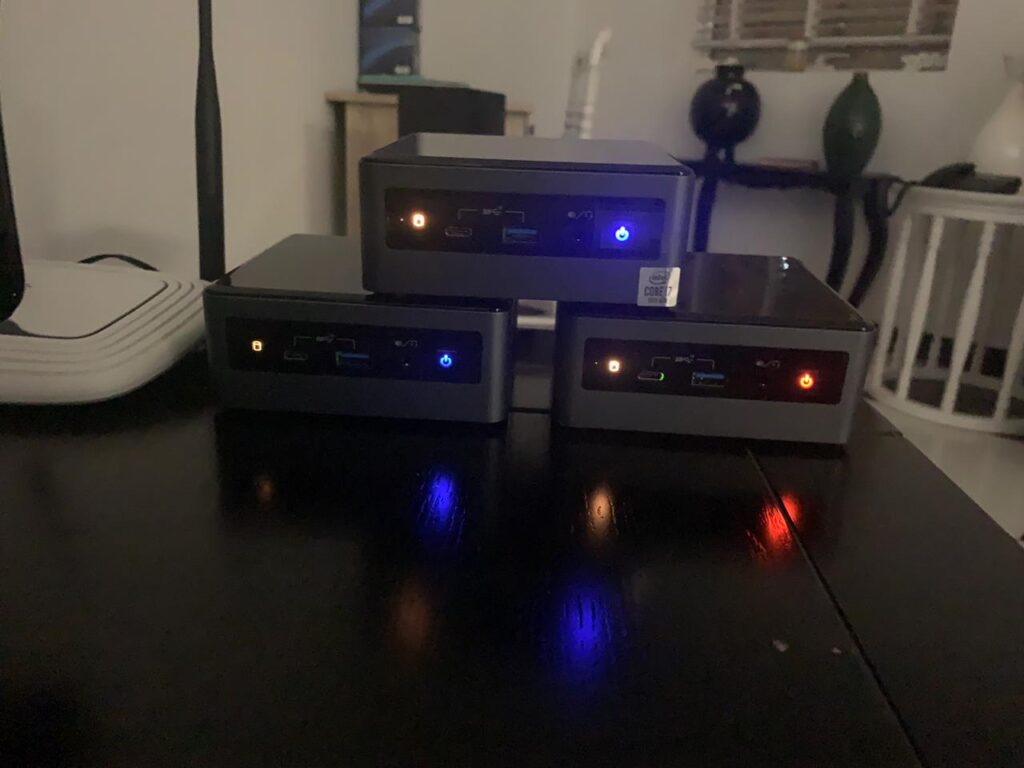
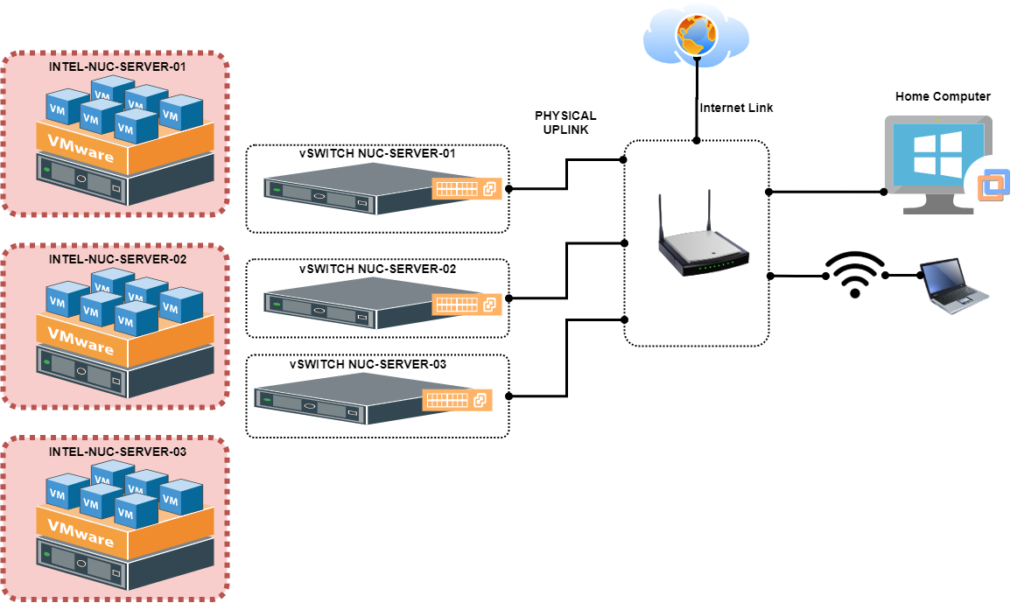
Physical Network Topology of the VMware Home Lab
For the physical network, I used my home Wi-Fi router as a switch.
First, I connected the ESXi uplinks from each Intel NUC server to the router’s LAN ports. This approach allowed me to avoid investing in a separate physical switch during the initial setup.
Each NUC server runs VMware ESXi. I used virtual switches and port groups to provide connectivity to the virtual machines and management services.
In addition, I planned to explore more uplinks using USB-to-Ethernet adapters.
This simple network design helped me manage the lab without adding unnecessary physical complexity.
More importantly, it gave me a starting point for testing virtual networking across multiple ESXi hosts.
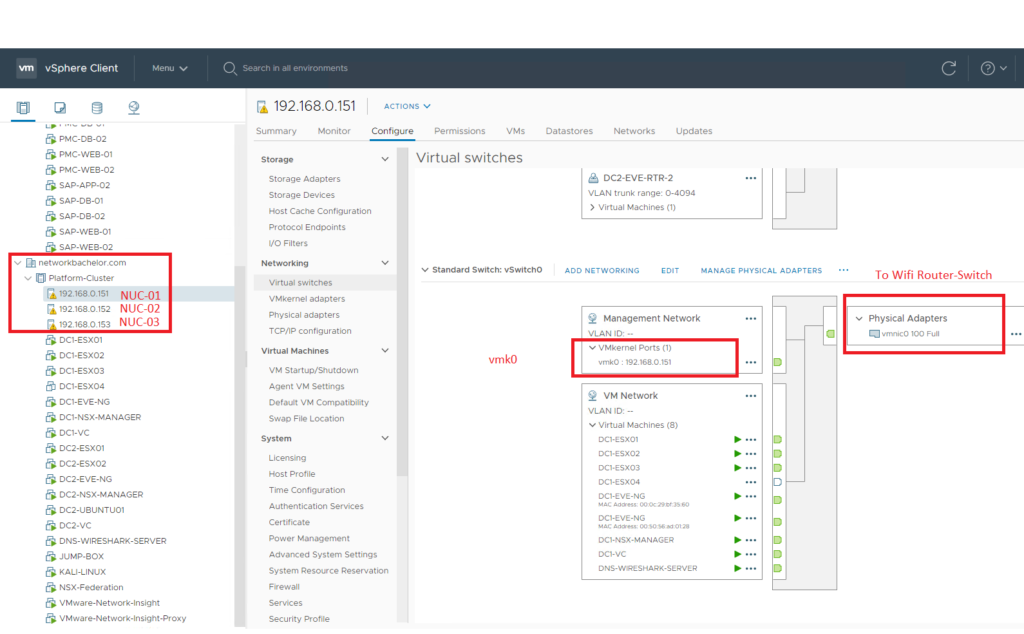
Configuring Nested ESXi for Two Data Centers
My next objective was to simulate two separate data centers using nested VMware ESXi.
To achieve this, I used the VMware vSphere Distributed Switch (VDS) features and created separate environments for DC1 and DC2.
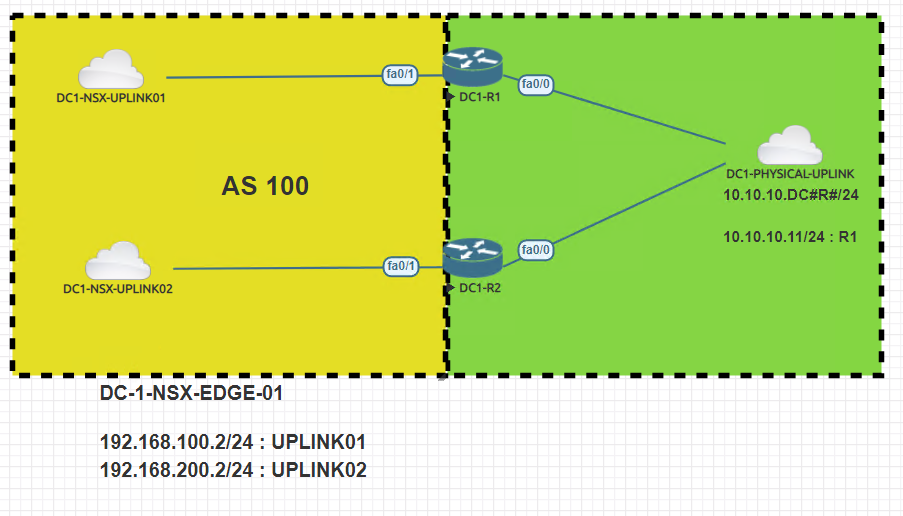
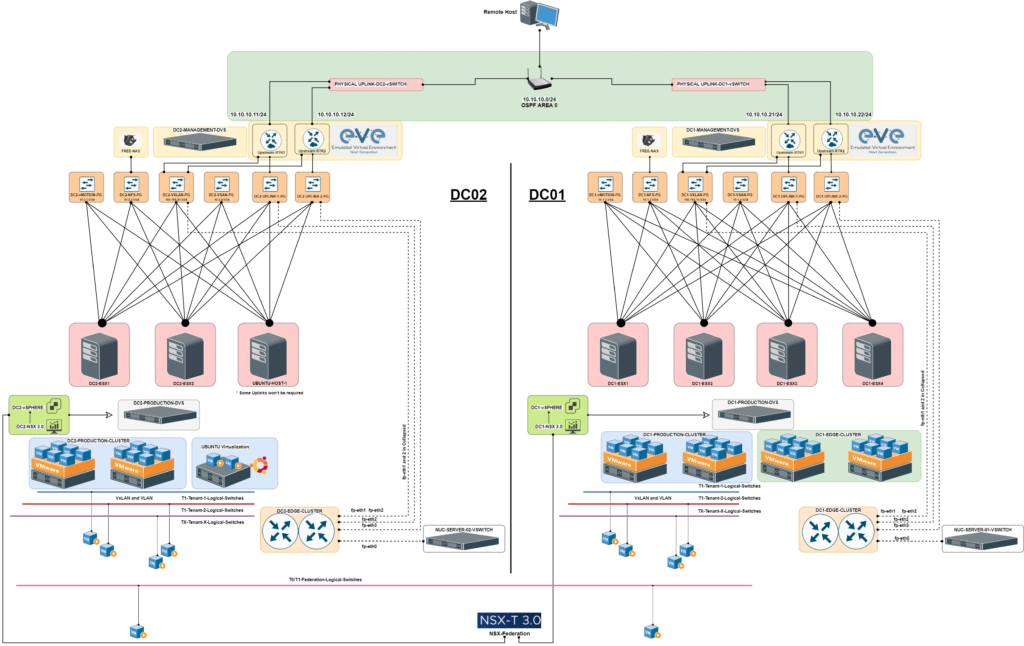
I placed the DC1 components on NUC-Server-1. Similarly, I deployed the DC2 components on NUC-Server-2.
This setup allowed me to test NSX-T 3.0 Federation in a virtual multi-site environment.
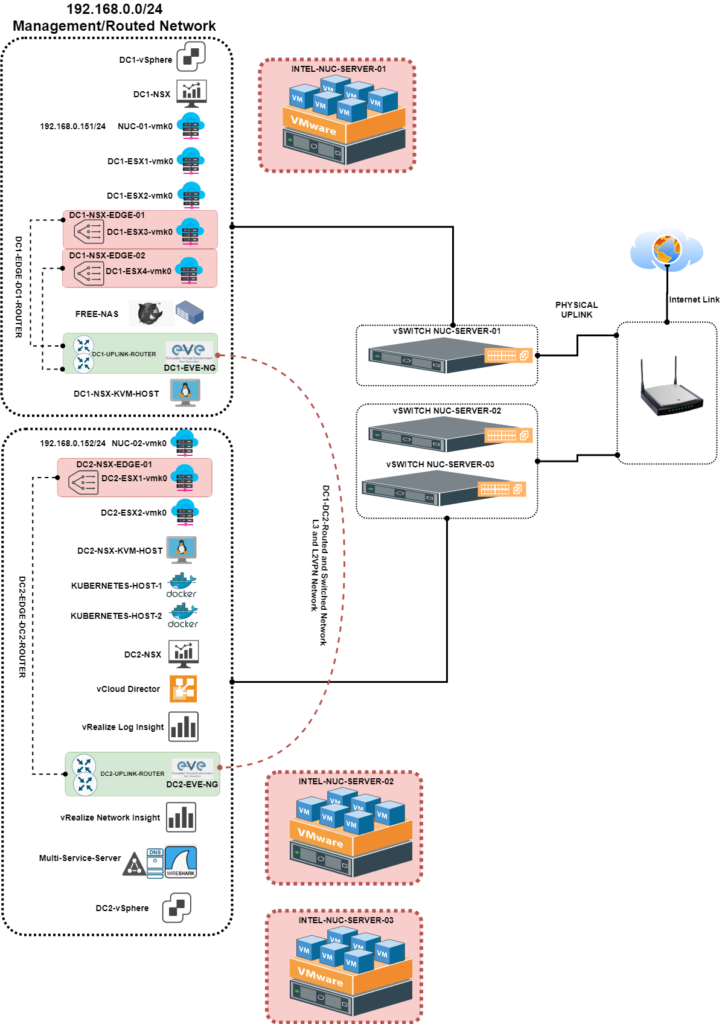
Management Network Connectivity
For management connectivity, I wanted a simple design.
Therefore, I used the existing virtual switching infrastructure on the NUC servers to connect the nested ESXi hosts, NSX components and other management services.
This approach helped me maintain connectivity while avoiding unnecessary network complexity.
In addition, the separate management connections made it easier to manage the virtual environments during testing.
nConnecting DC1 and DC2 with EVE-NG
Next, I needed a way to connect the workloads running across both simulated data centers.
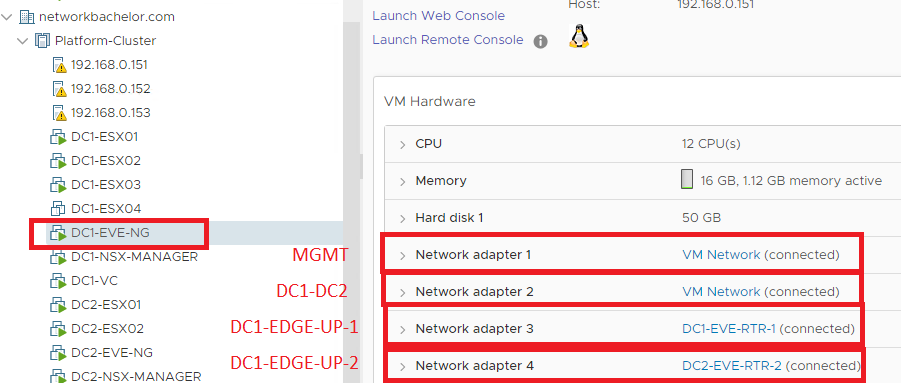
For this purpose, I used virtual routers in EVE-NG.
On the DC1 side, I connected one router interface to the local workload network, including the NSX-T Edge environment. Meanwhile, another interface connected toward the home router network.
I followed a similar approach for DC2 on NUC-Server-2.
As a result, I could simulate communication between two data centers and experiment with different routing scenarios.
Furthermore, I could reuse parts of the EVE-NG evironment for other networking experiments, including SD-WAN.
VMware Distributed Switch and Data Plane Connectivity
After completing the management network, I focused on data plane connectivity.
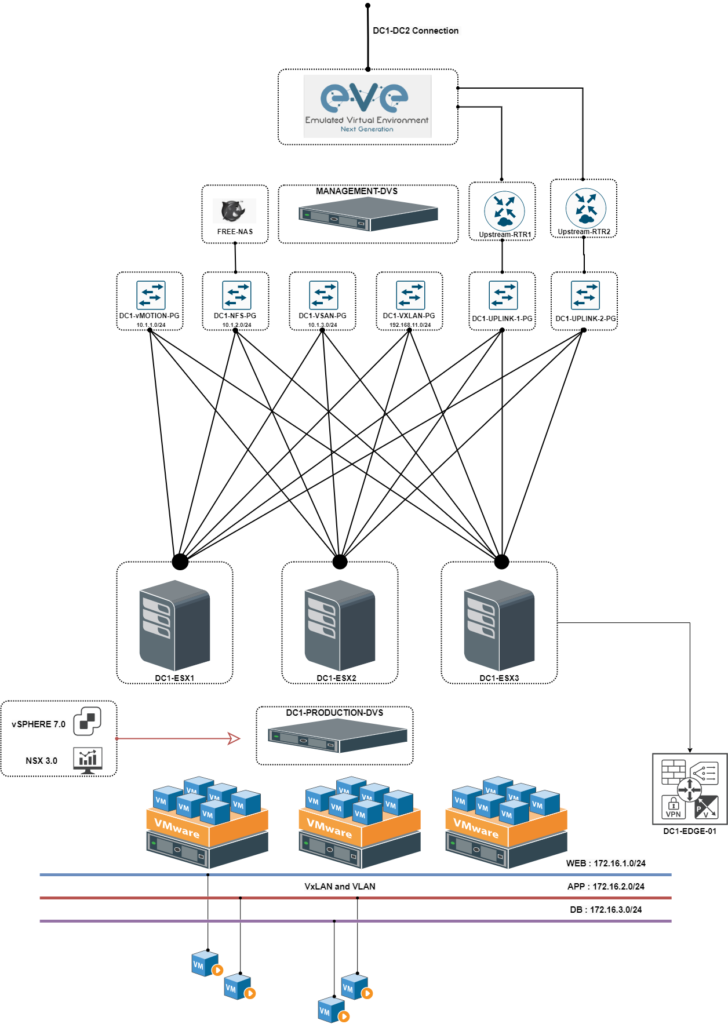
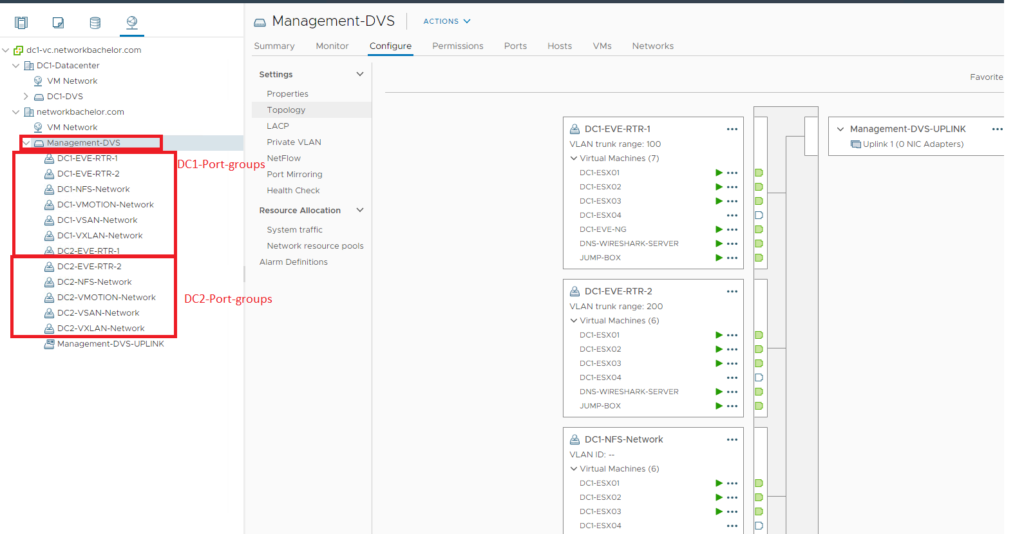
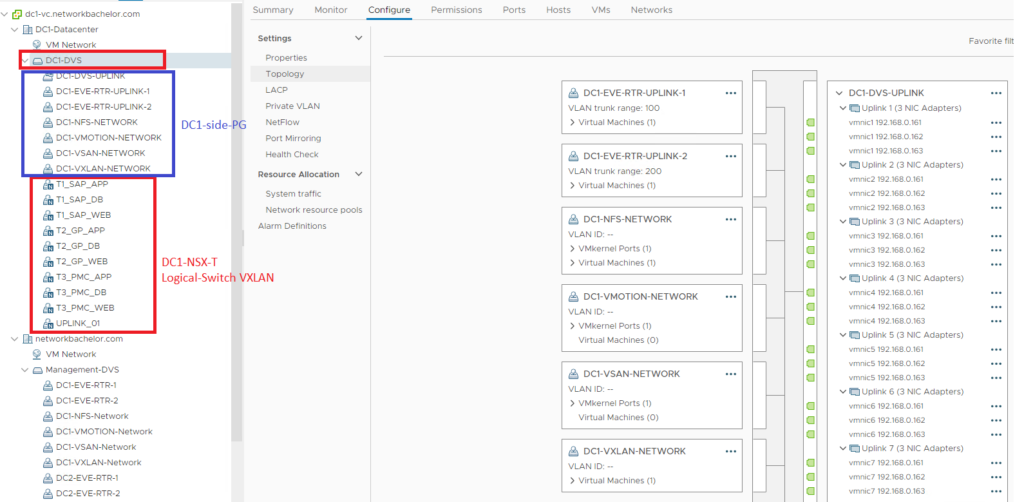
For DC1, I used port groups from the distributed switching environment on the physical NUC server. I then mapped those connections to the nested ESXi environment.
The topology includes two important distributed switches:
MANAGEMENT-DVS: This distributed switch exists on the physical NUC ESXi environment and provides the relevant host-side connectivity.
DC1-DVS: This distributed switch exists within the nested ESXi environment for DC1.
By mapping the appropriate uplinks and port groups, I connected the nested network to the underlying NUC infrastructure.
Similarly, I configured a corresponding network environment for DC2.
This arrangement helped me simulate a more realistic data center network without deploying separate physical infrastructure for every component.
In addition, I explored Terraform scripts to reproduce the setup and support future automation.
Testing NSX-T Federation Across DC1 and DC2
Once the management and workload networks were ready, I focused on NSX-T Federation.
NSX-T Federation allows organizations to coordinate networking and security configurations across multiple locations using a Global Manager and site-level Local Managers.
Therefore, I wanted to explore how these capabilities work in a simulated two-data-center environment.
My VMware home lab provided a practical environment for testing multi-site connectivity and examining active-active and active-standby data center design concepts.
The exercise also helped me understand how the management network, NSX-T Edge components and workload connectivity fit together.
However, a home lab cannot reproduce every aspect of a production deployment. Network capacity, availability and physical redundancy still require separate consideration.
For comparison, you can explore our article on Cisco ACI Multi-Site Architecture and Design.
You can also download the DC1–DC2 NSX-T Federation topology for a closer look at the network design.
In upcoming articles, I plan to explain the NSX-T Federation configuration and its practical benefits in more detail.
Key Lessons from This VMware Home Lab
Building a three-node VMware home lab helped me understand several important design considerations.
First, compact Intel NUC systems can provide a useful platform for learning VMware technologies.
Second, nested ESXi makes it possible to model more complex virtualization environments without additional physical servers.
Third, virtual switches and distributed switches help organize management and workload connectivity.
However, physical network performance remains important, especially when testing vMotion and other bandwidth-intensive operations.
Finally, automation tools such as Terraform offer opportunities to simplify repeated lab configurations.
Conclusion
Building a VMware home lab with three Intel NUC10i7FNH servers has been a valuable learning experience.
What started as a simple virtualization lab gradually developed into an environment for testing nested ESXi, distributed switching, EVE-NG routing and NSX-T Federation.
Although the 1 Gbps network interface introduced some performance limitations, the overall setup remained practical for hands-on learning.
Most importantly, this experience demonstrated how compact hardware can support meaningful experiments with enterprise networking and virtualization concepts.
For VMware engineers, network architects and IT professionals, a well-planned home lab offers an opportunity to explore configurations, troubleshoot issues and improve technical skills.
In the next part of this series, I will explore the NSX-T Federation configuration in greater detail.
Explore More VMware Networking Resources
Want to expand your knowledge of VMware ESXi, NSX-T and data center networking?
Read more practical tutorials, architecture guides and hands-on technical articles at Network Bachelor.
Need expert guidance for enterprise network architecture, IT infrastructure or cybersecurity?
Connect with TREZBON TECHNOLOGIES to discuss your requirements and explore suitable consulting services.
NSX Advanced Load Balancer: Features & Architecture
VMware NSX Security: Features, Use Cases & Analysis
NSX-T T0 and T1 on Same Edge Cluster | Part 17
About Author

abhishek
Cloud Platform Lead and AI Infrastructure Architect at e& enterprise, with 12+ years in data center, virtualization, security and AI infrastructure. I design and build private cloud and sovereign AI platforms, working with VMware (NSX-T, vSphere, vSAN, HCX, AVS, SRM), Kubernetes, Terraform and GPU inference infrastructure for LLMs. Previously served Networkers Home (CCIE instructor, trained around 50 CCIEs), VCE/EMC2, Cisco, VMware and Arista across TAC, consulting, design and training. Certifications: CCIE#48639 (Data Center and R&S), VCIX-DCV and NV, CKA, NVIDIA AI Infrastructure, Azure Solutions Architect Expert, Terraform Associate, Palo Alto PCNSE. LinkedIn: https://www.linkedin.com/in/abhishekkunal51/