AI Training Infrastructure: From Jupyter to InfiniBand
Building modern AI training infrastructure requires more than powerful GPUs and advanced machine learning frameworks. It also depends on reliable networking, efficient storage, workload scheduling, and collaboration between development and infrastructure teams.
For network engineers, the world of machine learning and large language model (LLM) training can initially seem complicated.
A machine learning team develops a model, prepares the training data, and submits a job to a high-performance computing cluster. However, what happens after the job enters the Slurm scheduler?
How does the workload access GPUs? How do computing nodes communicate? And how does InfiniBand networking support distributed AI training?
These questions become increasingly important as organizations deploy larger AI models across multiple servers and GPU clusters.
Connecting Machine Learning with HPC Infrastructure
AI training environments typically involve two closely connected teams.
First, the machine learning team develops models, prepares datasets, and configures training frameworks such as PyTorch.
Meanwhile, the HPC infrastructure team manages computing resources, GPU drivers, networking, storage, and workload scheduling.
Although their responsibilities differ, both teams depend on each other.
For example, a machine learning workload may run successfully but deliver poor performance because of incorrect network configuration, incompatible drivers, or insufficient storage throughput.
Similarly, a container may access GPUs correctly while failing to use the intended InfiniBand or RDMA communication path.
As a result, distributed training performance depends on more than the application code.
What Will You Learn in This Guide?
This article explains how AI training workloads move from machine learning development environments into production HPC clusters.
Specifically, you will learn how:
- Machine learning teams prepare datasets and training workloads.
- Slurm manages computing resources and schedules GPU jobs.
- PyTorch and distributed training frameworks coordinate model training.
- NCCL enables communication between GPUs.
- InfiniBand and RDMA support high-performance networking.
- Container runtimes such as Apptainer and Enroot support HPC workloads.
- Infrastructure administrators validate GPU, networking, and storage readiness.
Additionally, the guide explains where machine learning responsibilities end and infrastructure administration begins.
By understanding this connection, network engineers and HPC administrators can troubleshoot problems more effectively and support reliable AI training environments.
A network engineer’s field guide to the other side of the AI infrastructure stack
The Two Worlds
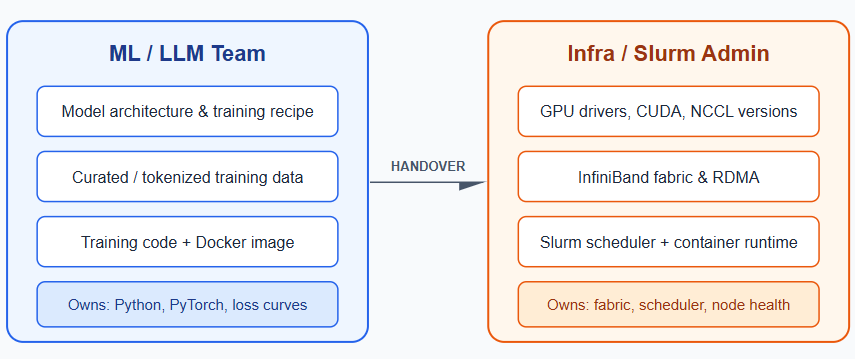
There are, broadly, two teams involved in getting a large model trained on a cluster:
- The ML/LLM team — researchers, ML engineers, MLOps engineers. They own the model, the data, and the training code.
- The infrastructure/HPC team — Slurm admins, network engineers, storage engineers. They own the fabric, the scheduler, the drivers, and the runtime.
Neither team can do the other’s job well, and the handoff between them is where most real-world production incidents happen — a driver mismatch, a misconfigured RDMA device, a dataset that doesn’t fit the filesystem’s I/O profile.
“OK fine, Slurm — but what jobs does it actually run?”
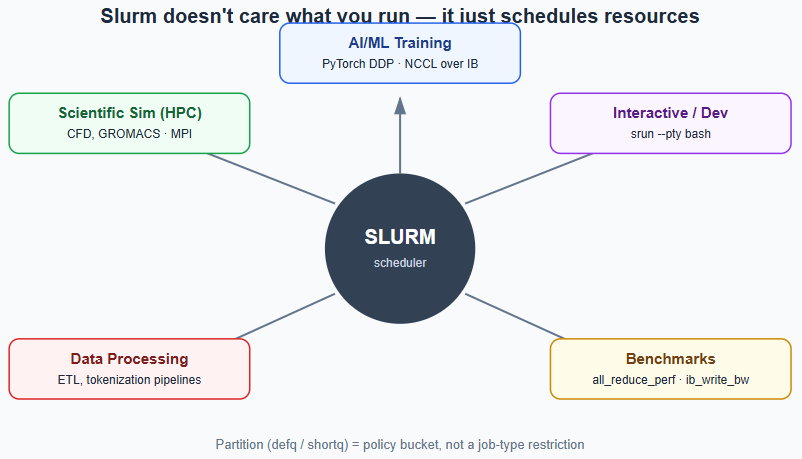
This is the first question anyone from networking asks, because Slurm’s job (pun intended) is easy to misread as “an AI scheduler.” It isn’t. Slurm is a generic resource manager — it allocates nodes, CPUs, GPUs, memory, and time, then runs whatever executable you point it at. It has no idea what’s inside the job.
In a real HPC/AI environment, that translates into a handful of recurring categories:
- AI/ML training & inference — distributed PyTorch/DeepSpeed/Megatron jobs using NCCL over InfiniBand; this is the Core42/DGX SuperPOD territory.
- Scientific/numerical simulation — CFD, molecular dynamics (GROMACS, LAMMPS), weather models — usually MPI-based, predating the AI boom but running on the same fabric.
- Data processing/ETL — tokenization pipelines, feature engineering, usually CPU-heavy and less latency-sensitive.
- Benchmarks/diagnostics —
all_reduce_perf(NCCL health),ib_write_bw(raw IB bandwidth), HPL/Linpack — exactly what you’d run on an idleshortqpartition before releasing nodes to real training. - Interactive/dev jobs —
srun --pty bashfor debugging on an actual compute node.
The partition (defq, shortq, whatever you’ve named yours) is just a policy bucket — different time limits and priorities — not a job-type restriction.
Who’s Actually on “The ML Team”
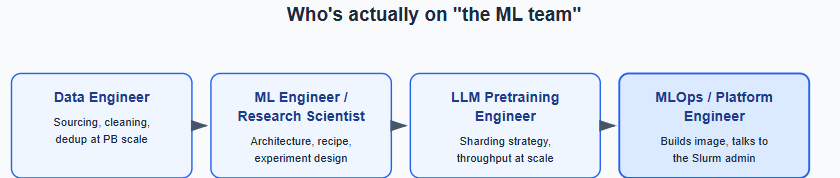
“The ML team” is really four different roles, and each one hands off a different artifact down the chain:
- Data Engineer — sourcing, cleaning, deduplicating data at terabyte-to-petabyte scale.
- ML Engineer / Research Scientist — architecture, training recipe, experiment design.
- LLM Pretraining Engineer — owns the distributed training system: sharding strategy, checkpoint cadence, throughput at scale.
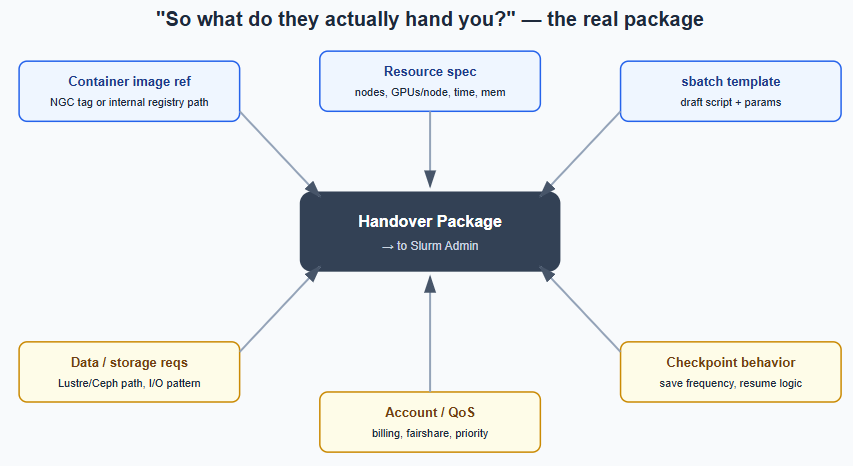
- MLOps / Platform Engineer — builds the Docker image, owns CI/CD, and is usually the person who actually talks to you, the Slurm admin.
The Data Dimension — What They Actually Train On
Splitting by training stage:
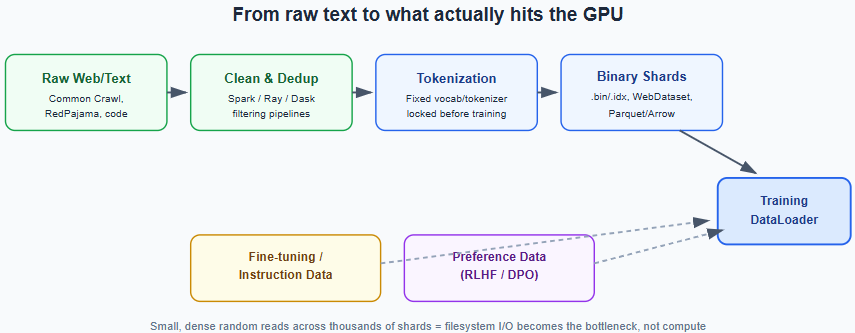
- Pretraining data — massive, broad-coverage text (and increasingly code/math/multilingual/multimodal): Common Crawl derivatives, The Pile, RedPajama, FineWeb, or proprietary scrapes. Scale is in trillions of tokens.
- Fine-tuning/instruction data — much smaller, higher-quality instruction-response pairs.
- Preference data (RLHF/DPO) — paired responses with human or model-generated preference labels for alignment.
Why this matters to you as infra: raw text isn’t fed into training directly — it’s pre-tokenized and packed into formats optimized for fast, random-access reads: WebDataset (tar-shard based), Megatron-style .bin/.idx memory-mapped binary shards, or Parquet/Arrow. These formats are exactly why LLM pretraining jobs are often I/O-bound rather than compute-bound if the underlying filesystem (Lustre/Ceph/GPFS) isn’t tuned for the read pattern — thousands of small random reads, hitting every node simultaneously at the start of every epoch.
The Role of PyTorch — and Everything Sitting on Top of It
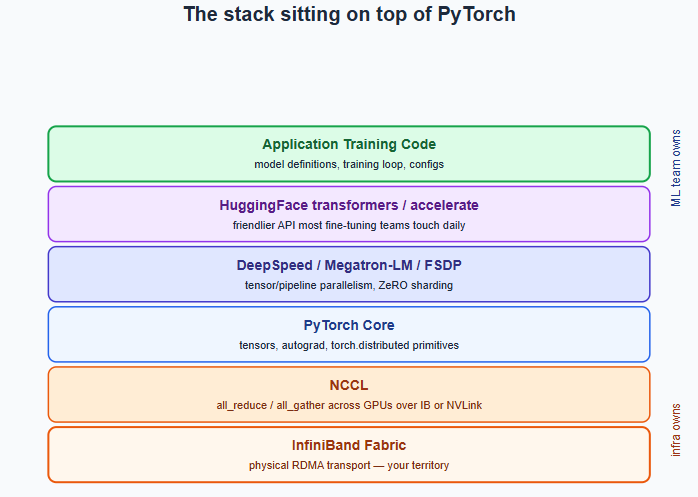
PyTorch is the tensor/autograd engine — forward pass, backward pass, gradients. Almost nobody trains at scale with vanilla PyTorch alone:
- PyTorch core — tensors, autograd, and
torch.distributed, which gives you the low-level primitives (all_reduce,all_gather, process groups) everything else builds on. - DeepSpeed / Megatron-LM / FSDP — implement the actual parallelism strategies that make training 70B+ parameter models across hundreds of GPUs possible: splitting the model itself (tensor/pipeline parallelism) and sharding optimizer states (ZeRO).
- HuggingFace
transformers/accelerate/datasets— the friendlier glue layer most fine-tuning teams use daily. - NCCL — not a training framework, but the library that actually moves gradients between GPUs across the fabric during
all_reduce. NCCL builds rings or trees across GPUs based on detected topology (NVLink within a node, InfiniBand between nodes), and its performance depends entirely on correct topology awareness — a wrongNCCL_IB_HCAor missing RDMA device visibility silently degrades communication to sockets, with no error thrown. - JAX — the PyTorch alternative, more common at Google-lineage labs.
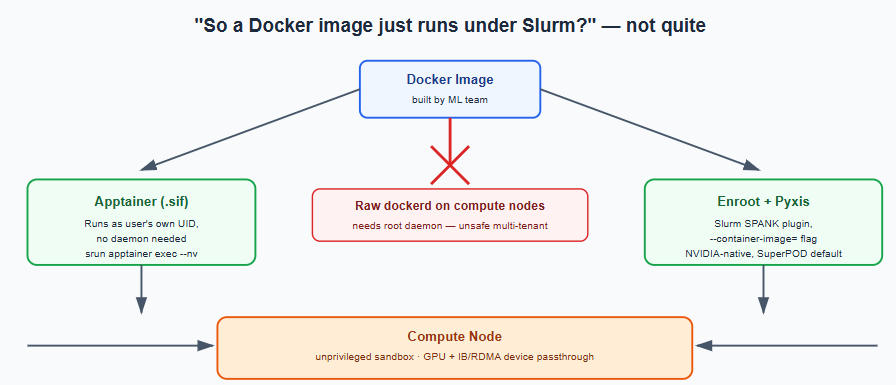
“So the ML team just gives you a Docker image and it runs under Slurm?”
Close, but not quite — and this is the nuance that trips up most people coming from a non-container HPC background.
Docker itself typically does not run directly on compute nodes. Docker requires a root-privileged daemon. On a multi-tenant cluster where hundreds of users share nodes, a persistent root daemon is a security non-starter — one user’s container could escape and touch another user’s data or the whole node.
Instead, the image gets run through one of two paths:
- Apptainer (formerly Singularity) — converts the Docker image to a
.siffile, runs as the user’s own UID, no daemon:
srun apptainer exec --nv myimage.sif python train.py- Enroot + Pyxis — the NVIDIA-native path on DGX SuperPOD-style clusters. Pyxis is a Slurm SPANK plugin that lets you invoke containers directly as sbatch/srun flags:
srun --container-image=nvcr.io/nvidia/pytorch:24.01-py3 --container-mounts=/data:/data python train.pyThis is almost certainly the pattern behind any NVIDIA-reference-architecture cluster (Base Command Manager, DGX SuperPOD).
Either way, the container has to be launched with GPU and InfiniBand/RDMA device passthrough explicitly configured — this is where “the job runs but is inexplicably slow” bugs live: a container that can see the GPU but not /dev/infiniband/* will still complete a training run, just over TCP sockets instead of RDMA, at a fraction of the speed, with nothing in the logs pointing at why.
What Gets Fabricated Inside the Docker Image
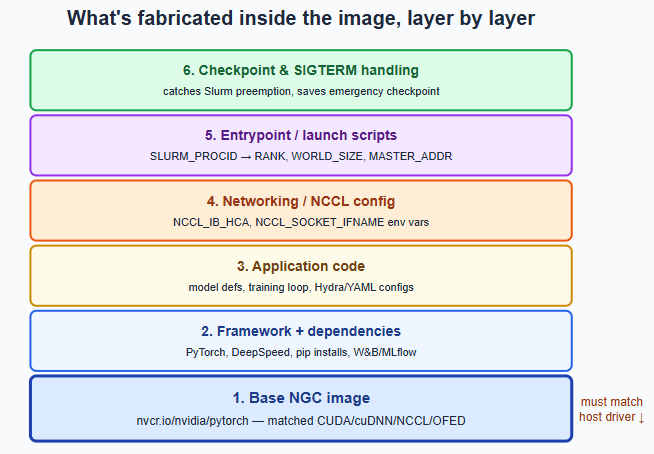
Six layers, bottom to top:
- Base image — almost always an NVIDIA NGC container (
nvcr.io/nvidia/pytorch:xx.xx-py3), because it ships a pre-validated, matched set of CUDA, cuDNN, NCCL, and InfiniBand-compatible libraries (OFED userspace). This is the single most important compatibility layer — an image built against CUDA 12.3 on a host whose driver only supports up to 12.1 either fails outright or silently underperforms. - Framework + dependencies — pip/conda installs for the training framework, tokenizer libraries, dataloading libraries.
- Application code — model definitions, training loop, config files (Hydra/YAML), sometimes custom CUDA kernels.
- Networking configuration — environment variables (and occasionally patched NCCL builds) to match the cluster’s NIC naming and topology.
- Entrypoint/launch scripts — reads Slurm’s own env vars (
SLURM_PROCID,SLURM_NTASKS,SLURM_NODELIST) and translates them into what PyTorch expects (RANK,WORLD_SIZE,MASTER_ADDR,MASTER_PORT). This is the literal seam where the ML world and the scheduler world are stitched together. - Checkpoint/signal-handling hooks — catches
SIGTERM(Slurm sends this before killing a preempted or timed-out job) and triggers an emergency checkpoint save.
What the Admin Actually Checks Before Releasing the Job
This is the part that doesn’t show up in ML team documentation, because it’s not their layer — it’s yours:
- Driver/CUDA/NCCL alignment — does the image’s CUDA/NCCL version actually match the host driver?
- RDMA device visibility — is
/dev/infiniband/*correctly mounted into the container runtime (Apptainer--nv/ Enroot device passthrough)? A job that “runs” but silently falls back from IB to TCP is the single most common invisible failure mode in multi-node training. - Topology-aware placement — does the job land on nodes that are actually close on the fabric (same leaf switch/rack), or does Slurm’s
topology.confneed tuning so multi-node jobs aren’t spread across a suboptimal path? - Filesystem I/O readiness — can the shared filesystem sustain the read pattern from tokenized shards across every node hitting it simultaneously at epoch start?
- Multi-tenancy isolation — cgroups for CPU/memory, GPU MIG/exclusive-mode settings, and (your world) NSX-T-style network segmentation so one tenant’s job traffic can’t interfere with another’s.
- Monitoring — DCGM exporters feeding Prometheus/Grafana so GPU utilization, ECC errors, and thermal data are visible once the job is running.
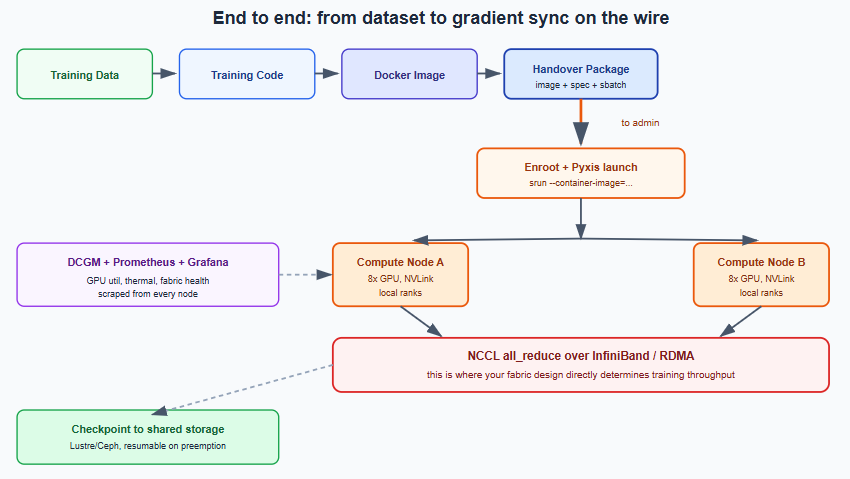
End to End: From Dataset to Gradient Sync on the Wire
Putting the whole chain together — this is the diagram that ties every question above into one flow, from raw data all the way to the actual all_reduce traveling across your fabric:
Conclusion: Connecting AI Development with High-Performance Infrastructure
Building reliable AI training infrastructure requires more than developing machine learning models or deploying powerful GPU servers. Successful AI workloads depend on how effectively computing resources, networking, storage, and software components work together.
Throughout this guide, we explored how machine learning teams prepare training workloads and how HPC administrators support their execution across distributed computing environments.
First, machine learning engineers develop models, prepare datasets, and configure training frameworks such as PyTorch.
Next, they package the required applications and dependencies into container images.
Meanwhile, Slurm manages computing resources and schedules workloads across available nodes.
However, successful job scheduling does not automatically guarantee efficient training performance.
For example, incompatible GPU drivers, incorrect container configurations, limited storage throughput, or missing RDMA connectivity can create performance bottlenecks.
Therefore, infrastructure administrators must validate the complete environment before releasing demanding AI workloads.
Additionally, technologies such as NCCL, InfiniBand, and high-performance storage play important roles in supporting communication and data movement during distributed training.
As AI models become larger and training environments grow more complex, collaboration between machine learning and infrastructure teams becomes increasingly important.
Network engineers, in particular, bring valuable experience in fabric design, connectivity, troubleshooting, and performance optimization.
Consequently, their expertise can help organizations identify infrastructure limitations and improve the reliability of distributed AI environments.
Ultimately, effective AI training infrastructure depends on a coordinated approach to workload scheduling, GPU computing, network performance, storage design, and operational monitoring.
By understanding how these components interact, organizations can make better infrastructure decisions, reduce avoidable disruptions, and support scalable AI and machine learning workloads.
Planning an AI or HPC Infrastructure Deployment?
Building a reliable AI training environment requires careful planning across networking, computing, storage, and security.
Whether your organization is evaluating GPU cluster connectivity, designing high-performance network infrastructure, or preparing its data center for demanding AI workloads, the right technical guidance can help reduce complexity and improve deployment readiness.
Trezbon Technologies provides professional consulting services in enterprise networking, IT infrastructure design, system integration, and cybersecurity.
Our team can help organizations assess infrastructure requirements, identify design considerations, and plan secure, scalable environments that support their business and technology objectives.
Looking to strengthen your AI infrastructure foundation?
Connect with Trezbon Technologies to discuss your requirements and explore how our professional services can support your project.
Explore our services: Trezbon Professional Services
Contact our team: Speak with Trezbon Technologies
Trezbon Technologies — Bridge your ideas to life with us.
FAQ Section for Organic Search Visibility
What is AI training infrastructure?
AI training infrastructure includes the computing hardware, networking, storage, software frameworks, and workload management systems used to train machine learning models. It commonly includes GPUs, high-speed networking, distributed training libraries, and orchestration tools.
How does Slurm support AI training?
Slurm manages computing resources and schedules jobs across HPC clusters. It helps administrators allocate GPUs, CPUs, memory, and execution time according to workload requirements and scheduling policies.
Why is InfiniBand used in AI training?
InfiniBand provides high-bandwidth, low-latency connectivity for distributed computing workloads. In supported AI environments, it helps computing nodes exchange data efficiently during training.
What is the role of NCCL in distributed AI training?
NCCL is a communication library that supports collective operations between NVIDIA GPUs. These operations help distributed training frameworks exchange data and synchronize computations across GPUs.
What is the difference between an ML engineer and an HPC administrator?
An ML engineer typically focuses on models, datasets, training frameworks, and application development.
An HPC administrator focuses on computing resources, workload scheduling, infrastructure configuration, monitoring, and operational reliability.
Both roles contribute to successful distributed AI training.
The Questions No Single Team Can Answer
AI Infrastructure Engineer Workbook: 12-Stage Hands-On Guide

Secure Data Destruction: NIST SP 800-88 Guide for HDDs, SSDs & Cloud
About Author

abhishek
Cloud Platform Lead and AI Infrastructure Architect at e& enterprise, with 12+ years in data center, virtualization, security and AI infrastructure. I design and build private cloud and sovereign AI platforms, working with VMware (NSX-T, vSphere, vSAN, HCX, AVS, SRM), Kubernetes, Terraform and GPU inference infrastructure for LLMs. Previously served Networkers Home (CCIE instructor, trained around 50 CCIEs), VCE/EMC2, Cisco, VMware and Arista across TAC, consulting, design and training. Certifications: CCIE#48639 (Data Center and R&S), VCIX-DCV and NV, CKA, NVIDIA AI Infrastructure, Azure Solutions Architect Expert, Terraform Associate, Palo Alto PCNSE. LinkedIn: https://www.linkedin.com/in/abhishekkunal51/