Kubernetes for AI/ML Workloads: GPU Scheduling & MLOps Guide
Kubernetes was designed around a simple assumption: workloads are interchangeable and resources are fungible. In other words, a pod can usually move from one node to another without much consequence.
However, AI/ML training and inference challenge that assumption. GPUs aren’t interchangeable. For example, a workload may require eight GPUs within the same NVLink domain. Using eight GPUs with the wrong topology can be just as problematic as having no GPUs available.
Moreover, distributed training creates additional scheduling challenges. A single training job can span dozens of pods. In many cases, all of those pods must start together or not at all.
The workload itself is also more complex than a standard container. Instead, it may include a training pipeline, experiment tracker, artifact store, and an additional scheduler running on top of Kubernetes.
As a result, running AI/ML workloads on Kubernetes requires a different operational approach. This post explains how GPU scheduling works and how Kubeflow and MLflow integrate with the scheduling layer.
In addition, we’ll explore how multiple teams can efficiently share a GPU pool without starving each other of resources. Finally, we’ll cover the day-2 realities of troubleshooting and upgrading a cluster without disrupting long-running training jobs.1. How Kubernetes Schedules GPU Workloads
Kubernetes has no native concept of a GPU. Therefore, the first step is to make GPUs visible to the Kubernetes scheduler. The scheduler must then place GPU workloads on the right nodes.
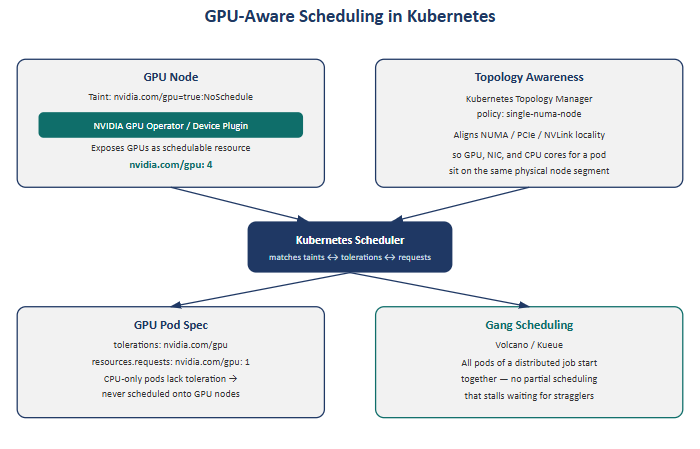
Making GPUs schedulable. The NVIDIA GPU device plugin runs on every GPU node. Today, many environments use the full NVIDIA GPU Operator instead. It exposes nvidia.com/gpu as a schedulable resource, similar to cpu and memory.
Without this integration, the scheduler cannot see a node’s GPU resources. As a result, pods may reach the node without gaining access to its GPUs.
Keeping non-GPU workloads off GPU nodes. GPU nodes are typically tainted with nvidia.com/gpu=true:NoSchedule. Only pods with the matching toleration can be scheduled on those nodes.
Consequently, routine CPU-only services are kept away from expensive GPU infrastructure. This helps preserve GPU capacity for workloads that actually need it.
Topology-aware placement. At scale, simply requesting “a GPU” isn’t enough. A multi-GPU workload also depends on the correct hardware topology.
Ideally, its GPUs, NICs, and CPU cores should align with the appropriate NUMA and PCIe topology. Otherwise, cross-socket traffic can reduce performance.
The GPU Operator can help manage topology-aware placement. Alternatively, Kubernetes can use its native Topology Manager with the single-numa-node policy. This policy prevents placement when the required topology cannot be satisfied.
Gang scheduling for distributed jobs. The default Kubernetes scheduler places pods independently. However, distributed training jobs often require several pods to start together.
For example, a training job may require four pods at the same time. If only two start, they can remain idle while waiting for the other two. As a result, expensive GPU resources may sit unused.
Tools such as Volcano and Kueue address this problem through gang scheduling. They coordinate related pods as a group. Therefore, the required pods can be scheduled together rather than leaving a distributed job partially scheduled.
2. Integrating Kubeflow and MLflow with Kubernetes GPU Infrastructure
Kubeflow and MLflow solve different problems, and it’s worth being precise about where each one sits.
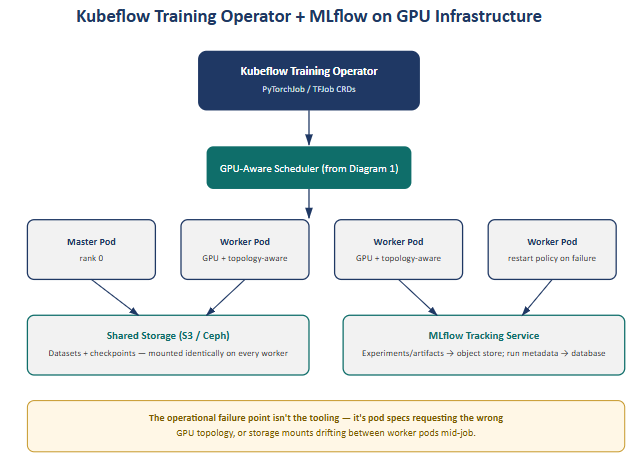
Kubeflow’s Training Operator (via the PyTorchJob and TFJob custom resources) handles distributed job orchestration on top of the GPU-aware scheduler described above. It’s the layer that turns “train this model across 8 GPUs” into the right set of master/worker pods, with the correct restart policies if a worker dies mid-job.
MLflow operates independently of the scheduling problem entirely — it tracks experiments, parameters, and artifacts, typically running as an in-cluster service backed by object storage (S3 or Ceph) for artifacts and a relational database for run metadata.
The two systems only become an operational concern where they touch the infrastructure layer underneath them. There are two failure points worth knowing cold:
- Pod spec correctness. If the Training Operator’s generated pod specs don’t request GPU resources and topology hints correctly, jobs either fail to schedule or land with poor GPU locality — the orchestration layer is only as good as what it hands to the scheduler.
- Storage consistency. Datasets and checkpoints need to be mounted identically across every worker pod. A shared volume that’s mounted with different paths, permissions, or staleness on even one worker silently corrupts a distributed training run — one of the more painful classes of bug because it doesn’t fail loudly, it just produces bad results.
3. Multi-Tenancy and GPU Resource Quotas in Kubernetes
GPUs are scarce and expensive in a way CPU and memory generally aren’t, which means the “one team starves another” failure mode is far more costly on a GPU cluster than a general-purpose one.
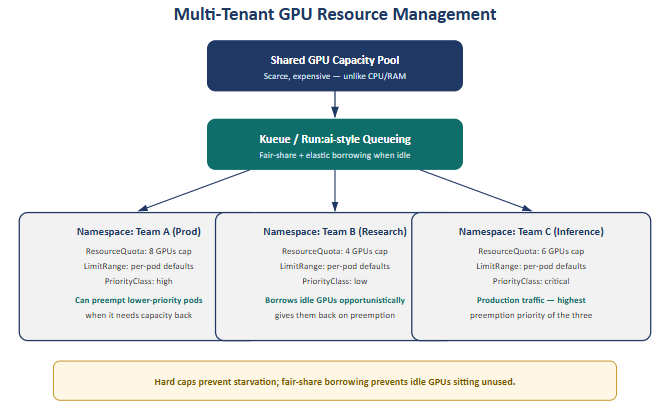
The baseline pattern is one namespace per team or project, with ResourceQuota capping total GPU consumption per namespace and LimitRange setting sane per-pod defaults so a single misconfigured job can’t silently claim the entire quota. PriorityClass layered on top lets production workloads preempt lower-priority research or experimentation pods when capacity is tight.
However, raw quotas alone are a blunt instrument. A team’s unused quota can remain idle instead of becoming available to other workloads. Therefore, platforms such as Kueue and Run:ai introduce fair-share scheduling and elastic borrowing. This borrow-and-reclaim model is what makes multi-tenant GPU clusters efficient instead of just safe.
4. Troubleshooting Kubernetes GPU Scheduling and Networking
A useful mental framework for “why is my pod stuck” on a GPU cluster:
| Symptom | First check | What it tells you |
|---|---|---|
Pod stuck Pending | kubectl describe pod — scheduling events | Insufficient GPU resources, taint/toleration mismatch, or topology constraint that can’t be satisfied |
| Nodes under pressure | kubectl top nodes | Memory/CPU exhaustion masquerading as a scheduling failure |
| Cluster-wide weirdness | kubectl get events --all-namespaces | CNI errors, image pull failures, or node-level problems not visible from a single pod’s perspective |
| RDMA/InfiniBand pods failing to get network | CNI daemonset logs + host NIC state | Common with SR-IOV-based CNIs (Multus + SR-IOV CNI) used to expose InfiniBand interfaces into pods — the failure often lives at the host network layer, not in Kubernetes at all |
After resolving the immediate issue, configure monitoring and alerts for the specific failure signature. This way, the system can alert the team before users notice the problem. As a result, the team can respond quickly instead of troubleshooting the same issue from scratch.
5. Upgrading Production Kubernetes GPU Clusters with Minimal Downtime
Upgrading a cluster during an active training run requires extra care. For example, you cannot simply reschedule a job that has already completed four days of a two-week training run. Otherwise, the team could lose days of valuable training progress.
Control plane first. With an HA control plane, upgrading it has no workload impact — this is the safe, low-stakes part of the process.
Worker nodes in rolling batches, following cordon → drain (respecting PodDisruptionBudgets) → upgrade or replace → uncordon. This is standard practice for stateless workloads.
GPU nodes need an extra layer of care. Avoid hard-evicting a long-running training job during a checkpoint. Instead, coordinate node draining with the training job’s checkpointing cadence. The upgrade process should wait for or trigger a checkpoint before draining the node. As a result, the team can avoid losing hours of training progress stored in GPU memory.
Stage the upgrade in non-production first. Kubernetes itself often isn’t the main source of upgrade problems. Instead, compatibility issues between the GPU Operator and the new Kubernetes or containerd version can cause failures.
Therefore, test the GPU Operator against the new platform version before production deployment. This approach helps identify driver and device-plugin problems before they affect the entire GPU fleet. Ultimately, finding these issues in staging costs far less than discovering them in production.
6. The GPU/HPC-Focused Kubernetes Operator Ecosystem
A short list of the operators that consistently show up once a cluster is running real GPU workloads at scale:
- NVIDIA GPU Operator — automates the full lifecycle of drivers, the CUDA toolkit, the device plugin, and the DCGM exporter across every GPU node. At any meaningful scale, manually installing and versioning GPU drivers per node stops being viable; this is what makes fleet-wide GPU management tractable.
- Volcano and Kueue — add the HPC-style gang scheduling and fair-share queueing that the vanilla Kubernetes scheduler was never designed for, covered in sections 1 and 3 above.
Together, these operators are what let a general-purpose orchestrator like Kubernetes behave like a purpose-built HPC scheduler when it needs to — without giving up everything else Kubernetes is good at for the rest of the platform.
Where the Pieces Fit Together
Stepping back, the six areas above aren’t independent — they’re layers of the same stack:
- Section 1 (scheduling) is the foundation everything else sits on
- Section 2 (Kubeflow/MLflow) is the MLOps layer that consumes that scheduling foundation
- Section 3 (multi-tenancy) is the governance layer that decides who gets access to it
- Sections 4–5 (incident response, upgrades) are the day-2 operational disciplines that keep it running
- Section 6 (the operator ecosystem) is what makes all of the above maintainable at fleet scale rather than as a collection of manual, per-node procedures
Get the scheduling layer wrong, and nothing above it works reliably no matter how well-configured Kubeflow or MLflow are. Get the governance layer wrong, and a well-scheduled cluster still turns into a source of team conflict over capacity. The operational maturity of an AI/ML platform shows up less in any single piece of tooling and more in how cleanly these layers hand off to each other.
For organizations looking to bridge the gap between development and production, Trezbon Professional Services offers end-to-end expertise to design, deploy, and secure your high-performance environment; whether you need help with foundational infrastructure, advanced AI networking, or robust cybersecurity, reach out to trezbon.com/services to accelerate your deployment.
Conclusion: Building Production-Ready Kubernetes for AI/ML Workloads
Running AI/ML workloads on Kubernetes requires much more than simply making GPUs available to containers. Instead, a production-ready platform must combine GPU-aware scheduling, topology optimization, MLOps integration, resource governance, observability, and reliable day-2 operations.
**Moreover, tools such as NVIDIA GPU Operator, Kubeflow, MLflow, Kueue, and Volcano help transform Kubernetes from a general-purpose container platform into infrastructure capable of supporting demanding AI and distributed GPU workloads.
However, the real value comes from how these components work together.** Effective scheduling improves GPU utilization, fair-share resource management prevents teams from competing for capacity, and strong operational practices help keep critical training and inference workloads available.
Ultimately, a well-designed Kubernetes AI/ML platform provides a scalable foundation for moving GPU workloads from experimentation into production.
Need Help Building Your Kubernetes AI Infrastructure?
Planning or scaling Kubernetes, NVIDIA GPU, AI/ML, MLOps, networking, or high-performance infrastructure?
Trezbon Professional Services can help organizations design, deploy, optimize, and secure production-ready infrastructure for demanding AI and enterprise workloads.
Explore our services: https://trezbon.com/services
Bridge your AI infrastructure from design to production with Trezbon.
NVIDIA GPU Workloads on Kubernetes Part 7: Running GPU Test Jobs
Kubernetes GPU Scheduling: RuntimeClass, Affinity & Gang Scheduling
NVIDIA GPU Kubernetes Cluster Validation: Complete Readiness Checklist | Part 6
About Author

abhishek
Cloud Platform Lead and AI Infrastructure Architect at e& enterprise, with 12+ years in data center, virtualization, security and AI infrastructure. I design and build private cloud and sovereign AI platforms, working with VMware (NSX-T, vSphere, vSAN, HCX, AVS, SRM), Kubernetes, Terraform and GPU inference infrastructure for LLMs. Previously served Networkers Home (CCIE instructor, trained around 50 CCIEs), VCE/EMC2, Cisco, VMware and Arista across TAC, consulting, design and training. Certifications: CCIE#48639 (Data Center and R&S), VCIX-DCV and NV, CKA, NVIDIA AI Infrastructure, Azure Solutions Architect Expert, Terraform Associate, Palo Alto PCNSE. LinkedIn: https://www.linkedin.com/in/abhishekkunal51/