NSX-T Segment Without Gateway: Part 14 Guide
Introduction
In this part of the NSX-T series, we will explore how an NSX-T segment works without an IP subnet or gateway. We will also examine how virtual machines communicate across different ESXi hosts.
First, we will understand how NSX-T creates and realizes logical segments. Next, we will examine how the controller shares endpoint information with ESXi transport nodes.
In addition, we will explore VTEP tables, ARP information, and logical switching. These components help virtual machines communicate across different hosts.
Unlike a segment connected to a logical router, this scenario uses only Layer 2 switching. Therefore, virtual machines can communicate within the same IP subnet without requiring a Tier-1 gateway.
However, communication between different IP subnets requires an appropriate Layer 3 routing solution.
To demonstrate this behavior, we will use a practical NSX-T lab environment. We will examine the traffic flow and observe how the controller updates the transport nodes.
Finally, we will discuss real-world use cases and explain when this configuration is useful.
Lab Setup
Before exploring the scenario, let’s understand our NSX-T lab environment.
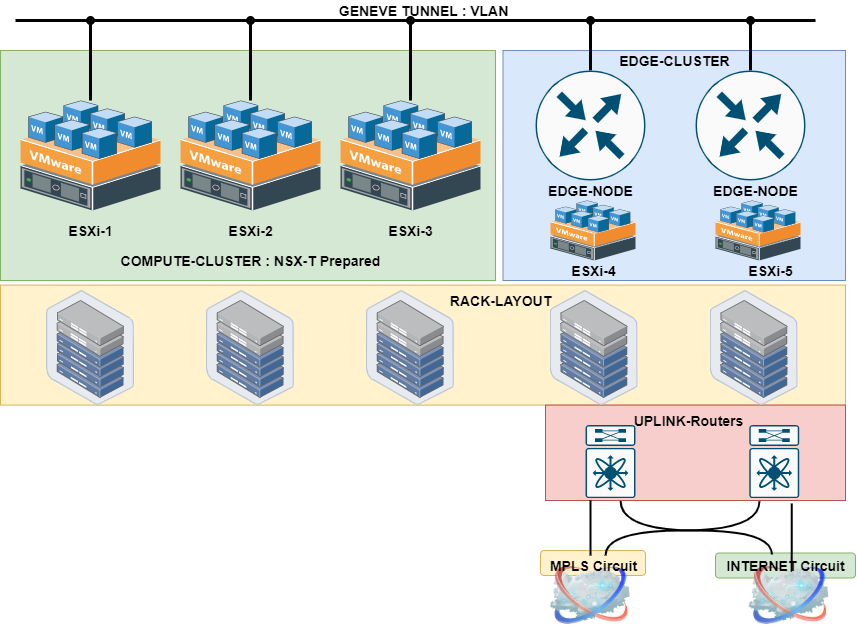
The lab includes five ESXi hosts connected to a VMware vCenter cluster.
- All five ESXi hosts are prepared as NSX-T transport nodes.
- ESXi-1, ESXi-2, and ESXi-3 serve as compute hosts.
- ESXi-4 and ESXi-5 are reserved for hosting NSX Edge nodes.
- A separate distributed virtual switch supports Edge TEP traffic.
Although the lab includes Edge hosts, we will not use an Edge cluster in this scenario.
Instead, we will focus on logical switching between virtual machines connected to the same NSX-T segment.requirements from Layer 3 routing design.
Scenario 1: NSX-T Segment Without IP Subnet or Gateway
In this scenario, we will explore how NSX-T realizes a logical segment on ESXi transport nodes.
First, we create a segment named SEG_A with the following settings:
- Segment Name: SEG_A
- Tier-1 Gateway: Not connected
- Gateway IP Subnet: Not configured
- Edge Cluster: Not required
As a result, SEG_A operates as a Layer 2 logical segment without a gateway provided by NSX-T.
In below scenario:
Segment SEG_A is created T1 Gateway: NO and IP Subnet: NO

Understanding NSX-T Realized State
NSX-T uses the concept of desired and realized states to manage infrastructure configuration.
When we create SEG_A, the segment appears in NSX Manager. However, it may not be instantiated on every ESXi transport node immediately.
Instead, NSX-T realizes the required switching configuration on the relevant transport nodes when workloads use the segment.
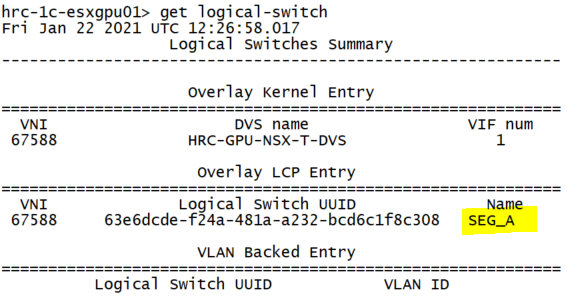
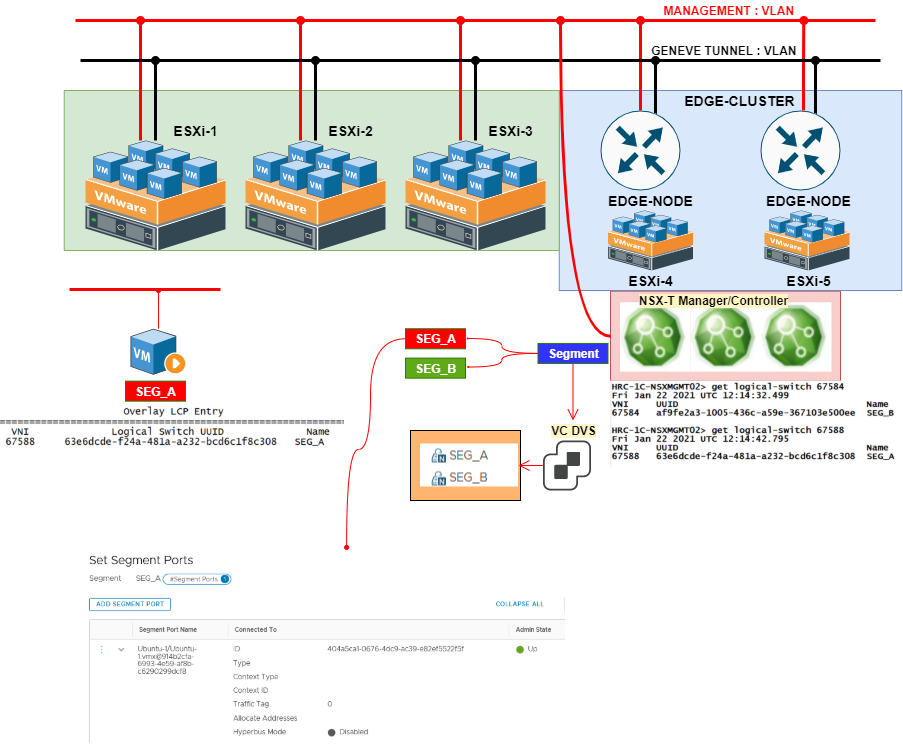
For example, when we connect VM1 to SEG_A on ESXi-1, NSX-T prepares the necessary logical switching configuration on that host.
We can then verify the logical switch information using the following command:
get logical-switches
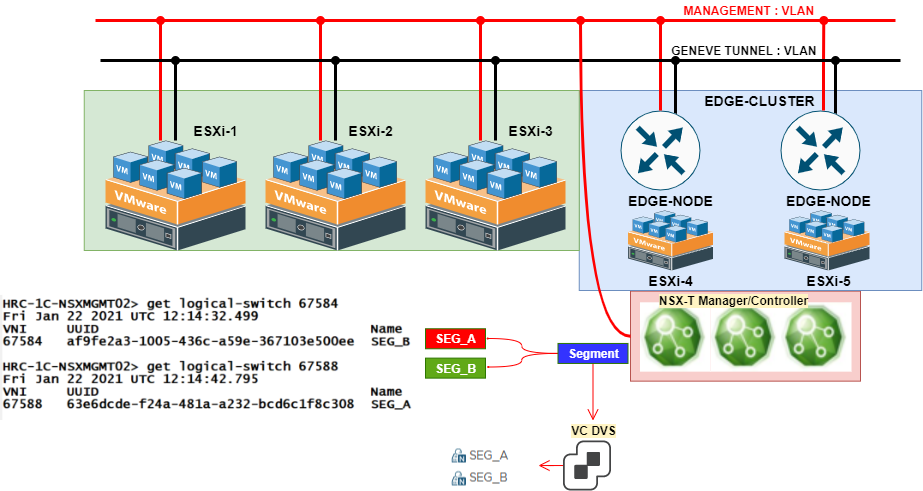
Similarly, when VM2 connects to SEG_A on ESXi-2, the segment becomes available on that transport node.
Therefore, the logical switching configuration is distributed according to workload requirements.
Logical Routing Behavior
In this scenario, SEG_A has no Tier-1 gateway or configured gateway IP address.
Therefore, NSX-T does not provide a routing interface for this segment.
Virtual machines within the same IP subnet can communicate through Layer 2 switching. However, communication between different IP subnets requires a separate routing solution.
As a result, the segment supports Layer 2 connectivity without relying on an NSX-T logical router.
Logical Switching and VTEP Communication
Next, let’s examine how VM1 and VM2 communicate when they connect to SEG_A on different ESXi hosts.
Each ESXi transport node maintains a control-plane connection with the NSX-T controller.
Through this connection, the controller distributes the endpoint information required for logical switching.
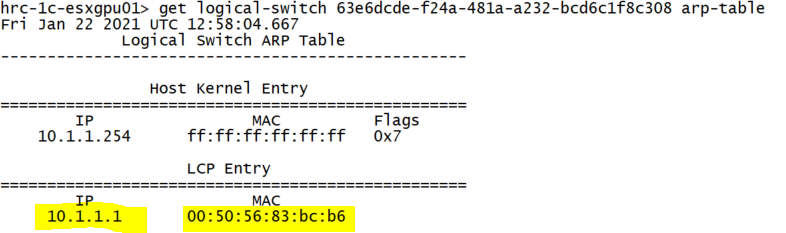
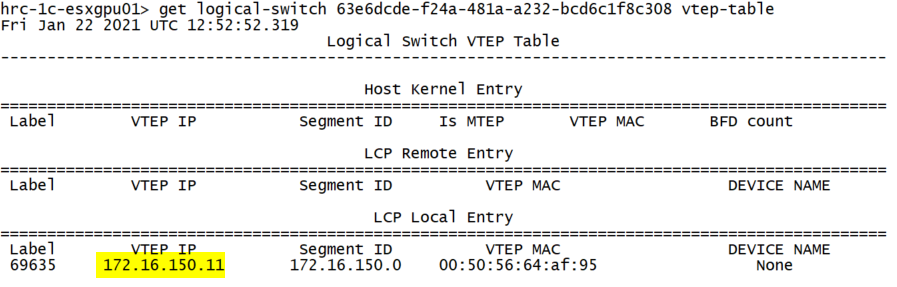
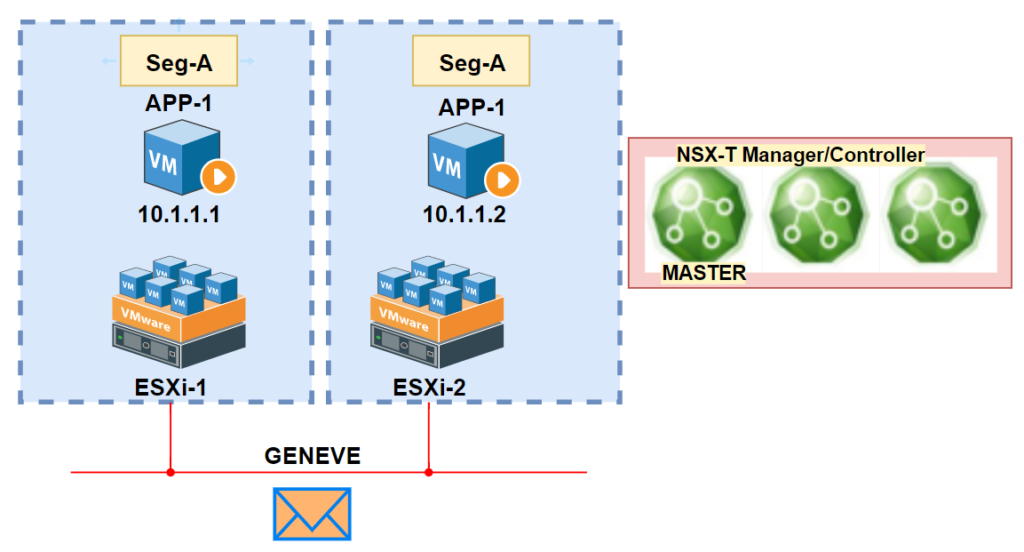
For example, VM1 resides on ESXi-1, while VM2 resides on ESXi-2. Both virtual machines connect to SEG_A.
When VM1 communicates with VM2, the transport nodes use the available MAC and tunnel endpoint information to forward traffic.
For overlay segments, the ESXi hosts use Geneve encapsulation to transport Layer 2 traffic across the underlying IP network.
Consequently, both virtual machines can communicate as members of the same logical segment, even though they reside on different physical hosts.

Controller Synchronization
The NSX-T controller helps distribute endpoint information between transport nodes.
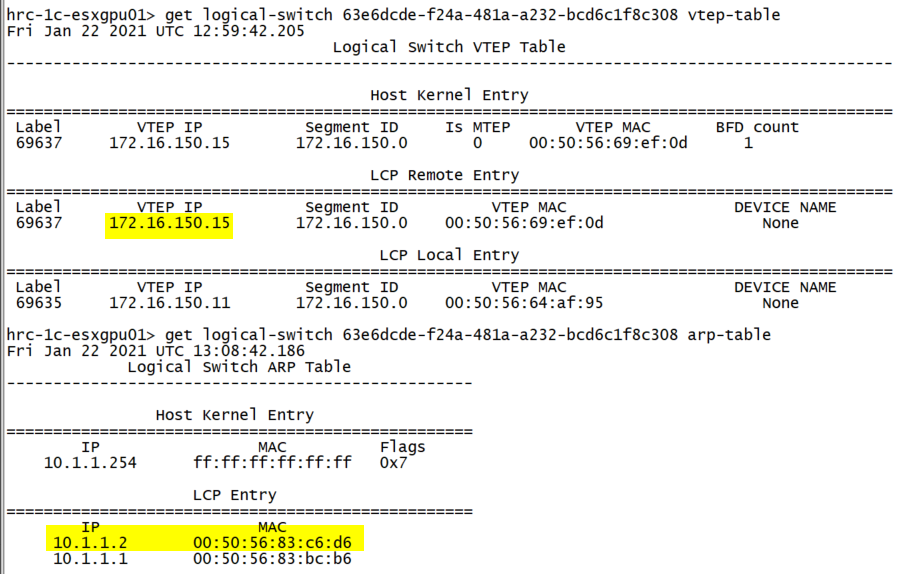
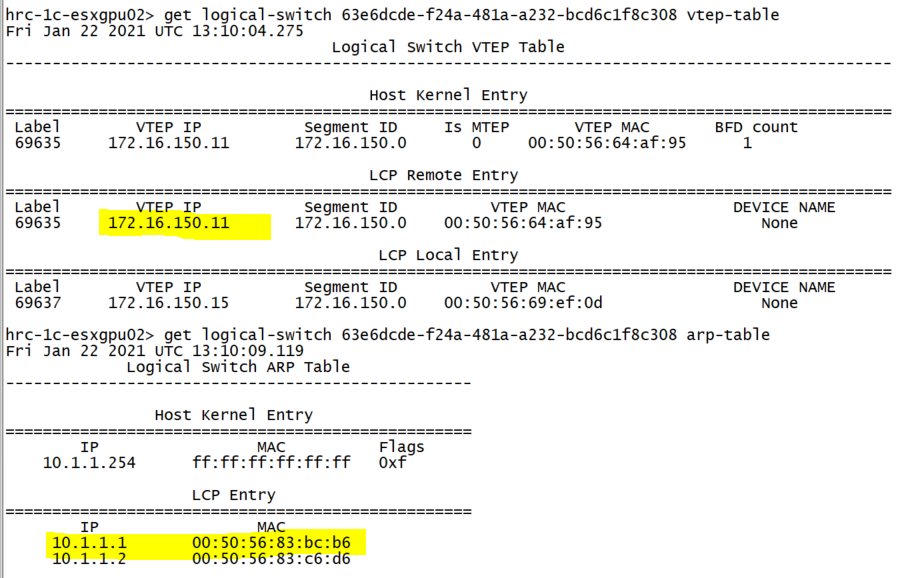
For example, when VM2 connects to SEG_A on ESXi-2, the control plane makes the relevant endpoint information available to participating transport nodes.
Similarly, ESXi-1 receives the information required to reach VM2.
This approach reduces the need for traditional flooding and learning for known endpoints.
However, some broadcast, unknown-unicast, and multicast traffic may still require replication or other handling, depending on the NSX version and configuration.
Therefore, NSX-T combines centralized control-plane intelligence with distributed data-plane forwarding.

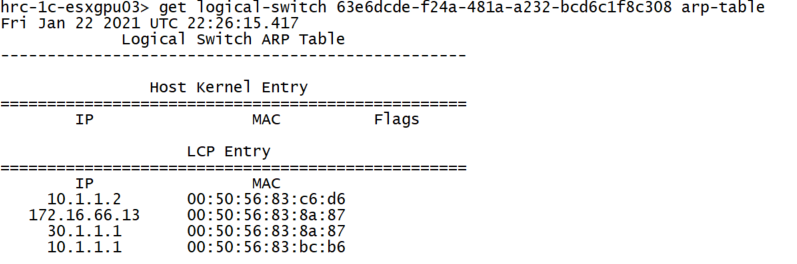
And the same is also updated on ESXi-1 and ESXi-2
Use Case: Layer 2 Connectivity Without a Gateway
This configuration is useful when workloads require Layer 2 connectivity without an NSX-managed gateway.
For example, an organization may need to connect virtual machines across different ESXi hosts while maintaining the same logical network.
In this case, SEG_A provides a common Layer 2 broadcast domain.
Furthermore, virtual machines can use different IP subnets on the same segment. Their MAC addresses can still be learned within that Layer 2 domain.
However, being connected to the same segment does not automatically provide communication between different IP subnets.
For that, the environment needs a suitable Layer 3 routing solution.
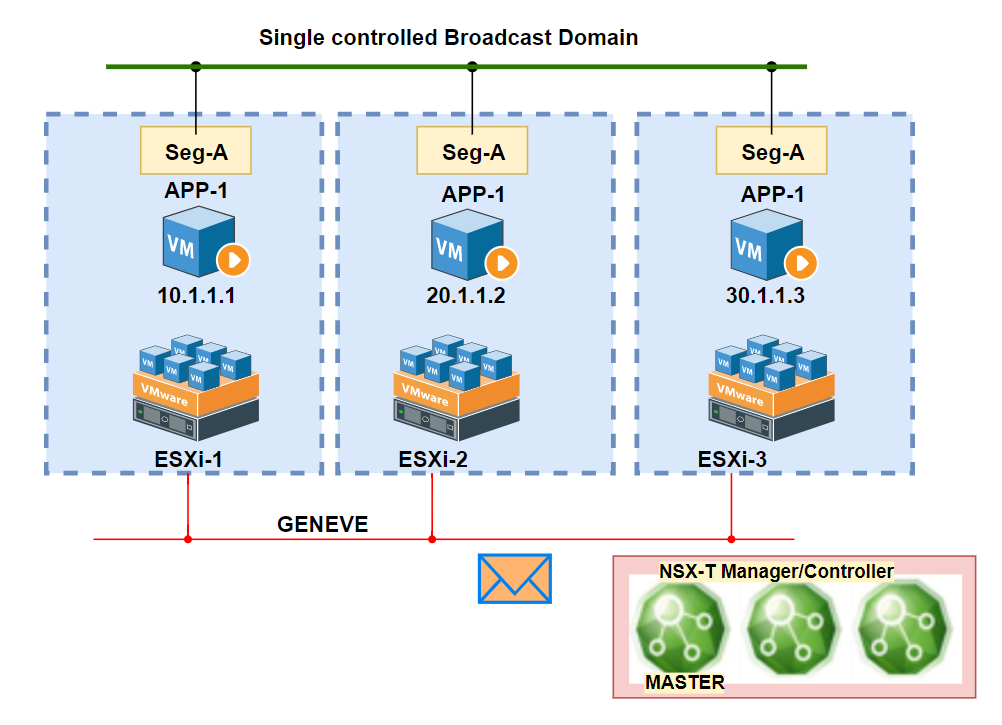
This behavior is conceptually similar to a Layer 2 bridge domain in Cisco ACI without an associated routed gateway.
As a result, network engineers can separate Layer 2 connectivity requirements from Layer 3 routing design.
Conclusion
In this part of the NSX-T series, we explored how an NSX-T segment operates without an IP subnet or gateway.
First, we examined how NSX-T realizes logical segments on ESXi transport nodes. Next, we learned how the controller distributes endpoint information across the environment.
We also explored how VTEP tables and logical switching enable virtual machines to communicate across different ESXi hosts.
Most importantly, we learned that an NSX-T segment can provide Layer 2 connectivity without a Tier-1 gateway. However, communication between different IP subnets still requires Layer 3 routing.
Understanding this behavior helps network engineers design, troubleshoot, and manage NSX-T environments more effectively.
In the next part of this series, we will explore an NSX-T segment connected to a gateway without an Edge cluster. We will examine how distributed routing changes the traffic flow and enables communication between subnets.
Continue Learning VMware NSX-T
Want to understand how NSX-T handles logical switching, distributed routing, and traffic forwarding?
Explore our practical NSX-T tutorials, lab scenarios, and configuration guides. Each article helps you build a clearer understanding of enterprise network virtualization.
Explore more VMware NSX-T tutorials:
https://www.networkbachelor.com/category/enterprise-dc-networking-storage/vmware-nsx-t
Follow Network Bachelor for more practical networking, virtualization, and cybersecurity insights.
LLM Kubernetes Projects: 5 Hands-On AI Infrastructure Labs

Choosing the Right NAC Platform for Your Enterprise: A Data-Driven Evaluation

Secure Data Destruction: NIST SP 800-88 Guide for HDDs, SSDs & Cloud
About Author

abhishek
Cloud Platform Lead and AI Infrastructure Architect at e& enterprise, with 12+ years in data center, virtualization, security and AI infrastructure. I design and build private cloud and sovereign AI platforms, working with VMware (NSX-T, vSphere, vSAN, HCX, AVS, SRM), Kubernetes, Terraform and GPU inference infrastructure for LLMs. Previously served Networkers Home (CCIE instructor, trained around 50 CCIEs), VCE/EMC2, Cisco, VMware and Arista across TAC, consulting, design and training. Certifications: CCIE#48639 (Data Center and R&S), VCIX-DCV and NV, CKA, NVIDIA AI Infrastructure, Azure Solutions Architect Expert, Terraform Associate, Palo Alto PCNSE. LinkedIn: https://www.linkedin.com/in/abhishekkunal51/