NVIDIA GPU Worker Nodes on Kubernetes: Installation & Cluster Setup
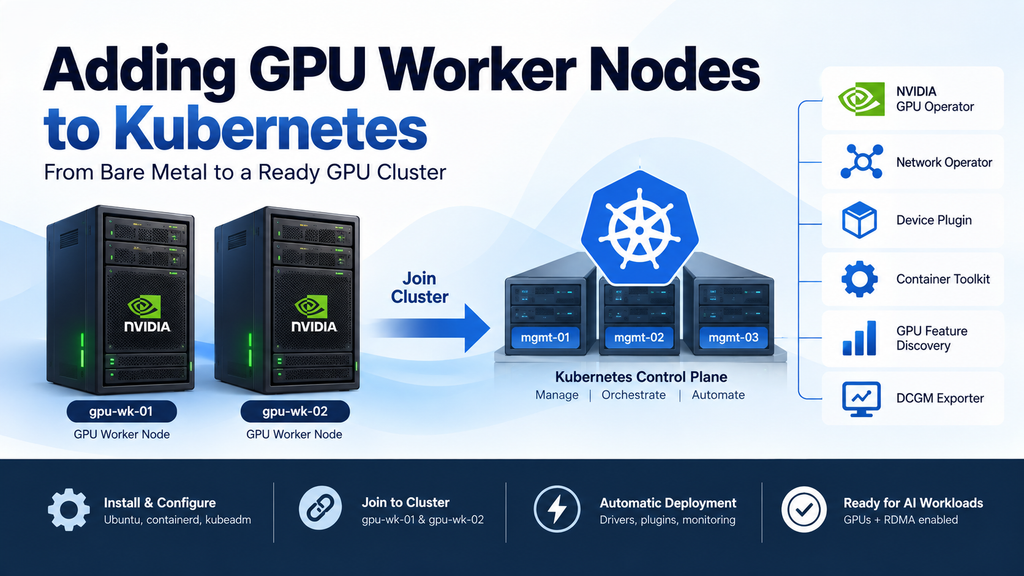
In the previous parts, we prepared the Kubernetes environment and deployed the GPU Operator and Network Operator. Now, gpu-wk-01 and gpu-wk-02 will join the cluster and trigger the automated reconciliation process.
First, we install and configure Ubuntu on both GPU worker nodes. Next, we prepare containerd and install the required Kubernetes components. Then, we use kubeadm to join each GPU worker node to the cluster.
Once the nodes are registered, Node Feature Discovery identifies the NVIDIA hardware. As a result, the GPU Operator automatically deploys the NVIDIA driver, Container Toolkit, Device Plugin, GPU Feature Discovery, and DCGM Exporter.
Finally, we confirm that Kubernetes can see the GPUs as allocatable resources and verify RDMA networking for future multi-node GPU workloads.
By the end of this guide, both NVIDIA GPU worker nodes will be ready for the next stage of the Falcon AI Kubernetes deployment.
Prerequisite
The GPU Operator and Network Operator are healthy and waiting for GPU worker nodes to join the cluster. The CRDs and NFD have also been verified. At this stage, the cluster still has no worker nodes.
You’ve completed Part 3: GPU Operator and Network Operator are confirmed healthy and idle-watching, CRDs and NFD verified. Cluster still has zero worker nodes.
You’ll also need the two physical/virtual GPU hosts from the Falcon AI spec —
gpu-wk-01andgpu-wk-02— racked, powered, and reachable on the network, with Ubuntu 22.04 LTS not yet installed (we do that fresh in this post, same as we did for the management nodes in Part 1).
Recap: where Falcon AI stands
| Role | Count | Hostnames | Status after Part 3 |
|---|---|---|---|
| Management (control plane) | 3 | mgmt-01, mgmt-02, mgmt-03 | Ready, tainted NoSchedule |
| GPU worker | 2 (growing) | gpu-wk-01, gpu-wk-02 | Hardware racked, no OS yet |
| Load balancer | 1 | k8s-lb | Fronting API server on :6443 |
| GPU Operator | — | gpu-operator namespace | Verified idle-watching |
| Network Operator | — | network-operator namespace | Verified idle-watching |
What’s about to happen — read this before you run anything
Before running the commands, it is important to understand the deployment sequence.
First, Steps A–C require manual configuration. During these stages, we prepare the operating system, container runtime, and Kubernetes components.
Next, the GPU worker nodes join the Kubernetes cluster.
After that, Steps D–G happen automatically. Node Feature Discovery detects the NVIDIA hardware, while the GPU Operator and Network Operator reconcile the required components.
As a result, the NVIDIA driver, Container Toolkit, Device Plugin, GPU Feature Discovery, DCGM Exporter, and networking components are deployed without manually installing the NVIDIA driver on each node.
This automated workflow is why we installed and validated the operators before adding the GPU worker nodes.
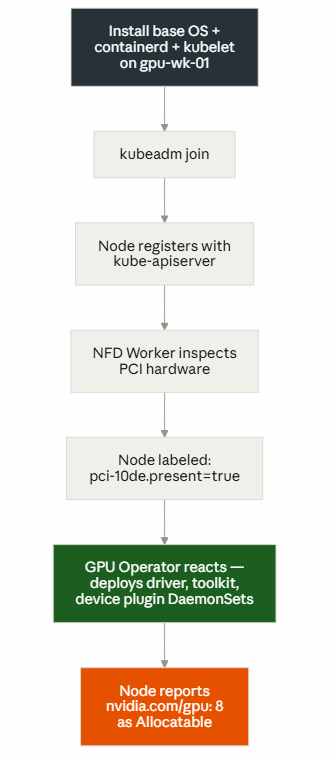
Steps A–C are manual (you run them). Steps D–G are automatic — this is the entire point of Parts 2–3. If you understand this diagram, you understand why we front-loaded operator installation before touching hardware at all.
Step 1 — Base Linux install on gpu-wk-01 and gpu-wk-02
Identical process to Part 1’s management nodes: Ubuntu 22.04 LTS Server, minimal package set, OpenSSH enabled, separate /var partition (GPU nodes will pull large driver/container images — give this more headroom than you did on management nodes, 200GB+ recommended).
sudo apt update && sudo apt upgrade -y
sudo hostnamectl set-hostname gpu-wk-01   # gpu-wk-02 on the second host

sudo swapoff -a
sudo sed -i '/ swap / s/^/#/' /etc/fstab

cat <<EOF | sudo tee /etc/modules-load.d/k8s.conf
overlay
br_netfilter
EOF
sudo modprobe overlay
sudo modprobe br_netfilter

cat <<EOF | sudo tee /etc/sysctl.d/k8s.conf
net.bridge.bridge-nf-call-iptables  = 1
net.bridge.bridge-nf-call-ip6tables = 1
net.ipv4.ip_forward                 = 1
EOF
sudo sysctl --system
Note what we’re not doing here: no manual NVIDIA driver install, no manual CUDA toolkit. That’s the GPU Operator’s job once this node joins — installing drivers by hand now would just create a conflict for it to clean up later.
Step 2 — Container runtime (on gpu-wk-01 / gpu-wk-02)
Same as Part 1’s management nodes — containerd with SystemdCgroup = true:
sudo apt install -y containerd
sudo mkdir -p /etc/containerd
containerd config default | sudo tee /etc/containerd/config.toml
sudo sed -i 's/SystemdCgroup = false/SystemdCgroup = true/' /etc/containerd/config.toml
sudo systemctl restart containerd
sudo systemctl enable containerd
Step 3 — Install kubelet and kubeadm (on gpu-wk-01 / gpu-wk-02)
Worker nodes need kubelet and kubeadm only — not kubectl, since you won’t administer the cluster from a GPU node.
sudo apt install -y apt-transport-https ca-certificates curl gpg
curl -fsSL https://pkgs.k8s.io/core:/stable:/v1.30/deb/Release.key | \
  sudo gpg --dearmor -o /etc/apt/keyrings/kubernetes-apt-keyring.gpg
echo 'deb [signed-by=/etc/apt/keyrings/kubernetes-apt-keyring.gpg] https://pkgs.k8s.io/core:/stable:/v1.30/deb/ /' | \
  sudo tee /etc/apt/sources.list.d/kubernetes.list
sudo apt update
sudo apt install -y kubelet kubeadm
sudo apt-mark hold kubelet kubeadm
Step 4 — Join the cluster (on gpu-wk-01 / gpu-wk-02)
Use the worker join command saved from Part 1’s kubeadm init output. If you didn’t save it, regenerate it from mgmt-01:
# On mgmt-01, if you need a fresh token
kubeadm token create --print-join-command
Then on each GPU node:
sudo kubeadm join k8s-lb:6443 \
  --token <token> \
  --discovery-token-ca-cert-hash sha256:<hash>
Step 5 — Watch the automatic chain fire (on mgmt-01)
This is the moment Parts 2 and 3 were building toward. Watch the node register:
kubectl get nodes -o wide -wExpected — gpu-wk-01 appears as Ready within a minute or two, Roles blank (it’s a worker, no role label by default):
NAME        STATUS   ROLES           AGE   VERSION
mgmt-01     Ready    control-plane   45m   v1.30.x
mgmt-02     Ready    control-plane   44m   v1.30.x
mgmt-03     Ready    control-plane   44m   v1.30.x
gpu-wk-01   Ready    <none>          32s   v1.30.x
Now watch NFD label it (Ctrl+C the previous watch first):
kubectl get node gpu-wk-01 --show-labels | tr ',' '\n' | grep pciExpected: feature.node.kubernetes.io/pci-10de.present=true (10de is NVIDIA’s PCI vendor ID).
Now watch the GPU Operator react — this can take 3–5 minutes as driver pods pull images and compile/load the kernel module:
kubectl get pods -n gpu-operator -o wide --field-selector spec.nodeName=gpu-wk-01 -wExpected sequence of pods appearing on gpu-wk-01, in roughly this order:
nvidia-driver-daemonset-xxxxx           Init/Running
nvidia-container-toolkit-daemonset-xxx  Running
nvidia-device-plugin-daemonset-xxx      Running
gpu-feature-discovery-xxx               Running
nvidia-dcgm-exporter-xxx                Running
Step 6 — Confirm GPUs are advertised as Allocatable resources
The single most important validation in this entire post:
kubectl describe node gpu-wk-01 | grep -A5 AllocatableExpected:
Allocatable:
  cpu:                 ...
  memory:              ...
  nvidia.com/gpu:      8
If nvidia.com/gpu isn’t listed, the device plugin hasn’t registered yet — check Step 5’s pod list before assuming something’s broken.
Step 7 — Repeat for gpu-wk-02, then verify RDMA networking
Run Steps 1–6 on gpu-wk-02. Once both nodes are up, confirm the Network Operator has configured RDMA (this becomes important for multi-node NCCL training later in the series):
kubectl get pods -n network-operator -o wide
kubectl exec -it -n network-operator <ofed-pod-on-gpu-wk-01> -- ibv_devices
Expected: at least one InfiniBand/RoCE device listed per node.
Troubleshooting checkpoint
| Symptom | Likely cause | Check |
|---|---|---|
Node stuck NotReady | containerd not running, or CNI not reaching worker | systemctl status containerd, kubectl get pods -n kube-system -o wide |
No pci-10de.present label | NFD pod not scheduled, or PCI passthrough issue | kubectl get pods -n gpu-operator -l app=node-feature-discovery -o wide |
Driver DaemonSet CrashLoopBackOff | Secure Boot enabled (blocks unsigned kernel module load), or kernel headers missing | kubectl logs -n gpu-operator <driver-pod> |
nvidia.com/gpu missing from Allocatable | Device plugin pod not yet Running | kubectl get pods -n gpu-operator -o wide | grep device-plugin |
Conclusion: NVIDIA GPU Worker Nodes Are Now Ready
Adding NVIDIA GPU worker nodes to Kubernetes is more than simply joining additional servers to the cluster. The operating system, container runtime, Kubernetes components, GPU software stack, and high-performance networking must work together correctly.
First, we prepared gpu-wk-01 and gpu-wk-02 with Ubuntu, containerd, kubelet, and kubeadm. Next, both GPU worker nodes joined the Kubernetes cluster through the load-balanced API endpoint.
Once the nodes joined, Node Feature Discovery detected the NVIDIA hardware. As a result, the GPU Operator automatically deployed the NVIDIA driver, Container Toolkit, Device Plugin, GPU Feature Discovery, and DCGM Exporter.
Finally, we confirmed that both GPU worker nodes expose nvidia.com/gpu: 8 as allocatable Kubernetes resources and verified RDMA networking for future multi-node GPU workloads.
Therefore, the Falcon AI cluster now has the GPU infrastructure required to move from cluster preparation toward workload validation and AI application deployment.
Need Help Building NVIDIA GPU & Kubernetes Infrastructure?
Planning an enterprise NVIDIA GPU cluster, Kubernetes AI platform, high-performance network, or private AI infrastructure?
Trezbon provides consulting and implementation services for enterprise AI infrastructure, Kubernetes, networking, security, and GPU environments.
Build your NVIDIA GPU and Kubernetes infrastructure with Trezbon.
👉 Talk to our team: https://trezbon.com/#contact
Where we are
✅ gpu-wk-01 and gpu-wk-02 installed from bare Ubuntu, joined to the cluster ✅ NFD labeled both nodes automatically ✅ GPU Operator deployed driver, toolkit, device plugin, GFD, and DCGM exporter — with zero manual driver installation ✅ Both nodes report nvidia.com/gpu: 8 as Allocatable ✅ RDMA networking confirmed via Network Operator
Next in the series: Part 5 — What Happens Inside the Cluster on GPU Nodes, a closer look at every DaemonSet now running on gpu-wk-01/gpu-wk-02 — what each one does, why it exists, and how they depend on each other.
Kubernetes GPU Monitoring: Prometheus, Grafana & DCGM Guide
Kubernetes GPU Scheduling: RuntimeClass, Affinity & Gang Scheduling
Kubernetes Networking Fundamentals: OSI, VXLAN, veth & Linux Bridges
About Author

abhishek
Cloud Platform Lead and AI Infrastructure Architect at e& enterprise, with 12+ years in data center, virtualization, security and AI infrastructure. I design and build private cloud and sovereign AI platforms, working with VMware (NSX-T, vSphere, vSAN, HCX, AVS, SRM), Kubernetes, Terraform and GPU inference infrastructure for LLMs. Previously served Networkers Home (CCIE instructor, trained around 50 CCIEs), VCE/EMC2, Cisco, VMware and Arista across TAC, consulting, design and training. Certifications: CCIE#48639 (Data Center and R&S), VCIX-DCV and NV, CKA, NVIDIA AI Infrastructure, Azure Solutions Architect Expert, Terraform Associate, Palo Alto PCNSE. LinkedIn: https://www.linkedin.com/in/abhishekkunal51/