NVIDIA GPU Workloads on Kubernetes: Build a Ready Cluster
Part 1 of a hands-on workbook series. Follow along with real commands — by the end of this post you’ll have a working, validated Kubernetes control plane ready to receive GPU nodes.
The scenario
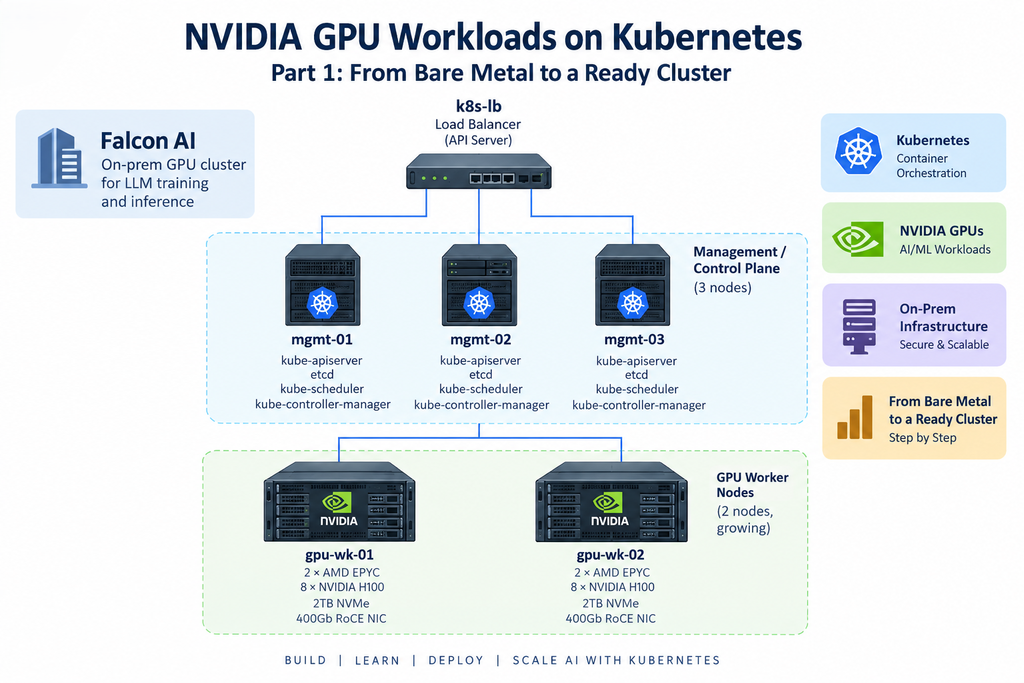
Throughout this series we’ll build out infrastructure for Falcon AI, a (fictional) company standing up an on-prem GPU cluster to fine-tune and serve LLMs. Their target architecture:
| Role | Count | Hardware | Hostnames |
|---|---|---|---|
| Management (control plane) | 3 | 16 vCPU / 64GB RAM / 500GB SSD | mgmt-01, mgmt-02, mgmt-03 |
| GPU worker | 2 (growing) | 2× AMD EPYC, 8× NVIDIA H100, 2TB NVMe, 400Gb RoCE NIC | gpu-wk-01, gpu-wk-02 |
| Load balancer (for HA API server) | 1 | Any small VM/appliance | k8s-lb |
We’ll use this exact naming throughout the series — when Part 5 talks about “the GPU node,” it means gpu-wk-01.
Why management nodes and worker nodes are architecturally separate
Understanding the separation between management and worker nodes is essential when building a production Kubernetes GPU cluster. Although a single-node environment may work for testing, production GPU infrastructure requires clearer separation between cluster management and workload execution.
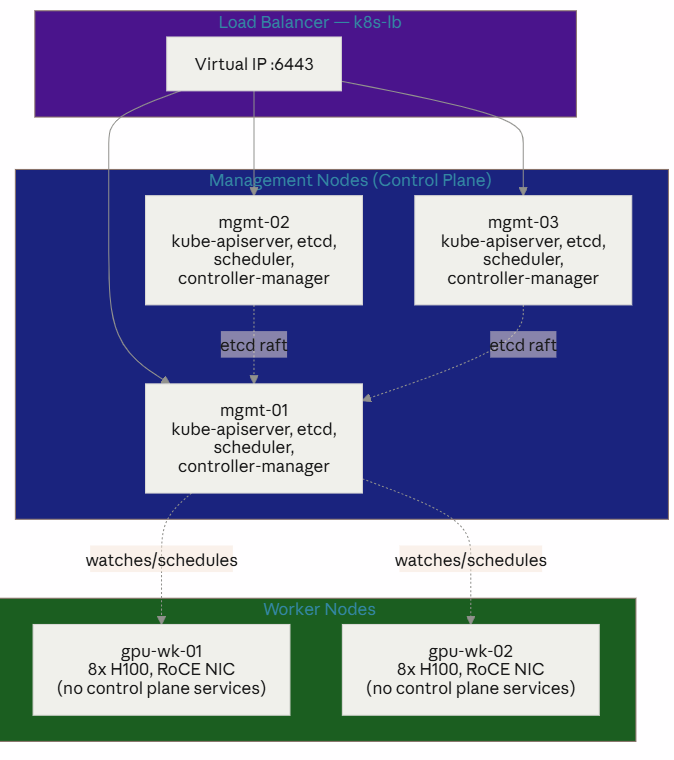
First, management, or control-plane, nodes run critical Kubernetes components such as kube-apiserver, etcd, kube-scheduler, and kube-controller-manager. Together, these services maintain cluster state and make scheduling and orchestration decisions.
In contrast, worker nodes are responsible for running application workloads. Furthermore, NVIDIA GPU worker nodes include additional components such as the NVIDIA driver stack, container toolkit, and device plugins. We will configure these GPU-specific components later in the series.
For example, running etcd on the same server as a demanding GPU workload can introduce unnecessary operational risk. A training job that consumes most of the available CPU and memory could affect etcd performance. As a result, control-plane stability may also be affected.
Therefore, management and GPU worker nodes should remain physically or logically separated. In addition, tainting the control-plane nodes prevents normal GPU workloads from being scheduled on them. Ultimately, this separation creates a more reliable foundation for scaling NVIDIA GPU workloads on Kubernetes.
Step 1 — Base Linux install (all nodes)
First, we prepare a consistent Linux foundation across every management and GPU worker node.
We’re using Ubuntu 22.04 LTS Server — the most common base for NVIDIA GPU Operator deployments, with predictable kernel/driver support. Same base OS on management and worker nodes; the divergence happens later.
During install:
- Partition with a separate
/var(control plane nodes generate heavy etcd/container logs; GPU nodes need room for container images and driver packages) - No desktop environment, minimal package set
- Enable OpenSSH server
After first boot, on every node (mgmt-01/02/03, gpu-wk-01/02):
# Update and set hostname
sudo apt update && sudo apt upgrade -y
sudo hostnamectl set-hostname mgmt-01   # adjust per node

# Disable swap — required by kubelet
sudo swapoff -a
sudo sed -i '/ swap / s/^/#/' /etc/fstab

# Load required kernel modules
cat <<EOF | sudo tee /etc/modules-load.d/k8s.conf
overlay
br_netfilter
EOF
sudo modprobe overlay
sudo modprobe br_netfilter

# Required sysctl params
cat <<EOF | sudo tee /etc/sysctl.d/k8s.conf
net.bridge.bridge-nf-call-iptables  = 1
net.bridge.bridge-nf-call-ip6tables = 1
net.ipv4.ip_forward                 = 1
EOF
sudo sysctl --system
Step 2 — Container runtime (all nodes)
Next, we install containerd as the container runtime across the cluster.
sudo apt install -y containerd
sudo mkdir -p /etc/containerd
containerd config default | sudo tee /etc/containerd/config.toml

# Set SystemdCgroup = true — required for kubelet compatibility
sudo sed -i 's/SystemdCgroup = false/SystemdCgroup = true/' /etc/containerd/config.toml
sudo systemctl restart containerd
sudo systemctl enable containerd
On GPU worker nodes, this same
containerdwill later get an NVIDIA runtime hook injected by the GPU Operator (Part 5) — no manual change needed now.
Step 3 — Install kubeadm, kubelet, kubectl (all nodes)
Once the runtime is ready, we install the core Kubernetes components.
sudo apt install -y apt-transport-https ca-certificates curl gpg
curl -fsSL https://pkgs.k8s.io/core:/stable:/v1.30/deb/Release.key | \
  sudo gpg --dearmor -o /etc/apt/keyrings/kubernetes-apt-keyring.gpg
echo 'deb [signed-by=/etc/apt/keyrings/kubernetes-apt-keyring.gpg] https://pkgs.k8s.io/core:/stable:/v1.30/deb/ /' | \
  sudo tee /etc/apt/sources.list.d/kubernetes.list
sudo apt update
sudo apt install -y kubelet kubeadm kubectl
sudo apt-mark hold kubelet kubeadm kubectl
Step 4 — Bootstrap the first management node
With the prerequisites in place, we can now bootstrap the first control-plane node.
On mgmt-01 only:
sudo kubeadm init \
  --control-plane-endpoint "k8s-lb:6443" \
  --upload-certs \
  --pod-network-cidr=10.244.0.0/16
Save the two kubeadm join commands it prints — one for control-plane nodes (mgmt-02, mgmt-03), one for workers (gpu-wk-01, gpu-wk-02).
mkdir -p $HOME/.kube
sudo cp -i /etc/kubernetes/admin.conf $HOME/.kube/config
sudo chown $(id -u):$(id -g) $HOME/.kube/config
Step 5 — Join the remaining management nodes
Afterward, we join the remaining management nodes to create the HA control plane.
On mgmt-02 and mgmt-03, run the control-plane join command from Step 4’s output, e.g.:
sudo kubeadm join k8s-lb:6443 \
  --token <token> \
  --discovery-token-ca-cert-hash sha256:<hash> \
  --control-plane --certificate-key <cert-key>
Step 6 — Install a pod network (CNI)
Next, we deploy the CNI so pods can communicate across the Kubernetes cluster.
# On mgmt-01
kubectl apply -f <your chosen CNI manifest — Cilium, Calico, or Flannel>
(Which CNI you pick matters a lot once RDMA/Multus enters the picture in Part 4 — we’ll revisit this choice specifically when we add GPU worker networking.)
Step 7 — Taint management nodes (keep GPU workloads off them)
To protect the control plane, we taint the management nodes.
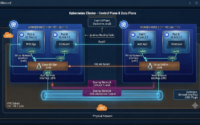
kubectl taint nodes mgmt-01 mgmt-02 mgmt-03 node-role.kubernetes.io/control-plane:NoScheduleThis is the practical enforcement of the architecture diagram above — control plane nodes host cluster brains, not tenant workloads.
Step 8 — Validate cluster readiness
Finally, we validate the cluster before introducing NVIDIA GPU worker nodes.
This closes the loop back to the checklist from the original readiness guide:
kubectl get nodes -o wide
kubectl get pods -A
kubectl -n kube-system get pods
kubectl get sc          # will be empty until Part 5's storage step — expected at this stage
You should see mgmt-01/02/03 as Ready, with Roles showing control-plane. No worker nodes yet — that’s exactly right; gpu-wk-01 and gpu-wk-02 haven’t joined. That’s Part 4.
Conclusion: the Kubernetes foundation is ready
At this stage, Falcon AI has transformed its bare-metal infrastructure into a working, highly available Kubernetes cluster ready for NVIDIA GPU workloads.
First, we prepared Ubuntu across the management and future GPU worker nodes. Next, we configured containerd and installed kubeadm, kubelet, and kubectl. Then, we bootstrapped the first management node and expanded the environment into a three-node HA Kubernetes control plane.
In addition, we installed the CNI and tainted the management nodes so application workloads remain separated from critical control-plane services. Finally, we validated the cluster and confirmed that mgmt-01, mgmt-02, and mgmt-03 are healthy and ready.
However, the cluster does not have GPU capacity yet. The next stage is where the infrastructure begins evolving into a real Kubernetes GPU cluster. We will bring gpu-wk-01 and gpu-wk-02 into the environment and prepare them for NVIDIA GPU workloads.
Ultimately, building reliable AI infrastructure starts with getting the foundation right. A stable control plane, container runtime, networking layer, and clear separation between management and worker resources provide the foundation required for scalable GPU operations.
Need help building NVIDIA GPU infrastructure?
Planning a production NVIDIA GPU, Kubernetes, or AI infrastructure environment requires more than installing individual components. Compute, networking, storage, Kubernetes, GPU management, security, and observability must work together as one architecture.
Trezbon can help organizations design, deploy, validate, and optimize enterprise GPU and AI infrastructure—from the underlying data center architecture to production-ready Kubernetes environments.
👉 Planning an NVIDIA GPU or Kubernetes infrastructure project?
Talk to Trezbon: https://trezbon.com/#contact
Next in the series: Part 2 — Installing the GPU and Network Operators via Helm, where we prepare the cluster (still with zero GPU nodes attached) to recognize NVIDIA hardware the moment it joins.
NVIDIA MIG vs Time-Slicing on Kubernetes: GPU Sharing Guide
Architecting the Enterprise Private LLM: A Blueprint for Infrastructure, Sizing, and High-Performance Networking
Kubernetes Networking Fundamentals: OSI, VXLAN, veth & Linux Bridges
About Author

abhishek
Cloud Platform Lead and AI Infrastructure Architect at e& enterprise, with 12+ years in data center, virtualization, security and AI infrastructure. I design and build private cloud and sovereign AI platforms, working with VMware (NSX-T, vSphere, vSAN, HCX, AVS, SRM), Kubernetes, Terraform and GPU inference infrastructure for LLMs. Previously served Networkers Home (CCIE instructor, trained around 50 CCIEs), VCE/EMC2, Cisco, VMware and Arista across TAC, consulting, design and training. Certifications: CCIE#48639 (Data Center and R&S), VCIX-DCV and NV, CKA, NVIDIA AI Infrastructure, Azure Solutions Architect Expert, Terraform Associate, Palo Alto PCNSE. LinkedIn: https://www.linkedin.com/in/abhishekkunal51/