NVIDIA MIG vs Time-Slicing on Kubernetes: GPU Sharing Guide
NVIDIA GPU Workloads on Kubernetes — Part 10: MIG vs Time-Slicing
Part 10 of the Falcon AI workbook series. Every post so far treated each H100 as a single, whole unit of scheduling. This post changes that assumption — and uses the observability stack from Part 9 to actually show the difference rather than just describe it.
Prerequisite
You’ve completed Part 9: Prometheus, Grafana, and DCGM dashboards are live and showing real per-GPU utilization data for
gpu-wk-01/gpu-wk-02.
Recap: where Falcon AI stands
| Role | Count | Hostnames | Status after Part 9 |
|---|---|---|---|
| Management (control plane) | 3 | mgmt-01, mgmt-02, mgmt-03 | Ready, tainted NoSchedule |
| GPU worker | 2 | gpu-wk-01, gpu-wk-02 | Ready, full observability stack live |
Why GPU Sharing Matters at Falcon AI’s Scale
Falcon AI has 16 NVIDIA H100 GPUs across two Kubernetes worker nodes. That provides substantial compute capacity. However, GPU resources are still finite.
Large distributed training jobs can justify using an entire H100. In contrast, a Jupyter notebook, CI/CD test, or small inference workload may use only a fraction of the GPU’s available capacity.
As more workloads compete for the same GPU cluster, whole-GPU scheduling can leave valuable resources underutilized. Therefore, Falcon AI needs a practical GPU sharing strategy.
Two important options are NVIDIA Multi-Instance GPU (MIG) and GPU time-slicing. Although both improve GPU utilization, they work in fundamentally different ways.
NVIDIA MIG vs Time-Slicing: How They Differ
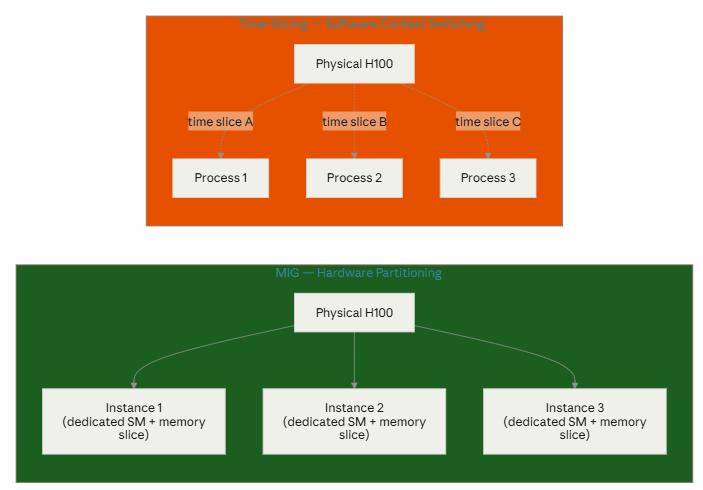
NVIDIA MIG partitions a supported physical GPU into multiple isolated GPU instances. Each MIG instance receives dedicated GPU resources and a defined memory allocation. As a result, MIG provides stronger isolation and more predictable performance between workloads.
Time-slicing, on the other hand, allows multiple workloads to share a physical GPU by taking turns using it. The GPU remains a single physical device rather than being partitioned into isolated hardware instances.
Therefore, time-slicing can increase scheduling density without providing the same level of hardware isolation as MIG.
The practical distinction is simple:
MIG = partition the GPU.
Time-slicing = share access to the GPU over time.
The full comparison
| Feature | MIG (Multi-Instance GPU) | Time-Slicing |
|---|---|---|
| Mechanism | Hardware partitioning | Software context switching |
| Isolation | Strong (hardware level) | Weak (shared GPU) |
| Memory | Dedicated | Shared |
| Performance | Predictable / guaranteed | Variable |
| Noisy neighbor risk | No | Yes |
| Fault isolation | Excellent | Poor |
| K8s resource name | nvidia.com/mig-<profile> (e.g. mig-1g.5gb) | nvidia.com/gpu (virtualized count) |
| Best for | Production, multi-tenant, latency-sensitive | Dev/test, best-effort, short jobs |
Mapping this to Falcon AI’s actual workloads
| Falcon AI workload | Recommended mode | Why |
|---|---|---|
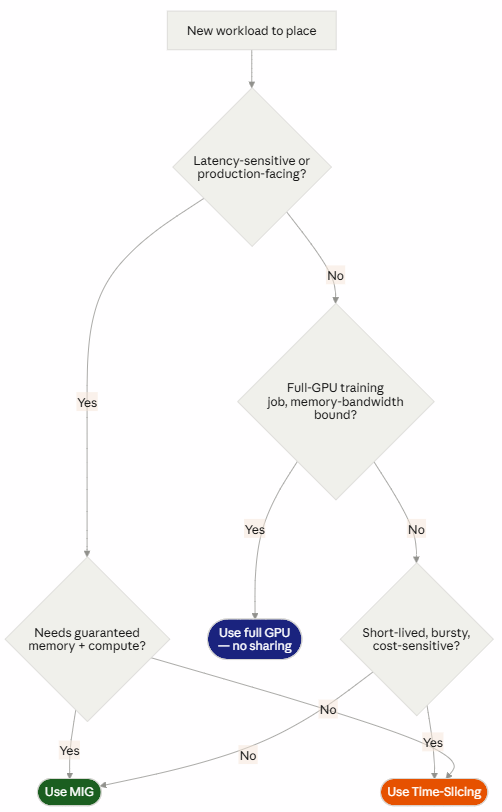
| KServe production inference endpoint (Part 8) | MIG | Predictable latency matters for a serving SLA; noisy-neighbor variance is unacceptable |
| ML engineer’s Kubeflow notebook, exploratory work | Time-slicing | Bursty, low-utilization, tolerates variable performance, needs many cheap slots more than guaranteed throughput |
| Multi-node NCCL/MPIJob training (Part 8) | Neither — full GPU | Distributed training wants the entire physical GPU’s SMs and memory bandwidth; partitioning would hurt, not help |
| CI/CD smoke tests (Rung 1 of Part 7’s ladder, run continuously) | Time-slicing | Short-lived, low-stakes, just needs “a GPU,” not “the best possible GPU” |
Decision flowchart
Step 1 — Enable MIG on a subset of GPUs (on gpu-wk-01)
Falcon AI doesn’t need to commit its whole fleet to one mode — MIG can be enabled per-node, even per-GPU. We’ll dedicate 2 of gpu-wk-01‘s 8 H100s to MIG for the KServe inference workload, leaving the rest full-GPU for training.
kubectl label node gpu-wk-01 nvidia.com/mig.config=all-1g.10gb --overwriteThe MIG Manager (installed as part of the GPU Operator back in Part 2) picks up this label and reconfigures the labeled GPUs automatically — same reconcile pattern from Part 3, just triggered by a label instead of a node join.
kubectl get pods -n gpu-operator -l app=nvidia-mig-manager -o wide -wPass criteria:
kubectl describe node gpu-wk-01 | grep migExpected: nvidia.com/mig-1g.10gb listed under Allocatable with the correct instance count.
Step 2 — Enable time-slicing on the remaining GPUs (cluster-wide default, or per-node)
yaml
# time-slicing-config.yaml
apiVersion: v1
kind: ConfigMap
metadata:
  name: time-slicing-config
  namespace: gpu-operator
data:
  any: |-
    version: v1
    sharing:
      timeSlicing:
        resources:
        - name: nvidia.com/gpu
          replicas: 4
kubectl apply -f time-slicing-config.yaml
kubectl patch clusterpolicy cluster-policy --type merge -p \
'{"spec": {"devicePlugin": {"config": {"name": "time-slicing-config"}}}}'Pass criteria:
kubectl describe node gpu-wk-01 | grep "nvidia.com/gpu"Expected: Allocatable now shows 4x the physical GPU count on time-sliced GPUs (replicas: 4 — four workloads can share each physical device).
Which GPU Sharing Mode Should You Choose?
The right approach depends on the workload.
For production inference, predictable performance and workload isolation are often important. Therefore, MIG can be a strong choice when the selected MIG profile provides enough compute and memory for the model.
For Kubeflow notebooks and exploratory development, time-slicing can be more efficient. These workloads are often bursty and may not require a dedicated H100.
Similarly, CI/CD GPU smoke tests usually need GPU access rather than maximum GPU performance. As a result, time-slicing can increase the number of tests that share the available infrastructure.
Large multi-GPU or multi-node training jobs have different requirements. These workloads often benefit from access to full GPUs, memory bandwidth, and high-speed GPU interconnects. Therefore, Falcon AI should benchmark the workload before introducing GPU partitioning or sharing.
Validate MIG and Time-Slicing with GPU Observability
Configuration alone is not enough. After enabling a GPU sharing strategy, Falcon AI should validate its behavior under real workloads.
This is where the Prometheus, Grafana, and DCGM observability stack from Part 9 becomes especially useful.
First, run representative workloads on the MIG instances. Then, observe GPU utilization, memory consumption, and workload performance.
Next, repeat the test with multiple workloads sharing a time-sliced GPU. As contention increases, compare application-level throughput and latency alongside GPU-level metrics.
Most importantly, do not judge the configuration from GPU utilization alone. A GPU can appear highly utilized while individual applications experience lower throughput or higher latency.
Therefore, combine DCGM metrics with workload-level measurements before deciding whether MIG or time-slicing is suitable for production.
Conclusion: MIG vs Time-Slicing Is a Workload Decision
NVIDIA MIG and time-slicing solve the same high-level problem—improving GPU utilization—but they solve it in very different ways.
MIG partitions supported NVIDIA GPUs into isolated instances with defined resources. Therefore, it is well suited to workloads that benefit from stronger isolation and more predictable resource allocation.
Time-slicing takes a different approach. It allows multiple workloads to share GPU access without creating the same hardware-level partitions. As a result, it can be a practical option for development notebooks, CI/CD tests, experiments, and other best-effort workloads.
For Falcon AI, the best strategy is not to force every workload into a single sharing model. Instead, match the GPU allocation strategy to the workload. Use full GPUs where maximum training performance matters, evaluate MIG where isolation and predictable resources matter, and consider time-slicing where utilization and scheduling density are the priorities.
Finally, use the observability stack from Part 9 to validate those decisions with real metrics. GPU sharing should improve infrastructure efficiency without silently reducing application performance.
Need Help Designing Kubernetes GPU Infrastructure?
Building a production NVIDIA GPU environment involves much more than installing the GPU Operator. GPU sizing, Kubernetes scheduling, MIG profiles, time-slicing, observability, inference architecture, storage, and high-speed networking all affect the final design.
Trezbon Technologies can help organizations design, validate, and optimize NVIDIA GPU and Kubernetes infrastructure for AI, machine learning, inference, and enterprise workloads.
Discuss Your AI Infrastructure Requirements: https://trezbon.com/#contact
Learn More About Trezbon Technologies: https://trezbon.com/
Next in the Falcon AI Series
Part 11 — Key Concepts Deep Dive
Next, the Falcon AI workbook explores RuntimeClass, taints and tolerations, node affinity, topology, and gang scheduling—the Kubernetes building blocks that determine where GPU workloads run and how resources are coordinated.

Enterprise Private LLM Infrastructure: Architecture, Sizing & High-Performance Networking
NVIDIA GPU Workloads on Kubernetes — Part 9: Observability Stack for GPU Clusters
Kubernetes for AI/ML Workloads: Scheduling, MLOps Integration, and Day-2 Operations at GPU Scale
About Author

abhishek
Expert in Network, Virtualization and Security field in On-Prem and Public Cloud. Passionate about new technology and consult the best solution to business organisation.Previously served Networkershome, EMC2, Cisco, VMware and Arista in different fields of Engineering, TAC, Consulting, Designing and Training. Certification : CCIE#48639, VCIX DCV and NV, Aviatrix Multi Cloud, SD-WAN Specialist, Palo Alto PCNSE, Amazon Cloud, Docker Certified Engineer. LinkedIn : https://www.linkedin.com/in/abhishekkunal51/