Slurm Administrator Daily Tasks: HPC & GPU Guide
The muscle-memory layer: commands, config files, and scripts — for the networking person moving into HPC/AI Ops
(Part two of a series — part one: From Jupyter Notebook to InfiniBand Fabric, covering what the ML/LLM team actually hands you before this stage begins.)
Introduction: Understanding Daily Slurm Administrator Tasks
Managing an HPC or AI cluster requires more than understanding how job scheduling works. A Slurm administrator must also monitor cluster health, manage computing resources, troubleshoot failed jobs, and maintain reliable infrastructure.
However, knowing what Slurm does and understanding how to manage it every day are two different things.
Slurm is a workload manager commonly used in high-performance computing environments. It helps organizations schedule jobs, allocate computing resources, and manage workloads across clusters.
For example, when an AI training job fails to start, an administrator must identify the problem quickly. The issue could involve insufficient GPU resources, scheduling priorities, unavailable nodes, or configuration errors.
Similarly, when a multi-node training workload experiences poor performance, the administrator may need to investigate GPU communication, InfiniBand connectivity, or network topology.
Therefore, effective Slurm cluster management requires practical troubleshooting skills, technical knowledge, and reliable monitoring tools.
What Will You Learn in This Guide?
This article explains the essential Slurm administrator tasks involved in managing modern HPC and AI infrastructure.
You will learn how to:
- Monitor cluster and node health using Slurm commands.
- Manage job queues and troubleshoot scheduling problems.
- Configure GPU resources, partitions, and scheduling policies.
- Check GPU performance and InfiniBand network connectivity.
- Automate routine administration with scripts.
- Monitor cluster performance using Prometheus and Grafana.
- Maintain reliable operations across HPC and AI environments.
Additionally, this guide connects Slurm administration with familiar enterprise networking concepts. As a result, network engineers transitioning into HPC and AI operations can better understand how their existing skills apply to GPU clusters.
Whether you are managing an existing HPC environment or preparing to support AI infrastructure, these practical techniques will help you understand the daily responsibilities of a Slurm administrator.
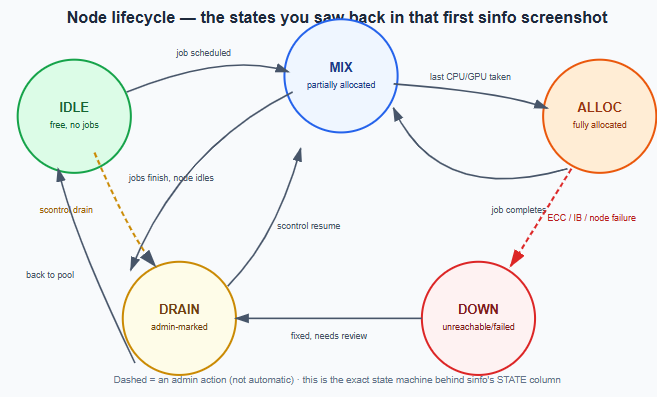
1. Cluster and Node State Management
One of the most important Slurm administrator tasks is monitoring the health and availability of computing nodes.
In an HPC environment, nodes move between different operational states depending on workload activity, resource availability, and maintenance requirements.
For example, a node may be idle, allocated to a job, partially allocated, or drained for maintenance.
Therefore, administrators must understand these states to maintain cluster availability and prevent scheduling problems.
First, they can use the sinfo command to review the current state of the cluster.
Next, they can inspect individual nodes using scontrol show node.
If a node develops hardware problems, such as GPU memory errors, the administrator can drain it to prevent new jobs from being assigned.
After completing maintenance and confirming that the node is healthy, the administrator can return it to service.
This process is similar to managing network infrastructure during maintenance. In both cases, engineers isolate affected resources, resolve problems, and restore normal operations.
As a result, effective node management helps maintain cluster stability and reduces unnecessary workload disruptions.
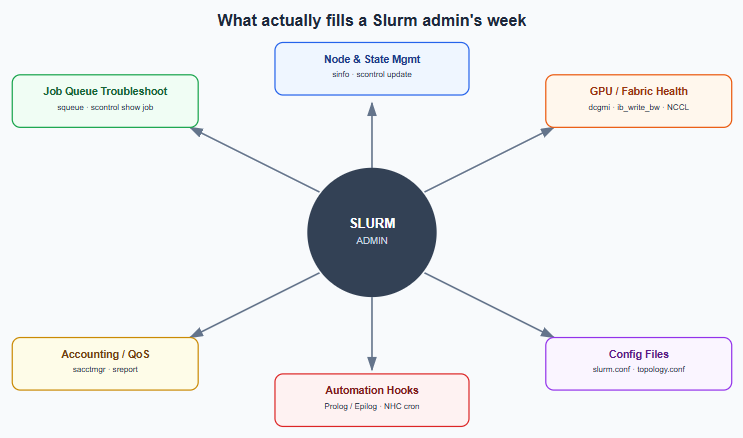
2. Slurm Job Queue Management and Troubleshooting
Managing job queues is another essential responsibility of a Slurm administrator.
In HPC and AI environments, multiple users often compete for limited computing resources. Consequently, some jobs may remain pending until the required resources become available.
However, not every pending job indicates a hardware problem.
For example, a job may be waiting because of scheduling priorities, insufficient GPU resources, account limits, or unavailable nodes.
Therefore, administrators must identify the actual reason before making configuration changes.
First, use squeue to examine running and pending jobs.
Next, inspect the affected job using scontrol show job.
This command provides information about resource requirements, scheduling conditions, and the reason a job has not started.
Additionally, administrators can use sacct to review completed jobs, resource consumption, and execution history.
By combining these commands, administrators can investigate scheduling problems more efficiently.
As a result, they can reduce unnecessary troubleshooting time and improve overall cluster operations.
3. Accounting, Fairshare, and QoS
This is the policy layer — the part that decides which team’s job jumps the queue when GPUs are scarce. Conceptually it’s the same job a QoS/CoS marking does on a network, except the currency being managed is GPU-hours instead of bandwidth.
bash
sacctmgr show associations           # who can run where, at what priority
sacctmgr add account mlteam Description="LLM Pretraining" Organization="ADNOC"
sacctmgr add user jdoe Account=mlteam
sacctmgr modify qos gpu_high set MaxTRESPerUser=gres/gpu=32

sreport cluster AccountUtilizationByUser start=2026-06-01 end=2026-06-30
sreport user TopUsage start=2026-06-01
4. Config Files You’ll Actually Edit
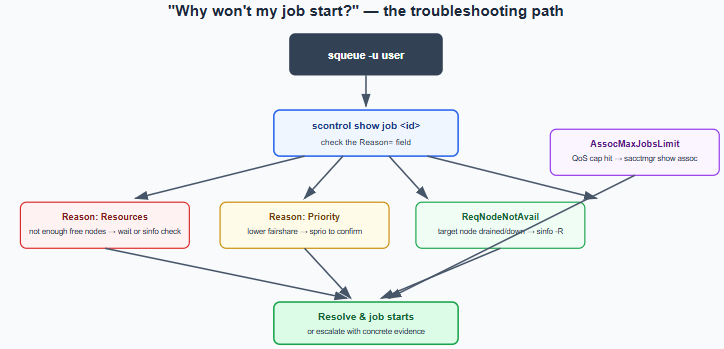
slurm.conf— the master config: partitions, node definitions, scheduler type (SchedulerType=sched/backfillis standard),SelectType=select/cons_tres(required for GPU-aware scheduling).gres.conf— maps GPUs to nodes:Name=gpu Type=h100 File=/dev/nvidia0 Cores=0-15.topology.conf— describes the actual switch/fabric hierarchy so Slurm can place multi-node jobs on topologically close nodes instead of scattering them across leaf switches:
  SwitchName=leaf1 Nodes=comp[001-016]
  SwitchName=leaf2 Nodes=comp[017-032]
  SwitchName=spine1 Switches=leaf1,leaf2
This one is squarely networking territory — it’s literally your fabric diagram, encoded as scheduler policy.
cgroup.conf— enforces resource isolation (CPU/memory/GPU limits per job) so jobs sharing a node can’t step on each other.
After any edit: scontrol reconfigure hot-reloads without restarting slurmctld, most of the time.
5. GPU & Fabric Health Checks
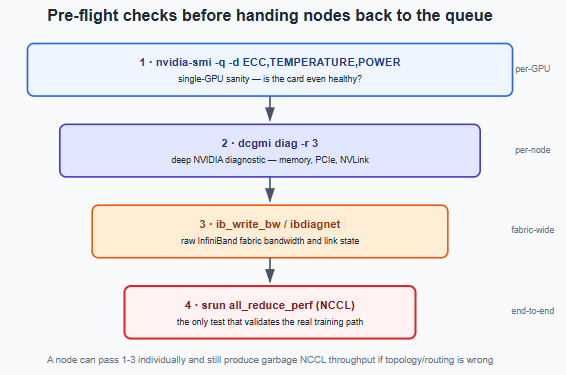
This is the actual daily grind on an AI cluster — the pre-flight sequence run before releasing nodes back to the queue after maintenance, or before handing nodes to a big training job. Each stage catches something the previous one physically can’t.
bash
# Single-GPU sanity
nvidia-smi -q -d ECC,TEMPERATURE,POWER

# Deeper NVIDIA diagnostic — memory, PCIe, NVLink
dcgmi diag -r 3
dcgmi health -c

# Fabric-level sanity
ib_write_bw -d mlx5_0                          # raw InfiniBand bandwidth test
ibstat                                          # port state, link speed
ibdiagnet                                       # fabric-wide diagnostic scan

# The test that actually matters — validates the real training path end-to-end
srun -N2 --gres=gpu:8 all_reduce_perf -b 8 -e 1G -f 2 -g 8
A node can pass every check up through ibstat individually and still produce garbage NCCL throughput if the topology or routing underneath is wrong. That last test is the only one that proves the whole path actually works.
6. Prolog/Epilog Scripts — the Automation Layer Admins Actually Write
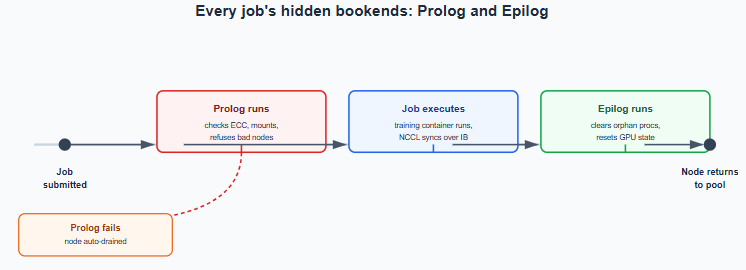
Slurm lets you hook a script before (Prolog) and after (Epilog) every job, defined in slurm.conf. This is where “job ran but silently degraded” gets caught proactively, instead of after a training team complains their throughput tanked for three days.
# /etc/slurm/prolog.sh — runs before every job on the node
#!/bin/bash
nvidia-smi --query-gpu=index,ecc.errors.uncorrected.volatile.total --format=csv,noheader \
  | awk -F',' '$2 > 0 {exit 1}'   # refuse to start the job if a GPU has uncorrected ECC errors
# /etc/slurm/epilog.sh — runs after every job, cleans up
#!/bin/bash
# clear any orphaned GPU processes, reset MPS if used
nvidia-smi --gpu-reset 2>/dev/null || true
7. Recurring Cron/Automation Scripts
- A node health-check cron, often built on NHC (Node Health Check) — a widely used open-source tool that periodically runs
nvidia-smi, checks disk space, checks IB link state, and auto-drains a node if something fails. It’s the exact same watchdog pattern behind any self-built monitoring dashboard for a recurring infra issue — write it once, let it catch problems before a human has to. - A munge key sync check — Slurm auth depends on
mungehaving an identical key across every node; a silent munge failure looks like random “job submission failed” errors cluster-wide, so admins script a periodic checksum comparison across nodes. - Log rotation/monitoring for
slurmctld.logandslurmd.log, typically shipped into the same Prometheus/Grafana stack already scraping DCGM metrics.
8. Monitoring: Prometheus + Grafana
Everything above this line is what you do when something’s already wrong. This section is what tells you something’s wrong in the first place — the same shape as any NMS pipeline you’ve already built: counters exported, scraped centrally, visualized, and alerted on.
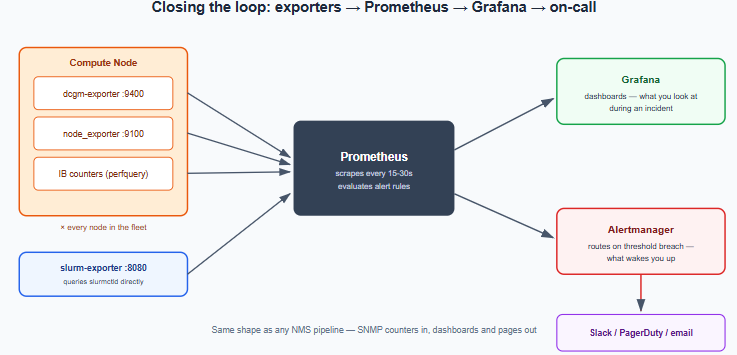
The exporters actually running on every node:
dcgm-exporter— NVIDIA’s own exporter, wraps DCGM to expose GPU utilization, temperature, power draw, ECC error counts, and NVLink/PCIe throughput as Prometheus metrics on:9400.node_exporter— the standard Prometheus exporter for CPU, memory, disk, and general host health.slurm-exporter— a community exporter that queriesslurmctlddirectly and exposes queue depth, job counts, and node-state counts (idle/mix/alloc/drain/down) as metrics — this is what turns thatsinfooutput into a time series you can graph and alert on.- IB fabric counters — pulled via
perfqueryor a custom exporter wrapping it, exposing port error/drop counters per switch port.
A minimal scrape config (prometheus.yml):
scrape_configs:
  - job_name: 'dcgm'
    static_configs:
      - targets: ['comp001:9400', 'comp002:9400']   # generated from the node list in practice
  - job_name: 'node'
    static_configs:
      - targets: ['comp001:9100', 'comp002:9100']
  - job_name: 'slurm'
    static_configs:
      - targets: ['slurmctld-host:8080']
PromQL queries you'll actually write:
promql# average GPU utilization per node, last 5 minutes
avg by (instance) (DCGM_FI_DEV_GPU_UTIL)
# any GPU reporting an uncorrectable ECC error
DCGM_FI_DEV_ECC_DBE_VOL_TOTAL > 0
# InfiniBand port error rate
rate(infiniband_port_errors_total[5m]) > 0
# how many nodes are currently in each Slurm state
count by (state) (slurm_node_state)
Alerting rules — this is where monitoring stops being a dashboard you glance at and starts being the thing that pages you before a user notices:
yamlgroups:
- name: gpu-fabric
rules:
- alert: GPUUncorrectableECC
expr: DCGM_FI_DEV_ECC_DBE_VOL_TOTAL > 0
for: 1m
labels:
severity: page
annotations:
summary: "Uncorrectable ECC error on {{ $labels.instance }}"
- alert: IBPortErrorRateHigh
expr: rate(infiniband_port_errors_total[5m]) > 10
for: 5m
labels:
severity: warn
annotations:
summary: "Rising IB error rate on {{ $labels.instance }}"
What the Grafana dashboard actually looks like — the panels that matter enough to earn permanent screen real estate: a per-node GPU utilization heatmap (dead giveaway for idle GPUs burning allocation), temperature/power trend lines, IB port error/drop counters, Slurm queue depth by partition, a live node-state summary (the graphed version of that original sinfo output), fairshare usage by account, and an active-alerts panel pinned at the bottom so nothing scrolls out of view during an incident.
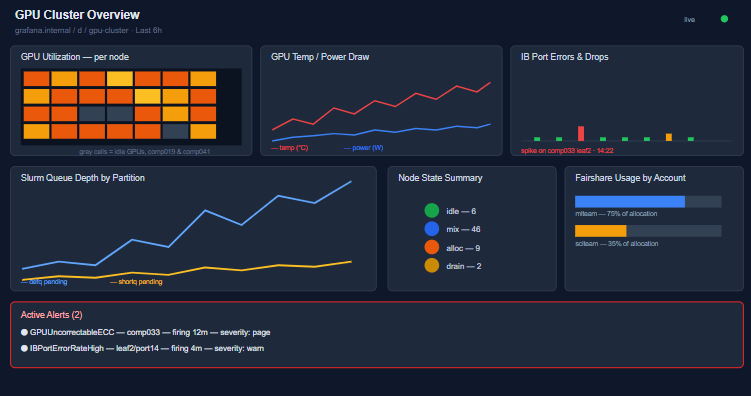
The node-state panel is worth pausing on — it’s the same idle/mix/alloc/drain/down breakdown from the very first sinfo -p defq in this series, just graphed over time instead of read as a snapshot. That’s the real value monitoring adds: the terminal tells you the state right now; Grafana tells you whether it’s been trending toward a problem for the last six hours.
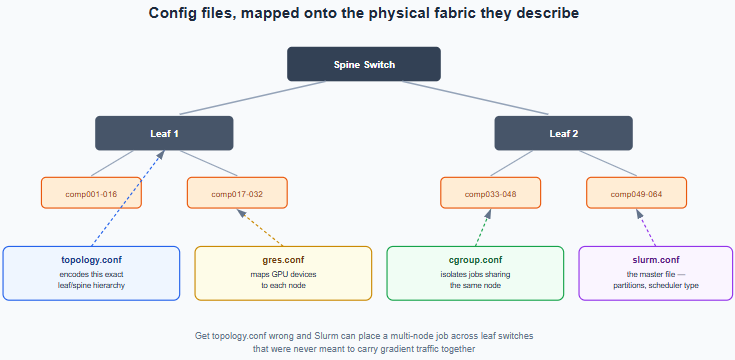
Where the Week Actually Goes
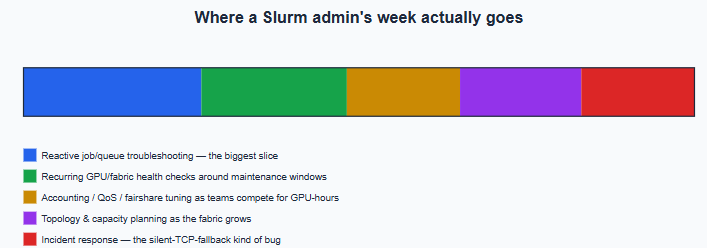
| Time spent | Task |
|---|---|
| Reactive | Debugging stuck/pending jobs (scontrol show job), draining bad nodes |
| Recurring | Health checks before/after maintenance windows, fabric diagnostics |
| Policy | Adjusting QoS/fairshare as teams compete for GPU-hours |
| Planning | topology.conf updates as the fabric grows, partition redesigns |
| Incident | Multi-node jobs silently falling back to TCP, chased down via NCCL_DEBUG=INFO |
Conclusion: Building Reliable HPC and AI Infrastructure with Effective Slurm Administration
Managing an HPC or AI cluster involves much more than scheduling computing jobs. A Slurm administrator plays an important role in maintaining cluster availability, optimizing GPU resource allocation, and supporting reliable workload execution.
Throughout this guide, we explored the essential Slurm administrator tasks involved in daily HPC operations. These responsibilities include monitoring node health, troubleshooting pending jobs, managing scheduling policies, maintaining configuration files, and validating GPU and InfiniBand performance.
Additionally, automation helps administrators reduce repetitive work and identify infrastructure problems before they affect critical workloads.
For example, automated health checks can identify faulty GPUs, while monitoring tools such as Prometheus and Grafana provide visibility into resource utilization, job queues, and cluster performance.
However, effective Slurm cluster management requires more than individual tools. Administrators must also understand how computing resources, storage systems, network fabrics, and scheduling policies interact.
This becomes especially important as organizations deploy larger AI training environments and distributed GPU workloads.
Therefore, combining practical Slurm administration skills with strong networking knowledge can help organizations improve operational efficiency, reduce avoidable disruptions, and make better use of their HPC infrastructure.
Ultimately, successful AI infrastructure management depends on consistent monitoring, careful resource planning, reliable automation, and effective troubleshooting.
By applying these practices, administrators can build a more stable and manageable environment for high-performance computing and enterprise AI workloads.
Need Expert Support for Your HPC and AI Infrastructure?
Building and managing reliable HPC infrastructure requires expertise across networking, computing, security, and system integration.
Whether your organization is planning a GPU cluster, evaluating high-performance networking requirements, or improving its existing AI infrastructure, the right technical guidance can help reduce deployment complexity and operational risks.
Trezbon Technologies provides professional consulting services to help organizations plan, design, and implement enterprise IT infrastructure.
Our expertise in enterprise networking, infrastructure design, and cybersecurity can support organizations building secure and scalable environments for demanding workloads.
Planning an HPC or AI infrastructure project?
Connect with Trezbon Technologies to discuss your technical requirements and explore how our consulting services can support your infrastructure goals.
Explore our professional services: https://trezbon.com/services
Contact our team: https://trezbon.com/#contact
Trezbon Technologies — Bridge your ideas to life with us.
NSX Advanced Load Balancer: Features & Architecture

Retina Scanning and Biometric Security: What You Need to Know About Privacy and Data Protection

Arista vs Cisco: Power Efficiency and TCO Comparison
About Author

abhishek
Cloud Platform Lead and AI Infrastructure Architect at e& enterprise, with 12+ years in data center, virtualization, security and AI infrastructure. I design and build private cloud and sovereign AI platforms, working with VMware (NSX-T, vSphere, vSAN, HCX, AVS, SRM), Kubernetes, Terraform and GPU inference infrastructure for LLMs. Previously served Networkers Home (CCIE instructor, trained around 50 CCIEs), VCE/EMC2, Cisco, VMware and Arista across TAC, consulting, design and training. Certifications: CCIE#48639 (Data Center and R&S), VCIX-DCV and NV, CKA, NVIDIA AI Infrastructure, Azure Solutions Architect Expert, Terraform Associate, Palo Alto PCNSE. LinkedIn: https://www.linkedin.com/in/abhishekkunal51/