Kubernetes GPU Scheduling: RuntimeClass, Affinity & Gang Scheduling
Part 2 of the Falcon AI workbook series. To begin, follow along with the real commands used throughout this deployment. As you progress, the cluster built in Part 1 will gain the operators required to recognize and configure GPU hardware. By the end of this post, these components will be in place before any GPU worker node joins the cluster. As a result, the environment will be prepared for GPU discovery and configuration in the next stage.
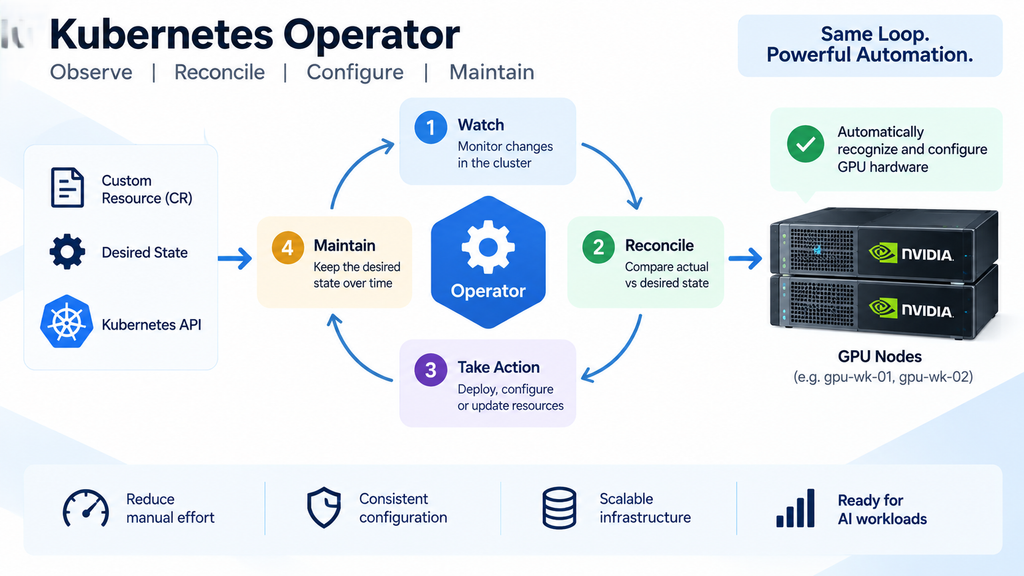
Prerequisite
You already have the cluster built in Part 1: 3-node HA management plane (
mgmt-01,mgmt-02,mgmt-03), CNI installed, control-plane nodes tainted,kubectl get nodesshows all threeReady. No worker nodes yet — that’s expected and correct at this stage.
Recap: where Falcon AI stands
| Role | Count | Hostnames | Status after Part 1 |
|---|---|---|---|
| Management (control plane) | 3 | mgmt-01, mgmt-02, mgmt-03 | Ready, tainted NoSchedule |
| GPU worker | 2 (growing) | gpu-wk-01, gpu-wk-02 | Not yet built — arrives in Part 4 |
| Load balancer | 1 | k8s-lb | Fronting API server on :6443 |
Why install operators before any GPU node joins?
This is the piece that confuses people coming from manual driver installs: you install the GPU Operator against a cluster that has no GPUs yet. That’s intentional. The Operator pattern means you’re installing a controller whose job is to watch for GPU hardware and react — not a one-time install script. At this stage, the operator remains idle but ready. Once gpu-wk-01 joins the cluster in Part 4, it can begin recognizing and configuring the GPU hardware.

The two operators we’re installing
| Operator | What it manages | Why Falcon AI needs it |
|---|---|---|
| NVIDIA GPU Operator | Driver, container toolkit, device plugin, DCGM exporter, MIG manager | Core requirement — every GPU node needs this stack |
| NVIDIA Network Operator | RDMA/RoCE drivers (OFED), SR-IOV device plugin | Falcon AI’s H100 nodes have 400Gb RoCE NICs for multi-node NCCL training — without this, GPUs work but distributed training is slow |
Later in the series, we introduce recommended but optional components such as storage operators, Prometheus, and Kubeflow when the workflow actually requires them. For now, however, installing these components would add unnecessary complexity because there is not yet a meaningful workload against which to validate them. Therefore, we postpone their installation until the appropriate stage. In this way, each component can be deployed and validated when its purpose becomes relevant.
How the Operator pattern actually works
In general, every Kubernetes Operator follows the same reconciliation loop. For this reason, it is worth understanding this pattern early in the series. Once you understand the process, the automated behavior in later sections becomes much easier to follow. In particular, this pattern explains how Operators continuously monitor, configure, and maintain the desired state of Kubernetes resources.
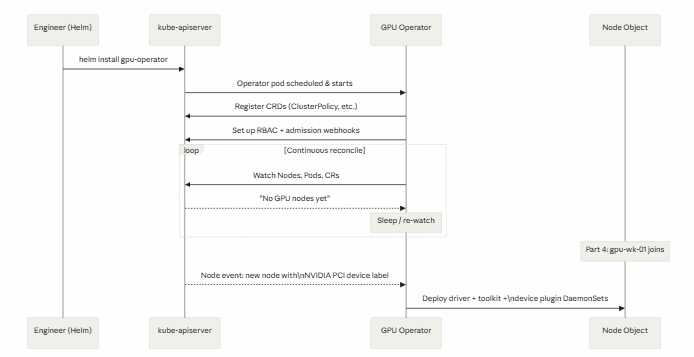
This is why we install operators before hardware exists — the watch loop is what makes Part 4 (“add worker nodes”) almost fully automatic.
Step 1 — Install Helm (on mgmt-01)
We run all cluster-admin commands from mgmt-01, the same node holding your ~/.kube/config from Part 1.
curl https://raw.githubusercontent.com/helm/helm/main/scripts/get-helm-3 | bash
helm version
Expected output:
version.BuildInfo{Version:"v3.15.x", GitCommit:"...", GoVersion:"go1.22.x"}Step 2 — Add the NVIDIA Helm Repositories on mgmt-01
Next, configure the NVIDIA Helm repository on mgmt-01. After adding the repository, update the local Helm index so that the latest available charts can be discovered.

helm repo add nvidia https://helm.ngc.nvidia.com/nvidia
helm repo update
Step 3 — Install the GPU Operator on mgmt-01
With the NVIDIA Helm repository configured, proceed with the GPU Operator installation. At this stage, Helm can retrieve the required GPU Operator chart from the NVIDIA repository.
kubectl create namespace gpu-operator

helm install gpu-operator nvidia/gpu-operator \
  --namespace gpu-operator \
  --set driver.enabled=true \
  --set toolkit.enabled=true \
  --set devicePlugin.enabled=true \
  --set dcgmExporter.enabled=true \
  --set migManager.enabled=true
driver.enabled=truetells the Operator to manage the NVIDIA driver itself via a containerized driver pod, rather than expecting you to have pre-installed drivers on the host. This is the recommended approach for fleet consistency — Falcon AI won’t have driver-version drift betweengpu-wk-01andgpu-wk-02.
Step 4 — Install the Network Operator (on mgmt-01)
kubectl create namespace network-operator

helm install network-operator nvidia/network-operator \
  --namespace network-operator \
  --set deployCR=true \
  --set ofedDriver.deploy=true \
  --set rdmaSharedDevicePlugin.deploy=true
Step 5 — Verify the operators are up (on mgmt-01, with zero GPU nodes)
kubectl get pods -n gpu-operator
kubectl get pods -n network-operator
kubectl get crd | grep -i nvidia
Expected output — controller pods Running, nothing else yet:
NAME                                              READY   STATUS    RESTARTS
gpu-operator-7f9c9d4b8f-x2k9p                     1/1     Running   0
gpu-operator-node-feature-discovery-master-...    1/1     Running   0
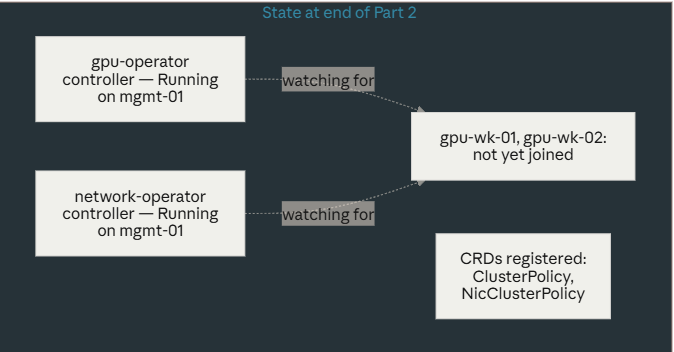
You will not see driver/toolkit/device-plugin DaemonSet pods yet — there’s nothing to schedule them on. That’s correct. Compare against the diagram above: we’re sitting in the “idle — watching” state.
Troubleshooting checkpoint
If kubectl get pods -n gpu-operator shows Pending instead of Running, check the taint from Part 1 — Helm charts sometimes need an explicit toleration to schedule the controller itself onto a management node:
kubectl describe pod -n gpu-operator <pod-name> | grep -A5 Events
Conclusion: Kubernetes GPU Scheduling in Practice
To conclude, effective Kubernetes GPU scheduling requires more than assigning a GPU to a pod. Instead, platform teams must coordinate runtime configuration, workload isolation, GPU placement, network topology, and scheduling policies.
First, RuntimeClass connects GPU workloads with the NVIDIA container runtime. Next, taints and tolerations help reserve GPU nodes for appropriate workloads. Similarly, node affinity helps Kubernetes select nodes with the required GPU characteristics. In addition, topology-aware scheduling becomes important when distributed AI workloads depend on high-performance communication between nodes.
Finally, gang scheduling addresses the coordination requirements of multi-pod and distributed training workloads. For example, Volcano can help coordinate workloads that require multiple resources to become available together. As a result, teams can reduce situations where only part of a distributed workload receives resources while other components remain pending.
More importantly, these Kubernetes GPU scheduling concepts work together. Therefore, understanding RuntimeClass, taints and tolerations, node affinity, topology, and gang scheduling gives platform teams greater control over GPU workload placement and resource utilization.
Ultimately, the Falcon AI Workbook Series connects these concepts with the wider NVIDIA GPU Kubernetes architecture—from cluster preparation and GPU integration to observability, GPU sharing, and workload scheduling. In this way, infrastructure and platform teams can move beyond simply running GPU containers toward building a more controlled, scalable, and production-ready AI platform.
Need Help Building Your AI & GPU Infrastructure?
Building a production-ready Kubernetes GPU platform requires the right combination of compute, networking, GPU scheduling, observability, security, and resource management.
If your organization is planning or scaling NVIDIA GPU infrastructure, Trezbon can help you evaluate, design, integrate, and optimize the infrastructure required for demanding AI workloads.
Turn your AI infrastructure strategy into a scalable production environment.
👉 Talk to Trezbon:
https://trezbon.com/#contact
Where we are
✅ Helm installed on mgmt-01, NVIDIA repos added ✅ GPU Operator running, watching for GPU hardware ✅ Network Operator running, watching for RDMA-capable NICs ✅ CRDs, RBAC, and webhooks registered — nothing deployed to nodes yet (nothing to deploy to)
Next in the series: Part 3 — What Happens Inside the Cluster After Operators Deploy, a closer look at the reconcile loop before we actually add hardware — then Part 4 joins gpu-wk-01 and gpu-wk-02 and watches the automation described above fire for real.

Enterprise Private LLM Infrastructure: Architecture, Sizing & High-Performance Networking
NVIDIA GPU Node on Kubernetes: 4-Layer Architecture & Troubleshooting
NVIDIA GPU Workloads on Kubernetes — Part 11: Key Concepts Deep Dive
About Author

abhishek
Cloud Platform Lead and AI Infrastructure Architect at e& enterprise, with 12+ years in data center, virtualization, security and AI infrastructure. I design and build private cloud and sovereign AI platforms, working with VMware (NSX-T, vSphere, vSAN, HCX, AVS, SRM), Kubernetes, Terraform and GPU inference infrastructure for LLMs. Previously served Networkers Home (CCIE instructor, trained around 50 CCIEs), VCE/EMC2, Cisco, VMware and Arista across TAC, consulting, design and training. Certifications: CCIE#48639 (Data Center and R&S), VCIX-DCV and NV, CKA, NVIDIA AI Infrastructure, Azure Solutions Architect Expert, Terraform Associate, Palo Alto PCNSE. LinkedIn: https://www.linkedin.com/in/abhishekkunal51/