NVIDIA GPU Workloads on Kubernetes — Part 11: Key Concepts Deep Dive
Learn Kubernetes GPU scheduling with RuntimeClass, taints and tolerations, node affinity, topology and gang scheduling using NVIDIA GPU workloads.
Part 11 — This post is part of the Falcon AI Workbook Series.. Four concepts have quietly appeared throughout every prior post without a full explanation: Runtime Class, taints/tolerations, node affinity/topology, and gang scheduling. This post gives each one the depth it deserves, so the series is a complete reference, not just a build log.
Prerequisite
You have completed Part 10, where MIG and time-slicing were configured on
gpu-wk-01and validated using the Grafana dashboards from Part 9. This post assumes the full stack from Parts 1–10 is in place.
Recap: where Falcon AI stands
| Role | Count | Hostnames | Status after Part 10 |
|---|---|---|---|
| Management / Control Plane | 3 | mgmt-01, mgmt-02, mgmt-03 | Ready; tainted NoSchedule |
| GPU Workers | 2 | gpu-wk-01, gpu-wk-02 | Ready, MIG + time-slicing configured and validated |
Where each concept already showed up
Before diving in, worth being explicit about where you already used each of these — this post explains the “why” behind decisions made earlier without you necessarily seeing the full picture at the time.
| Concept | First appeared | What it was doing |
|---|---|---|
| RuntimeClass | Part 7, every GPU pod spec | runtimeClassName: nvidia — told containerd which runtime to use |
| Taints/Tolerations | Part 1, Step 7 | NoSchedule taint kept workloads off mgmt-01/02/03 |
| Node Affinity/Topology | Part 5, GFD labels | nvidia.com/gpu.product labels exist specifically to be selected on |
| Gang Scheduling | Part 8, Volcano install | Prevented partial scheduling of multi-pod jobs |
Concept 1 — RuntimeClass
First, RuntimeClass tells Kubernetes which container runtime configuration a pod should use. In this case, that configuration is important because NVIDIA Container Toolkit registers the nvidia runtime alongside the default runc runtime. Without this configuration, a GPU pod can schedule successfully but still fail when an application attempts to access CUDA. Therefore, checking runtimeClassName should be part of your GPU workload validation process.

Without runtimeClassName: nvidia in a pod spec, the container starts under plain runc — it can still request nvidia.com/gpu as a resource and get scheduled onto a GPU node, but won’t actually have the driver libraries injected, and CUDA calls will fail inside the container. This is a common silent misconfiguration: the pod schedules fine, looks healthy, and only fails once your code touches the GPU.
bash
kubectl get runtimeclass
kubectl get runtimeclass nvidia -o yaml
Validation habit worth adopting: grep any new workload manifest for runtimeClassName before applying it — it’s easy to copy a pod spec that requests nvidia.com/gpu in resources but forgets the runtime class.
Concept 2 — Taints and Tolerations
Next, taints and tolerations control which workloads can run on specific nodes. For example, you can taint GPU nodes so that CPU-only workloads do not consume valuable GPU-worker resources. As a result, GPU capacity remains available for workloads that actually require it. However, the workload must include the matching toleration before Kubernetes can schedule it on the tainted node.
Now any pod that wants to run on a GPU node must explicitly tolerate it:
tolerations:
- key: "nvidia.com/gpu"
  operator: "Equal"
  value: "true"
  effect: "NoSchedule"
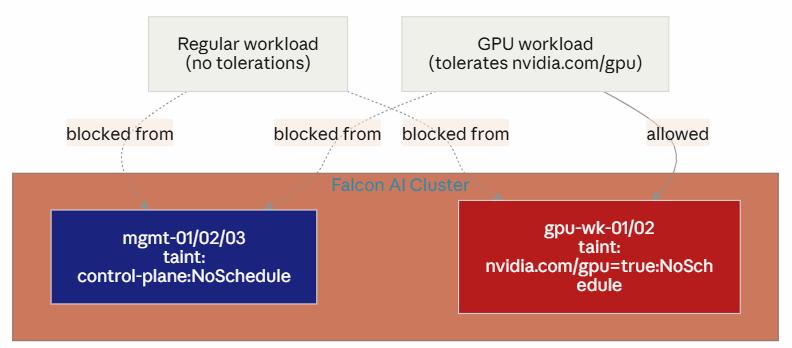
Without this second taint, a regular CPU-only workload with no GPU request could still land on gpu-wk-01 and consume CPU/memory that GPU-bound pods need — a subtler form of the noisy-neighbor problem from Part 10, at the node level instead of the GPU level.
Concept 3 — Node Affinity and Topology
Similarly, node affinity controls where Kubernetes places workloads. For example, you can select nodes with a specific NVIDIA GPU model by using the
nvidia.com/gpu.productlabel. In addition, topology-aware scheduling becomes important for distributed training. Therefore, multi-node AI workloads should consider both GPU characteristics and network topology when selecting nodes.
yaml
affinity:
  nodeAffinity:
    requiredDuringSchedulingIgnoredDuringExecution:
      nodeSelectorTerms:
      - matchExpressions:
        - key: nvidia.com/gpu.product
          operator: In
          values:
          - NVIDIA-H100-80GB-HBM3
For multi-node training specifically, topology also matters at the network level — you want training pods landing on nodes connected via the same RoCE fabric segment (validated back in Part 6, Category C), not split across segments with worse cross-node bandwidth. This is typically expressed via pod affinity/anti-affinity combined with topology-aware labels from the Network Operator, rather than plain node affinity alone.
Concept 4 — Gang Scheduling
Finally, gang scheduling addresses a different scheduling problem. By default, Kubernetes schedules pods independently. Consequently, some pods belonging to a distributed training job may start while others remain pending. As a result, allocated GPUs can sit idle while the job waits for additional resources. For this reason, Volcano gang scheduling can improve resource utilization for distributed AI workloads.
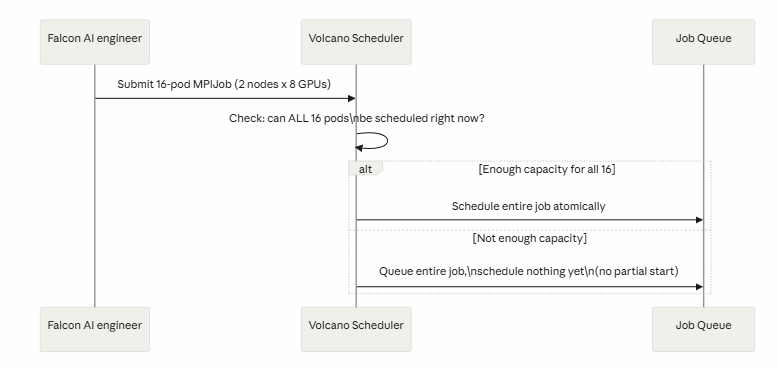
This is why Volcano existed as a prerequisite before Part 8’s MPIJob example would behave reliably under real multi-tenant load — without it, the NCCL test from Part 7 could technically still run (nothing else was competing for GPUs at the time), but it wouldn’t survive contact with a second team submitting jobs.
Bringing it together: one pod spec, all four concepts
yaml
apiVersion: v1
kind: Pod
metadata:
  name: falcon-training-worker
spec:
  runtimeClassName: nvidia                          # Concept 1
  tolerations:                                       # Concept 2
  - key: "nvidia.com/gpu"
    operator: "Equal"
    value: "true"
    effect: "NoSchedule"
  affinity:                                           # Concept 3
    nodeAffinity:
      requiredDuringSchedulingIgnoredDuringExecution:
        nodeSelectorTerms:
        - matchExpressions:
          - key: nvidia.com/gpu.product
            operator: In
            values: ["NVIDIA-H100-80GB-HBM3"]
  schedulerName: volcano                              # Concept 4
  containers:
  - name: worker
    image: nvcr.io/nvidia/pytorch:24.01-py3
    resources:
      limits:
        nvidia.com/gpu: 8
Every field in this spec maps to something built across the previous ten posts — this pod could not run correctly on Falcon AI’s cluster without all four concepts working together underneath it.
Where we are — series complete
✅ RuntimeClass, taints/tolerations, node affinity/topology, and gang scheduling — each understood at the mechanism level, not just as YAML fields to copy ✅ Traced each concept back to where it silently appeared earlier in the series ✅ Falcon AI’s cluster: 3-node HA management plane, 2 validated GPU workers, full operator stack, AI platform layer, observability, GPU sharing modes, and now the scheduling primitives tying it all together
Series recap
- Prerequisites & Cluster Readiness
- Installing GPU & Network Operators
- What Happens Inside the Cluster After Operators Deploy
- Adding GPU Worker Nodes
- What’s Actually Running on a GPU Node
- Validating Cluster Readiness
- Running a Test Job
- The AI Platform & Application Layer
- Observability Stack for GPU Clusters
- MIG vs Time-Slicing
- Key Concepts Deep Dive
From a bare Kubernetes cluster to a validated, observable, multi-tenant, production-ready AI platform — that’s the full journey the original infographic mapped out, now with a from-scratch, hands-on workbook behind every box in it.
Conclusion: Kubernetes GPU Scheduling in Practice
To conclude, the Falcon AI workbook series has now moved from basic Kubernetes infrastructure to the scheduling principles required for production AI workloads.
First, RuntimeClass connects GPU workloads with the NVIDIA container runtime. Next, taints and tolerations help protect expensive GPU nodes from unsuitable workloads. Similarly, node affinity and topology rules help Kubernetes place workloads on the right GPU and network resources.
Finally, gang scheduling addresses the resource requirements of distributed AI workloads. For example, multi-node training jobs can require several pods and GPUs to become available together. Therefore, a scheduler such as Volcano can help prevent partial scheduling and unnecessary GPU idle time.
More importantly, these concepts work together rather than operating as isolated Kubernetes features. As a result, understanding RuntimeClass, taints, tolerations, affinity, topology, and gang scheduling gives platform engineers greater control over GPU workload placement.
In addition, these scheduling primitives become increasingly important as AI infrastructure grows more complex. For example, multi-tenant Kubernetes environments must balance GPU utilization, workload isolation, performance, and resource availability.
Ultimately, effective Kubernetes GPU scheduling is not just about assigning a GPU to a pod. Instead, it is about placing the right workload on the right node, with the right runtime, resources, topology, and scheduling policy.
If you have followed the Falcon AI workbook series from the beginning, you have now seen the complete journey from cluster preparation and NVIDIA GPU integration to validation, observability, GPU sharing, and workload scheduling.
Most importantly, the next step is to apply these concepts to your own AI infrastructure. In this way, you can move from simply running GPU workloads on Kubernetes to building a more controlled, scalable, and production-ready AI platform.
Need Help Building Your AI Infrastructure?
Building a Kubernetes GPU platform is more complex than deploying a few GPU workloads. You also need the right infrastructure, networking, workload scheduling, observability, security, and resource-management strategy.
If your organization is planning, modernizing, or scaling AI infrastructure, Trezbon can help you explore the technology and infrastructure requirements for your environment.
Explore Trezbon: https://trezbon.com/
Talk to the Trezbon team about your AI infrastructure requirements and discover how the right technology strategy can support scalable, reliable workloads.
Continue the Falcon AI Workbook Series
Want to understand how a production-ready NVIDIA GPU Kubernetes platform is built?
Start from the beginning, follow each hands-on stage, and see how Kubernetes, NVIDIA GPU infrastructure, networking, observability, GPU sharing, and workload scheduling work together.
Continue the Falcon AI Workbook Series:
https://www.networkbachelor.com/
Keep learning. Keep testing. Keep building better AI infrastructure.
NVIDIA GPU Workloads on Kubernetes: Build a Ready Cluster
Kubernetes CNI Networking Explained: Pod Networks, CNI & Flannel
Kubernetes GPU Monitoring: Prometheus, Grafana & DCGM Guide
About Author

abhishek
Cloud Platform Lead and AI Infrastructure Architect at e& enterprise, with 12+ years in data center, virtualization, security and AI infrastructure. I design and build private cloud and sovereign AI platforms, working with VMware (NSX-T, vSphere, vSAN, HCX, AVS, SRM), Kubernetes, Terraform and GPU inference infrastructure for LLMs. Previously served Networkers Home (CCIE instructor, trained around 50 CCIEs), VCE/EMC2, Cisco, VMware and Arista across TAC, consulting, design and training. Certifications: CCIE#48639 (Data Center and R&S), VCIX-DCV and NV, CKA, NVIDIA AI Infrastructure, Azure Solutions Architect Expert, Terraform Associate, Palo Alto PCNSE. LinkedIn: https://www.linkedin.com/in/abhishekkunal51/