NVIDIA GPU Workloads on Kubernetes — Part 8: Building the AI Platform & Application Layer
Building a Kubernetes AI Platform on NVIDIA GPUs
Up to this point, the Falcon AI workbook has focused primarily on infrastructure. We deployed the NVIDIA GPU Operator, validated drivers, tested GPU resources, and confirmed that real workloads can run successfully across the cluster.
However, a validated GPU cluster is not yet a complete Kubernetes AI platform.
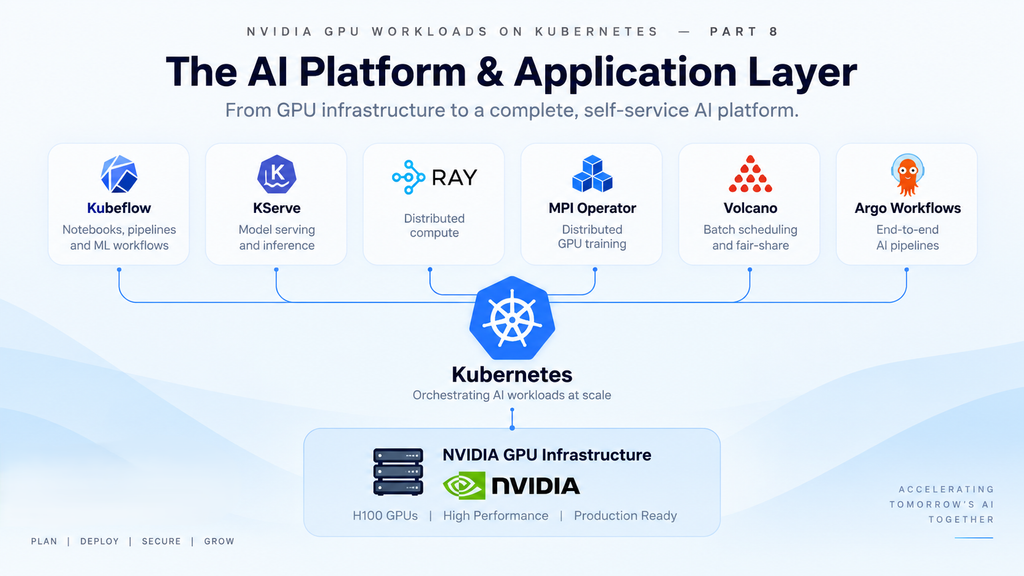
In Part 8, we move into the application layer by introducing Kubeflow, KServe, Ray, MPI Operator, and Volcano. Together, these technologies provide self-service notebooks, model serving, distributed computing, multi-GPU training, and workload scheduling for Falcon AI’s ML engineers.
As a result, users can submit AI training and inference workloads without managing the underlying Kubernetes or NVIDIA GPU infrastructure directly.
Prerequisite
You’ve completed Part 7: all five test-job rungs passed on the Falcon AI cluster (CUDA VectorAdd through vLLM inference). GPUs are proven end to end.
Recap: where Falcon AI stands
| Role | Count | Hostnames | Status after Part 7 |
|---|---|---|---|
| Management (control plane) | 3 | mgmt-01, mgmt-02, mgmt-03 | Ready, tainted NoSchedule |
| GPU worker | 2 | gpu-wk-01, gpu-wk-02 | Ready, validated end to end with real workloads |
How the Kubernetes AI Platform Components Work Together
Each component solves a different part of the AI workload lifecycle.
Kubeflow provides the self-service ML environment. KServe turns trained models into inference services. Ray enables distributed computing for workloads such as data processing and hyperparameter tuning.
Meanwhile, MPI Operator provides a Kubernetes-native approach to distributed training jobs. Volcano helps coordinate resource-intensive batch workloads when multiple jobs compete for limited GPU capacity.
Together, these components transform the underlying NVIDIA GPU cluster into a more complete Kubernetes AI platform for training, inference, and distributed machine learning workloads.
Kubernetes Infrastructure vs. AI Application Layer
Everything in Parts 4–7 ran as DaemonSets — one pod per node, infrastructure-owned, invisible to end users. Everything in this post runs as Deployments/StatefulSets — normal, scalable application workloads that happen to schedule GPU pods on Falcon AI’s behalf. This distinction matters because it changes who’s responsible for what:
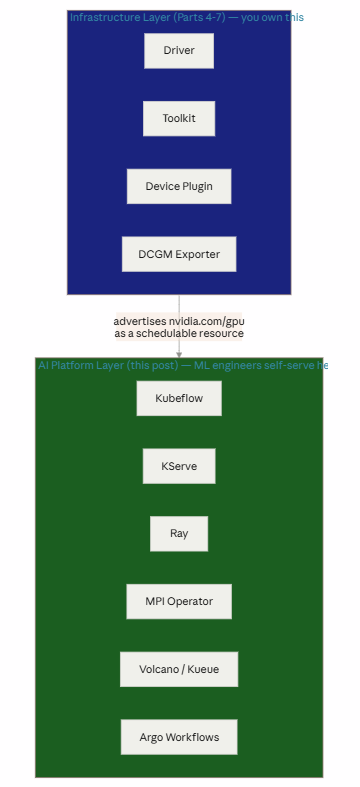
Everything below reads nvidia.com/gpu as an ordinary Kubernetes resource request — none of it needs to know or care that a GPU Operator exists underneath. That separation of concerns is the entire point of the six parts we’ve done so far.
Core Components of the Kubernetes AI Platform
| Component | Role | Why Falcon AI needs it |
|---|---|---|
| Kubeflow | ML platform — notebooks, pipelines, experiment orchestration | Self-service entry point for ML engineers, so they’re not filing tickets to you for every job |
| KServe | Model serving | Standardized way to deploy trained models as inference endpoints (builds on the vLLM smoke test from Part 7) |
| Ray | Distributed compute framework | Falcon AI’s data preprocessing and hyperparameter sweeps run better distributed than single-node |
| MPI Operator | Runs MPI-based distributed jobs | This is what actually wraps the multi-node NCCL test from Part 7 into a real, repeatable training job spec |
| Volcano / Kueue | Batch scheduling, quota & queuing | With only 2 GPU nodes (16 GPUs total) today, Falcon AI needs fair-share scheduling once multiple teams compete for capacity |
| Argo Workflows | Workflow/pipeline engine | Chains preprocessing → training → evaluation → registration as one pipeline |
Not installing yet, but worth knowing exists: MLflow (experiment tracking), Triton Inference Server (alternative/complement to vLLM for non-LLM models), Airflow (data pipelines), MinIO/Ceph (S3-compatible object storage for datasets and checkpoints — Falcon AI will need this before real training runs, covered when we set up Storage properly).
Step 1 — Install Kubeflow for ML Workflows
Kubeflow is a large distribution; for a first install we use the lightweight manifest set rather than the full platform:
git clone https://github.com/kubeflow/manifests.git
cd manifests
while ! kubectl apply -k example; do echo "Retrying, CRDs still establishing..."; sleep 10; done
kubectl get pods -n kubeflowPass criteria: central dashboard, pipeline, and notebook controller pods Running.
Step 2 — Deploy KServe for GPU Model Inference
bash
kubectl apply -f https://github.com/kserve/kserve/releases/download/v0.13.0/kserve.yaml
kubectl get pods -n kserve
Quick validation using an InferenceService — the KServe-native way to do what we did manually with vLLM in Part 7:
yaml
# opt125m-inferenceservice.yaml
apiVersion: serving.kserve.io/v1beta1
kind: InferenceService
metadata:
  name: opt125m
  namespace: inference-test
spec:
  predictor:
    model:
      modelFormat:
        name: huggingface
      args: ["--model_name=opt-125m", "--model_id=facebook/opt-125m"]
      resources:
        limits:
          nvidia.com/gpu: 1
kubectl apply -f opt125m-inferenceservice.yaml
kubectl get inferenceservice -n inference-testPass criteria: READY: True, with a URL Falcon AI’s application team can hit directly — no more manual kubectl exec/port-forward like Part 7.
Step 3 — Install Ray for Distributed AI Computing
helm repo add kuberay https://ray-project.github.io/kuberay-helm/
helm repo update
helm install kuberay-operator kuberay/kuberay-operator --namespace ray-system --create-namespace
kubectl get pods -n ray-system
Step 4 — Configure MPI Operator for Distributed GPU Training
kubectl apply -f https://raw.githubusercontent.com/kubeflow/mpi-operator/master/deploy/v2beta1/mpi-operator.yaml
kubectl get pods -n mpi-operator
This is what lets us formalize the multi-node NCCL test from Part 7 into an MPIJob:
yaml
# nccl-mpijob.yaml
apiVersion: kubeflow.org/v2beta1
kind: MPIJob
metadata:
  name: nccl-allreduce-test
spec:
  slotsPerWorker: 8
  runPolicy:
    cleanPodPolicy: Running
  mpiReplicaSpecs:
    Launcher:
      replicas: 1
      template:
        spec:
          containers:
          - name: launcher
            image: nvcr.io/nvidia/pytorch:24.01-py3
            command: ["mpirun", "--allow-run-as-root", "-np", "16",
                      "nccl-tests/build/all_reduce_perf", "-b", "8M", "-e", "128M"]
    Worker:
      replicas: 2
      template:
        spec:
          containers:
          - name: worker
            image: nvcr.io/nvidia/pytorch:24.01-py3
            resources:
              limits:
                nvidia.com/gpu: 8
kubectl apply -f nccl-mpijob.yaml
kubectl logs -f -l training.kubeflow.org/job-name=nccl-allreduce-test,training.kubeflow.org/replica-type=launcherPass criteria: same output as Part 7’s manual NCCL test, but now launched declaratively and repeatably across both gpu-wk-01 and gpu-wk-02 — the MPI Operator handles worker coordination automatically instead of you exec-ing into pods by hand.
Step 5 — Add Volcano For Kubernetes GPU Scheduling
With only 16 GPUs across 2 nodes, once more than one Falcon AI team submits jobs simultaneously, the default Kubernetes scheduler’s lack of gang scheduling and fair-share queuing becomes a real problem — a large job can partially schedule, stall waiting for the rest of its pods, and block smaller jobs behind it.
kubectl apply -f https://raw.githubusercontent.com/volcano-sh/volcano/master/installer/volcano-development.yaml
kubectl get pods -n volcano-system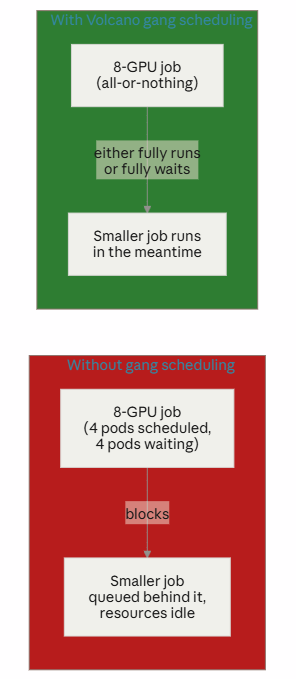
Kubernetes AI Platform: What We Built
✅ Kubeflow, KServe, Ray, MPI Operator, and Volcano installed on top of the validated infrastructure layer ✅ Re-implemented Part 7’s manual NCCL test as a declarative, repeatable MPIJob ✅ Re-implemented Part 7’s manual vLLM test as a KServe InferenceService ✅ Falcon AI’s ML engineers can now submit training and inference workloads without touching cluster internals
Conclusion: From NVIDIA GPU Cluster to Kubernetes AI Platform
Building a production AI environment requires more than making NVIDIA GPUs available to Kubernetes. Infrastructure provides the foundation, but ML engineers also need accessible tools for experimentation, distributed computing, training, inference, and workload scheduling.
In Part 8 of the Falcon AI workbook, we moved from GPU infrastructure to the Kubernetes AI platform and application layer. Kubeflow provides a self-service environment for ML workflows, while KServe standardizes model inference. In addition, Ray enables distributed computing, MPI Operator formalizes multi-GPU training, and Volcano helps coordinate resource-intensive workloads.
Together, these components create a more practical platform for running AI and machine learning workloads on Kubernetes.
More importantly, application teams can consume NVIDIA GPU resources through standard Kubernetes interfaces without managing the underlying GPU infrastructure themselves. This separation allows platform teams to control the cluster while giving ML engineers a simpler way to run training and inference workloads.
The next step is visibility. In Part 9, Falcon AI adds Prometheus, Grafana, NVIDIA DCGM Exporter, Loki, Tempo, and OpenTelemetry to monitor the Kubernetes cluster from GPU hardware through the application layer.
Building an Enterprise AI Platform on Kubernetes?
Designing a production NVIDIA GPU environment requires the right combination of compute, networking, storage, Kubernetes, GPU scheduling, observability, model serving, and distributed training.
Trezbon Technologies helps organizations design, deploy, assess, and optimize Kubernetes and NVIDIA GPU infrastructure for enterprise AI and machine learning workloads.
Whether you’re building a new GPU cluster, developing a Kubernetes AI platform, or optimizing an existing environment, our team can help turn infrastructure requirements into a scalable architecture.
👉 Discuss Your AI Infrastructure Requirements
🌐 Explore Trezbon Technologies
Next in the series: Part 9 — Observability Stack for GPU Clusters, wiring Prometheus, DCGM, Grafana, Loki, and Tempo into a full-stack view of everything we’ve built — cluster, nodes, GPUs, network, and now these application-layer workloads too.
Kubernetes for AI/ML Workloads: GPU Scheduling & MLOps Guide
NVIDIA Switches Explained: Models, NVUE CLI & Protocol Support
Kubernetes Networking Fundamentals: OSI, VXLAN, veth & Linux Bridges
About Author

abhishek
Cloud Platform Lead and AI Infrastructure Architect at e& enterprise, with 12+ years in data center, virtualization, security and AI infrastructure. I design and build private cloud and sovereign AI platforms, working with VMware (NSX-T, vSphere, vSAN, HCX, AVS, SRM), Kubernetes, Terraform and GPU inference infrastructure for LLMs. Previously served Networkers Home (CCIE instructor, trained around 50 CCIEs), VCE/EMC2, Cisco, VMware and Arista across TAC, consulting, design and training. Certifications: CCIE#48639 (Data Center and R&S), VCIX-DCV and NV, CKA, NVIDIA AI Infrastructure, Azure Solutions Architect Expert, Terraform Associate, Palo Alto PCNSE. LinkedIn: https://www.linkedin.com/in/abhishekkunal51/