NVIDIA GPU Workloads on Kubernetes — Part 3: What Happens Inside the Cluster After Operators Deploy
Part 3 of the Falcon AI workbook series. Follow along with real commands — this post has no new infrastructure to build. Instead we go hands-on inside the operators installed in Part 2, so you know exactly what “idle and watching” actually means before we hand it real GPU hardware in Part 4.
Prerequisite
You’ve completed Part 2: GPU Operator and Network Operator are both
Runningin thegpu-operatorandnetwork-operatornamespaces on your Falcon AI cluster. Still zero worker nodes — that’s expected.
Recap: where Falcon AI stands
| Role | Count | Hostnames | Status after Part 2 |
|---|---|---|---|
| Management (control plane) | 3 | mgmt-01, mgmt-02, mgmt-03 | Ready, tainted NoSchedule |
| GPU worker | 2 (growing) | gpu-wk-01, gpu-wk-02 | Not yet built — arrives in Part 4 |
| Load balancer | 1 | k8s-lb | Fronting API server on :6443 |
| GPU Operator | — | gpu-operator namespace | Controller Running, idle-watching |
| Network Operator | — | network-operator namespace | Controller Running, idle-watching |
Why this post exists
Part 2 ended with “the operator is running and watching.” Most engineers take that on faith and move straight to plugging in hardware. That’s a mistake — if something goes wrong in Part 4, you want to already know what the healthy idle state looks like, so you can tell “waiting for a node” apart from “broken.” This post is entirely inspection: no new installs, just understanding what’s already there.
The four things an Operator does on install — and how to see each one
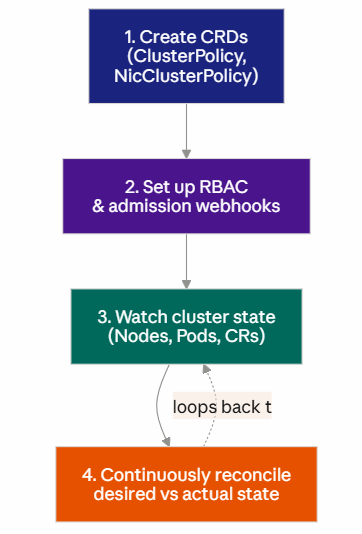
We’ll inspect each of these four in order, on mgmt-01.
1. CRDs — the operator’s vocabulary
The GPU Operator doesn’t hardcode “install driver version X.” Instead it defines a ClusterPolicy custom resource — a schema for what a correctly configured GPU node looks like — and reconciles reality toward it.
kubectl get crd | grep -i nvidiaExpected output:
clusterpolicies.nvidia.com
nicclusterpolicies.mellanox.com
Inspect the actual policy Falcon AI is running:
kubectl get clusterpolicy -o yamlLook for spec.driver.enabled, spec.devicePlugin.enabled, spec.migManager.enabled — these should match the --set flags from your Part 2 Helm install. This YAML is the operator’s source of truth; when gpu-wk-01 joins, this is the spec it gets reconciled against.
2. RBAC and admission webhooks
kubectl get clusterrole | grep -i gpu-operator
kubectl get validatingwebhookconfigurations,mutatingwebhookconfigurations | grep -i nvidia
The webhooks matter operationally: they’re why a malformed GPU workload spec (e.g., requesting nvidia.com/gpu: -1) gets rejected at admission time rather than failing silently on a node later. Worth knowing this exists before you’re debugging a stuck pod in Part 7.
3. Watching cluster state
This is the part that’s genuinely invisible unless you go looking. The operator is running a controller loop against the Kubernetes watch API — the same mechanism kubectl get pods -w uses under the hood.
kubectl logs -n gpu-operator deployment/gpu-operator --tail=50Expected: repeated reconcile log lines, no driver/toolkit pods deployed, no errors — just confirmation it’s alive and watching:
INFO controllers.ClusterPolicy Reconciling ClusterPolicy
INFO controllers.ClusterPolicy no nodes with nvidia.com/gpu.present=true found
That second line is the whole story of this post in one sentence.
4. Node Feature Discovery (NFD) — the trigger mechanism
NFD is what actually notices a GPU exists once gpu-wk-01 boots. It’s worth checking it’s running now, since it’s a silent dependency:
kubectl get pods -n gpu-operator -l app=gpu-feature-discovery
kubectl get pods -n gpu-operator -l app=node-feature-discovery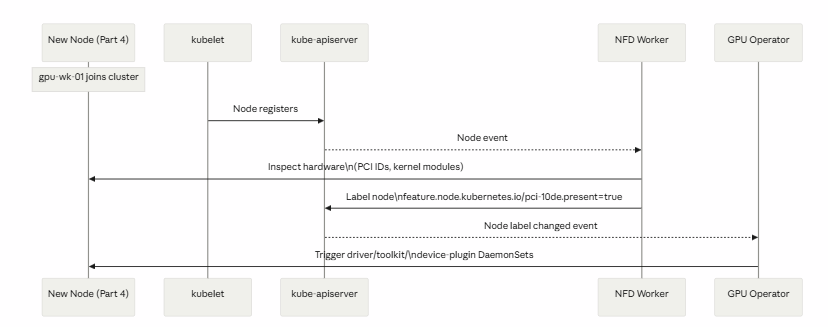
This sequence diagram is the answer to “how does the operator know a GPU showed up” — NFD is the sensor, the operator is the actuator.
Troubleshooting checkpoint
If kubectl logs -n gpu-operator deployment/gpu-operator shows repeated errors instead of clean reconcile lines, resolve those now — don’t carry a noisy operator into Part 4, where errors get much harder to distinguish from genuine hardware issues.
kubectl get events -n gpu-operator --sort-by='.lastTimestamp' | tail -20Where we are
✅ Verified all four CRDs, RBAC/webhooks, watch loop, and NFD are correctly in place ✅ Confirmed the operator logs show a clean “no GPU nodes found” idle state — not an error ✅ Understand exactly which component (NFD) triggers the operator when hardware appears ✅ Nothing changed on the cluster — this was validation, not installation
Next in the series: Part 4 — Adding GPU Worker Nodes, where gpu-wk-01 and gpu-wk-02 join the cluster for real and you’ll watch this entire reconcile chain fire — NFD labels the node, the operator reacts, and driver/toolkit/device-plugin DaemonSets land on the hardware for the first time.

Private LLMaaS and its Business Opportunities
Understanding Kubernetes Networking, Part 1: The Fundamentals You Need First
GPUs, Slurm, and Kubernetes: The Building Blocks of Modern HPC and AI Infrastructure
About Author

abhishek
Expert in Network, Virtualization and Security field in On-Prem and Public Cloud. Passionate about new technology and consult the best solution to business organisation.Previously served Networkershome, EMC2, Cisco, VMware and Arista in different fields of Engineering, TAC, Consulting, Designing and Training. Certification : CCIE#48639, VCIX DCV and NV, Aviatrix Multi Cloud, SD-WAN Specialist, Palo Alto PCNSE, Amazon Cloud, Docker Certified Engineer. LinkedIn : https://www.linkedin.com/in/abhishekkunal51/