DGX SuperPOD Deployment Guide: BCM, Kubernetes & Slurm
To begin with, deploying an NVIDIA DGX SuperPOD involves far more than connecting GPU servers and installing Kubernetes. A production-ready AI infrastructure requires a carefully engineered architecture in which GPU compute, high-performance networking, storage, cluster management, workload scheduling, observability, and AI operations work together as an integrated platform.
First, infrastructure teams must design the compute layer around the expected AI workloads. GPU capacity, CPU resources, memory, topology, node configuration, and scalability requirements all need to be considered. This is particularly important for large-scale AI training, distributed machine learning, fine-tuning, inference, and high-performance computing (HPC) workloads, where inefficient infrastructure design can prevent expensive GPU resources from reaching their full potential.
Next, the networking architecture must be designed to support the enormous volume of data exchanged between GPU nodes. Distributed AI workloads frequently require GPUs across multiple servers to communicate with extremely low latency and high bandwidth. Therefore, technologies such as NVIDIA InfiniBand, high-speed Ethernet, RDMA, GPUDirect RDMA, and optimized east-west network fabrics can become critical components of the overall architecture. The network must also provide sufficient redundancy and scalability so that additional GPU nodes can be introduced without creating communication bottlenecks.
At the same time, storage architecture must align closely with both GPU compute and network performance. Large AI environments continuously move training datasets, model checkpoints, container images, logs, and model artifacts between storage systems and GPU workers. Consequently, the storage platform must deliver the required throughput, IOPS, capacity, availability, and parallel access performance. If storage cannot supply data quickly enough, powerful GPUs may remain underutilized while waiting for data.
Moreover, cluster management provides the operational foundation that brings these infrastructure components together. Kubernetes-based environments require reliable control-plane services, GPU-aware node configuration, container runtimes, NVIDIA software components, operators, and supporting services. Infrastructure teams must validate not only whether individual components are running, but also whether they interact correctly across the entire GPU cluster.
Workload scheduling adds another critical layer. AI workloads may require one GPU, several GPUs within a server, or GPUs distributed across multiple nodes. Therefore, schedulers must understand GPU availability, resource requests, node characteristics, workload priorities, and placement requirements. Depending on the architecture, technologies such as Kubernetes scheduling, NVIDIA GPU Operator, NVIDIA Network Operator, Slurm, Volcano, or other workload-management platforms can help coordinate infrastructure resources for different AI workloads.
Meanwhile, GPU utilization must also be considered carefully. Simply having GPUs available does not guarantee that they are being used efficiently. Technologies such as NVIDIA Multi-Instance GPU (MIG) and GPU time-slicing can provide different approaches to sharing GPU resources across workloads. Selecting the appropriate model depends on workload isolation, performance requirements, GPU architecture, application characteristics, and operational objectives.
More importantly, production AI infrastructure requires comprehensive monitoring and observability. Infrastructure teams need visibility across GPU health, temperature, memory consumption, utilization, network performance, storage throughput, Kubernetes nodes, containers, and application workloads. Tools such as NVIDIA DCGM Exporter, Prometheus, Grafana, and Kubernetes monitoring components can provide the telemetry required to understand both infrastructure health and GPU utilization.
This visibility becomes especially valuable when troubleshooting performance problems. For example, low GPU utilization does not necessarily indicate a GPU problem. The underlying cause could instead be network congestion, storage latency, CPU limitations, memory pressure, scheduling constraints, application configuration, or data-pipeline bottlenecks. End-to-end observability helps infrastructure and AI teams identify where the actual constraint exists.
Furthermore, operational readiness requires teams to validate the environment before production workloads are introduced. This includes testing GPU discovery, driver compatibility, container GPU access, node health, network connectivity, storage performance, scheduling behavior, distributed GPU communication, monitoring, and workload execution. Validation should therefore extend beyond checking whether individual services report a Running status.
In addition, reliability and scalability must be incorporated into the architecture from the beginning. Management services, network paths, storage access, monitoring systems, and other critical components should be designed to minimize single points of failure. Capacity planning should also account for future GPU expansion, larger datasets, additional users, and increasingly demanding AI models.
As a result, a well-designed DGX SuperPOD operates as an integrated AI infrastructure platform rather than simply a collection of GPU servers. Compute provides acceleration, networking enables high-speed GPU communication, storage continuously feeds data to workloads, cluster management maintains infrastructure state, scheduling coordinates resource allocation, and observability provides operational visibility across the complete environment.
Ultimately, successful NVIDIA DGX SuperPOD deployment depends on engineering and validating all of these layers as one interconnected system. When GPU compute, networking, storage, Kubernetes, workload scheduling, GPU management, monitoring, and AI operations are properly aligned, organizations can build an AI platform that is more scalable, resilient, observable, operationally manageable, and capable of supporting demanding enterprise AI workloads at scale.
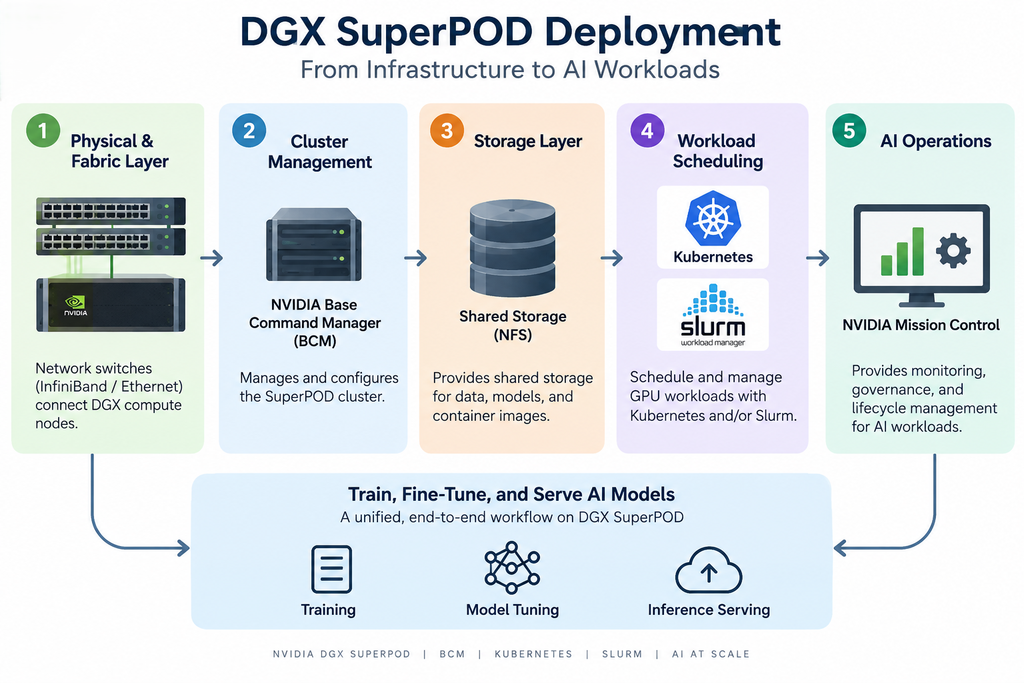
This technical workbook provides an end-to-end DGX SuperPOD deployment guide using NVIDIA Base Command Manager (BCM) and native Kubernetes. Specifically, the workbook follows the deployment lifecycle from physical infrastructure and network fabric through GPU scheduling and distributed training. From there, it moves into MLOps and inference serving. Finally, NVIDIA Mission Control brings these operational layers together. In this way, the workbook connects the major stages of the DGX SuperPOD deployment lifecycle within one end-to-end workflow.
| Cluster Manager | BCM 11.31 / 11.32 |
| Orchestration | Run:ai 2.23 |
| Unified Stack | NVIDIA Mission Control |
| Scheduler | Slurm + Kubernetes |
This workbook documents the standard, vendor-supported path for standing up a DGX SuperPOD — the one NVIDIA ships in its own deployment guides — as distinct from a vCluster-based multi-tenancy model.Through out this workbook, command examples come from NVIDIA’s official reference architecture or from genuine execution in a general-purpose environment. For example, these resources include Ansible, Helm and Kubernetes manifests, and the public NVIDIA GPU Operator source. Where possible, we used these tools directly and captured their actual output for this workbook. In addition, the captured results help connect the documented architecture with practical implementation. However, some deployment steps depend on proprietary BCM software or physical DGX hardware.In those cases, we provide the documented reference commands and syntax instead.However, some deployment steps require proprietary BCM software or physical DGX hardware.
01 Reference Architecture Overview
Five layers, one head node, no virtualized cluster slicing.
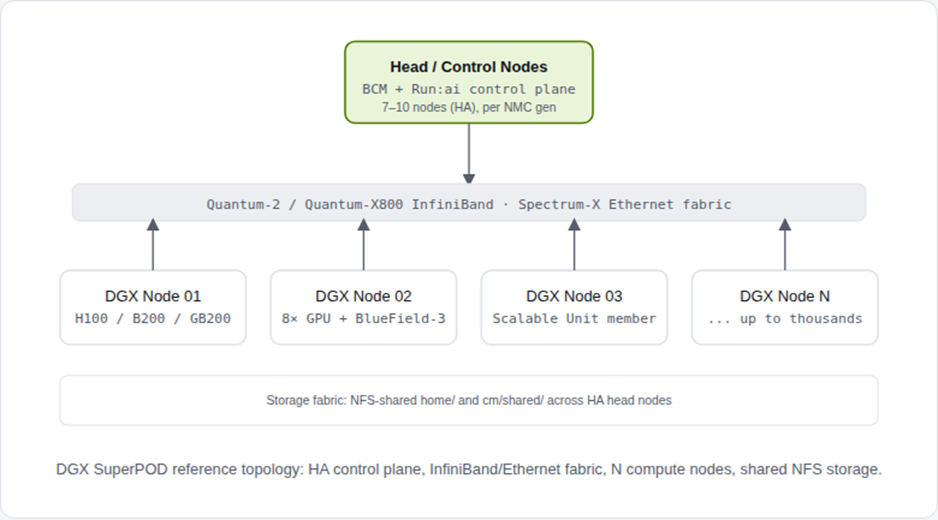
Reference specs (DGX B200 / B300, NMC 2.x)
| Cluster manager | NVIDIA Base Command Manager (BCM) 11.31 – 11.32 |
| Workload orchestration | NVIDIA Run:ai 2.23 |
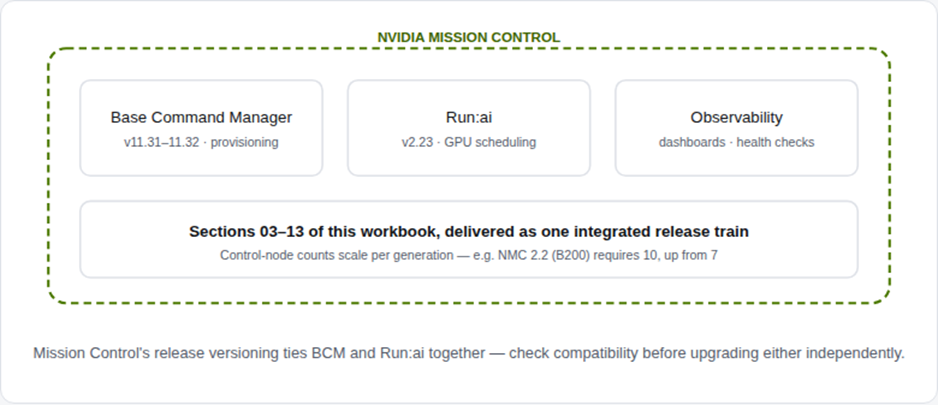
| Control node count (NMC 2.2, B200) | 10 (increased from 7 in prior spec) |
| Scheduler(s) | Slurm and/or Kubernetes, side by side |
| Storage requirement | NFS-shared home/ and cm/shared/ across head nodes; DGX OS image on NFS for HA |
| Networking | Quantum-2 (400Gb) / Quantum-X800 (800Gb) IB, or Spectrum-X Ethernet |
02 Physical & Fabric Layer
Cabling and network configuration precede any software installation.
Before deploying BCM, complete the physical installation and network switch configuration. In addition, document the intended deployment in a detailed site survey. This preparation ensures that the required network paths are clearly defined before provisioning begins.
For the DGX B300, the network layout uses eight ports across four OSFP connections for the InfiniBand compute fabric. At the same time, each pair of dual-port BlueField-3 HCAs provides parallel pathways to the storage and management fabrics. Furthermore, an optional dedicated port can support InfiniBand storage. Together, these connections establish the required network paths across the DGX infrastructure. As a result, the infrastructure team can validate the network design before BCM provisioning begins. Therefore, potential connectivity or configuration issues can be identified earlier in the deployment process.
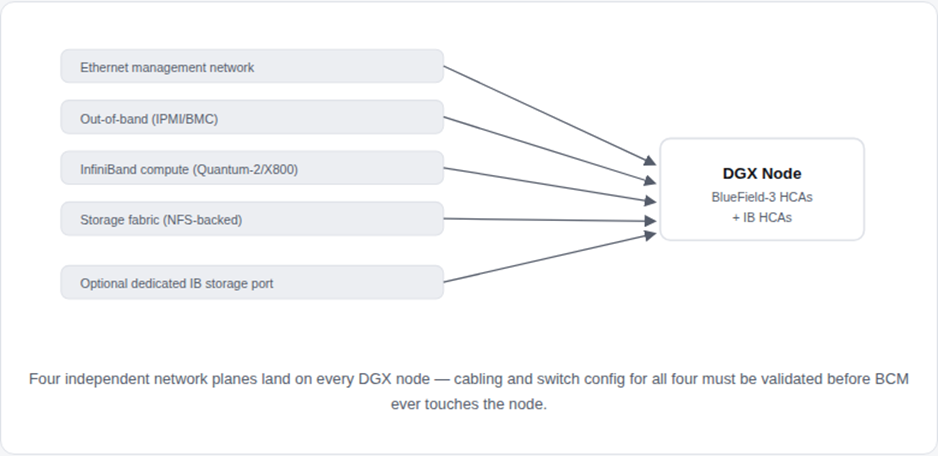
Site survey checklist (pre-BCM)
| Ethernet management network | configured, documented |
| Out-of-band (IPMI/BMC) network | configured, documented |
| InfiniBand compute fabric | cabled per rail-optimized topology |
| InfiniBand compute fabric | cabled per rail-optimized topology |
| Rail-optimized topology, IB-vs-RoCEv2 tradeoffs, and NCCL-to-fabric mapping are covered in depth in the companion posts “Building the Backend: AI Fabric Design” and “From Fabric to Flops” on this blog. |
03 Head Node — Base Command Manager
BCM is the automation layer every other step depends on.
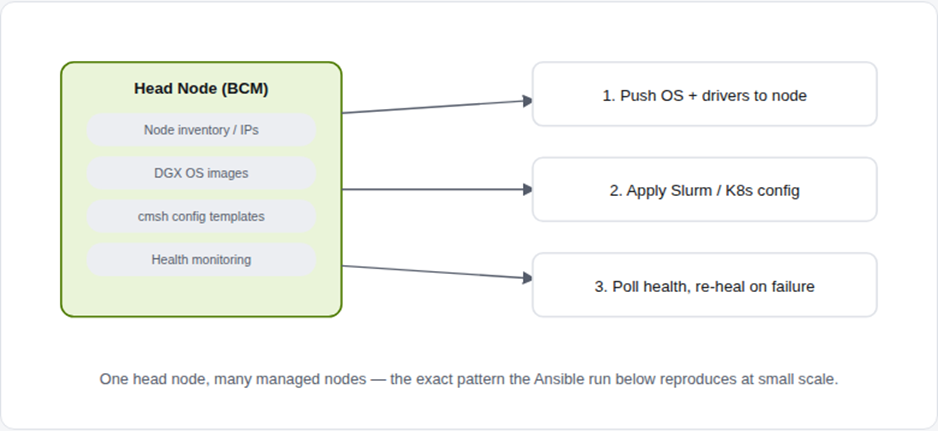
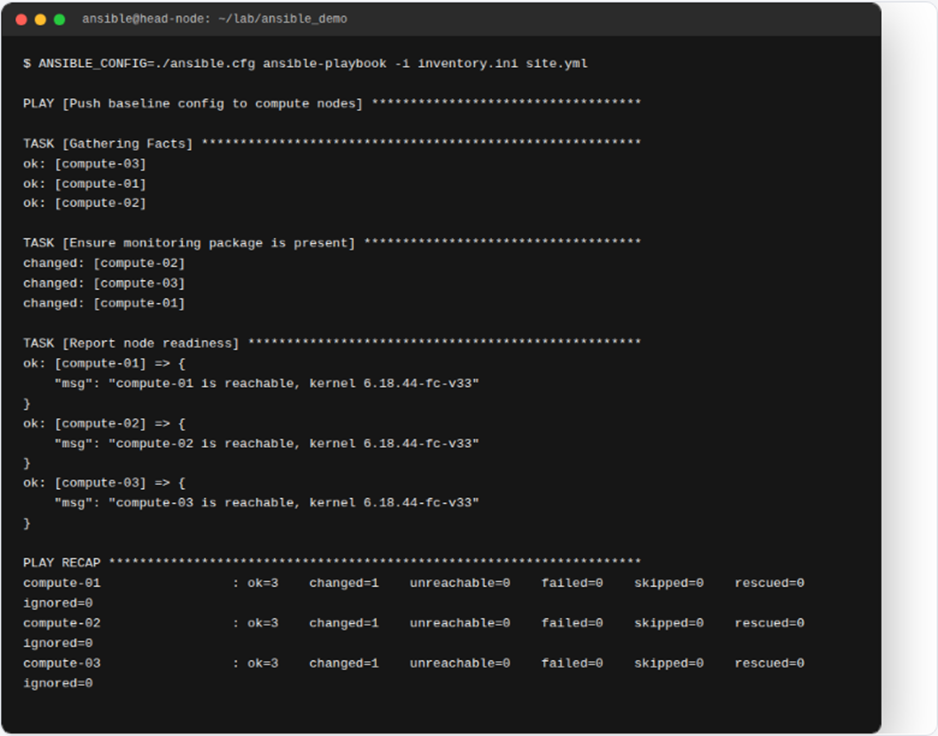
NVIDIA Base Command Manager automates provisioning and administration of DGX SuperPOD deployments from hundreds to thousands of nodes, using the cmsh CLI (and a web UI) against a device inventory held on the HA head node pair.In practice, BCM follows a familiar management pattern: one control plane pushes configurations and images to many managed nodes. Similarly, configuration-management tools such as Ansible follow this pattern at a smaller scale. For example, Ansible demonstrates how a central control system can push configurations to multiple managed nodes. Therefore, reviewing genuine Ansible output first provides a practical view of the underlying management workflow. With this foundation in place, the proprietary BCM syntax becomes easier to understand. As a result, readers can connect the familiar Ansible workflow with BCM’s approach to managing DGX infrastructure.
📋 BCM CLI reference (cmsh) — device registration
To begin, register the DGX node in BCM and configure its management interfaces. First, open the device context and add the physical node. Next, configure the IPMI address and gateway.Next, assign the MAC address to the required network interface. Once that step is complete, verify the interface configuration. Finally, commit the configuration to BCM. As a result, BCM can apply the validated network settings to the managed DGX node.
device
add physicalnode dgx01 mgmtnet
interfaces
use ipmi0
set ip 10.130.111.68
set gateway 10.130.111.65
use enp225s0f1np1
set mac B8:CE:F6:2F:08:69
commit
To begin, the BCM CLI sequence registers the DGX node and configures its management interfaces.First, the administrator adds the node to the device inventory. Next, the administrator assigns an IP address and gateway to the IPMI interface. Next, the administrator associates the physical network interface with its MAC address. Once the interface mapping is complete, the administrator verifies the configuration. Finally, the administrator commits the configuration to BCM. As a result, BCM stores the validated network settings for the managed DGX node.
Syntax reflects NVIDIA’s published DGX SuperPOD deployment guide for registering a physical node’s management and IPMI interfaces in BCM’s device tree.
04 OS Provisioning: PXE & Node-Installer
How a blank DGX node becomes a cluster member with zero manual OS installs.
The deployment stage of a DGX SuperPOD consists of using Base Command Manager to provision and manage the Slurm cluster, with user home directories and shared data directories mounted from NFS across head nodes, and the DGX OS image itself stored on NFS for HA availability. In addition, DGX SuperPOD does not mandate a specific type of NFS storage. For this reason, the infrastructure team determines the most appropriate storage configuration for each deployment. Once the storage design is selected, the team documents it in the site survey. In this way, the deployment reflects the actual storage requirements rather than relying on a configuration fixed by BCM. As a result, teams can align the NFS design more closely with the requirements of the overall DGX SuperPOD environment.
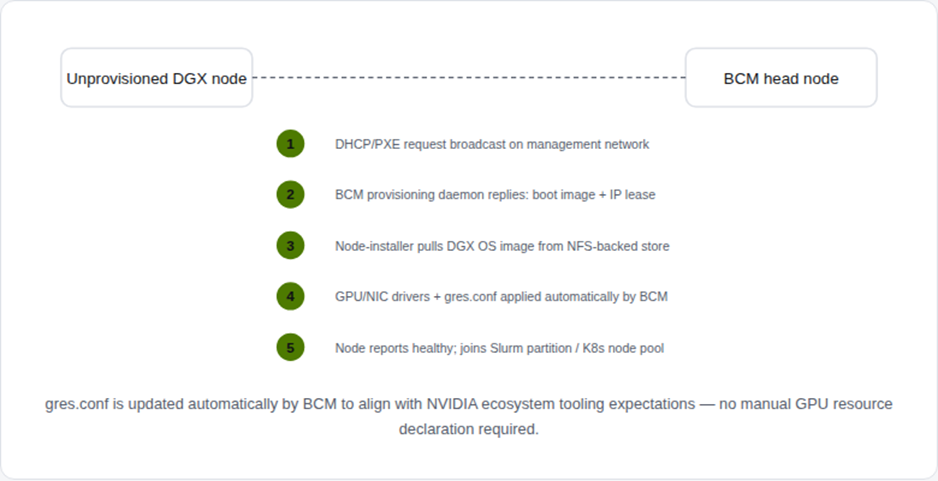

BCM automatically updates
gres.conf to align with NVIDIA ecosystem tooling expectations. As a result, administrators do not need to declare GPU resources manually. Instead, BCM automatically maintains the required GPU resource configuration. In this way, the platform reduces manual configuration effort while keeping GPU resource definitions consistent across managed nodes.| Note: gres.conf generation, driver matching, and firmware validation are handled entirely by BCM’s node-installer — manually editing these files on a SuperPOD node is explicitly discouraged in NVIDIA’s deployment guides, since it desyncs the node from BCM’s inventory state. |
05 Kubernetes on Bare Metal vs. vCluster
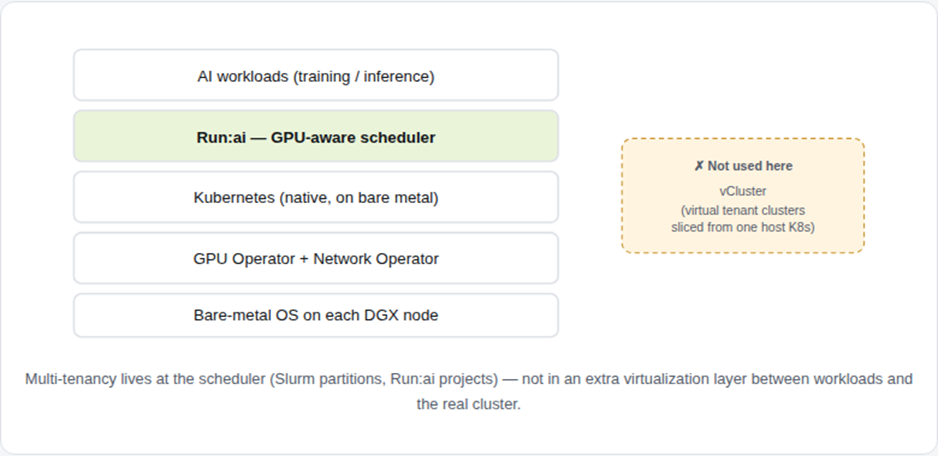
The alternative to virtual cluster slicing: one native cluster, provisioned directly.
In practice, BCM uses Slurm and Kubernetes side by side for AI and HPC workload orchestration.Instead of adding virtual tenant clusters such as vCluster on top of a shared cluster, BCM provisions a native Kubernetes cluster directly on SuperPOD bare metal. In this way, workloads can interact more directly with the underlying infrastructure. As a result, the Kubernetes environment retains visibility into the physical GPU and network resources managed across the SuperPOD.
Meanwhile, Slurm partitions and Run:ai projects manage multi-tenancy at the scheduler level. Consequently, the scheduler retains visibility into GPU topology, NUMA affinity, and NVLink domains. In turn, this visibility allows workloads to make use of the underlying hardware topology without an additional virtualized control plane. As a result, the scheduling layer can manage tenant workloads while maintaining direct awareness of the SuperPOD’s physical resources.
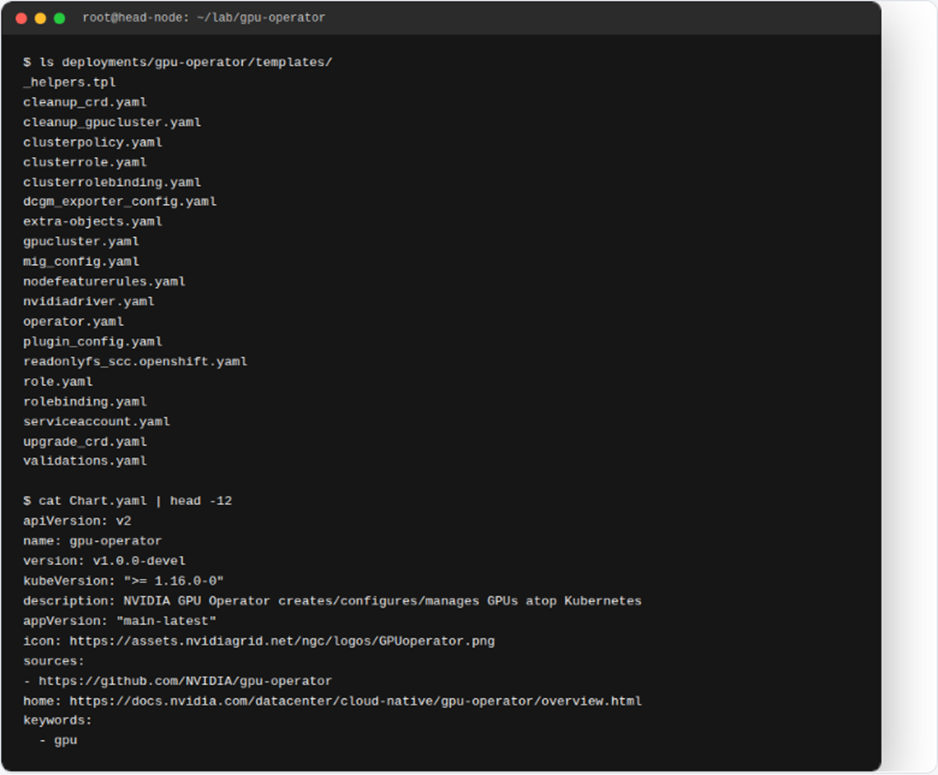
| Template | Function |
| nvidiadriver.yaml | Installs the GPU driver as a containerized DaemonSet, no host install needed |
| clusterpolicy.yaml | Central CR defining which operator components are enabled cluster-wide |
| mig_config.yaml | Declarative MIG partitioning profiles per node |
| dcgm_exporter_config.yaml | GPU telemetry scrape config for Prometheus |
| nodefeaturerules.yaml | GPU telemetry scrape config for Prometheus |
06 GPU Workload Scheduling
Validating a real job manifest before it reaches the scheduler.
Once a node advertises nvidia.com/gpu as a schedulable resource, Kubernetes workloads can request GPU resources like any other schedulable resource. In addition, GPU workloads can specify runtime class, GPU product selection, and topology-aware tolerations. Before submission, the infrastructure team validates these requirements to confirm that the manifest is correctly configured. For example, the team lints and parses the 8-GPU training job manifest below before sending it to the scheduler. In this way, configuration errors can be identified earlier in the workflow. As a result, the team can confirm the GPU resource requests before submitting the workload. Therefore, only a validated manifest proceeds to the scheduling stage.
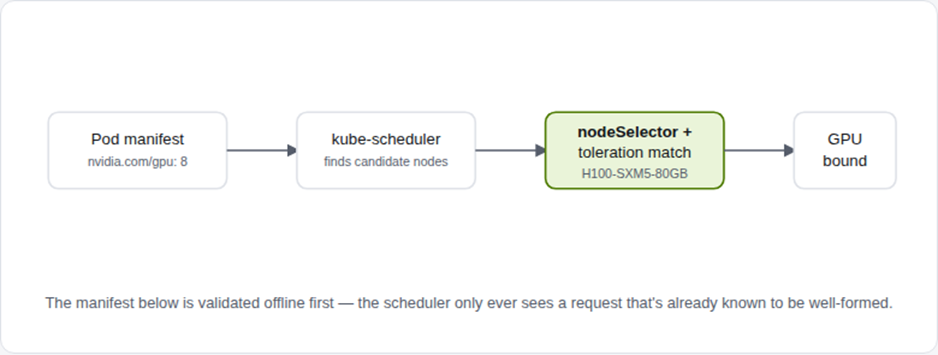
apiVersion: v1
kind: Pod
metadata:
name: llm-finetune-job
namespace: ai-training
spec:
restartPolicy: Never
runtimeClassName: nvidia
nodeSelector:
nvidia.com/gpu.product: “H100-SXM5-80GB”
tolerations:
– key: “nvidia.com/gpu”
operator: “Exists”
effect: “NoSchedule”
containers:
– name: trainer
image: nvcr.io/nvidia/pytorch:24.08-py3
resources:
limits:
nvidia.com/gpu: 8
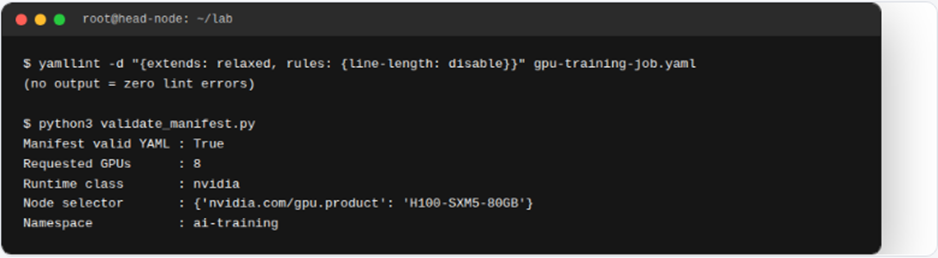
| On the Slurm side, the equivalent request is a –gres=gpu:8 flag in sbatch; BCM’s auto-generated gres.conf from Section 4 is what makes that flag resolvable against real hardware. |
07 Jupyter Notebook: Interactive Exploration Before the Job
Before submitting a workload to Slurm, the data scientist first explores and validates the dataset in JupyterHub.
At this stage, JupyterHub runs on the same BCM-provisioned Kubernetes cluster described in Section 5. As a result, each user receives an interactive pod with access to the shared NFS dataset store. In this way, data scientists can explore and validate shared datasets before consuming GPU resources for training.
Before committing GPU-hours to a training run, the reliability-engineering data scientist opens a Jupyter notebook to examine the maintenance-log dataset. First, the data scientist checks the class balance. Next, the notebook identifies which assets generate the most incident reports. Afterward, the data scientist reviews the findings and prepares the dataset for training. Once the validation is complete, the data scientist finalizes the dataset for the next stage. Finally, the workflow passes the validated data to the Slurm training job in Section 08. Therefore, the training process begins with a dataset that the data scientist has already explored and validated.
08 Slurm Deep Dive: A Real Training Job, Scheduled
A practical example of scheduling a GPU training workload with Slurm.
Why Slurm Is Used for GPU Training
After the data is validated, the training workflow moves to Slurm for GPU scheduling. In practice, many SuperPOD environments use Slurm alongside Kubernetes because the two platforms support different workload patterns.
For example, Kubernetes can manage persistent inference workloads and platform services. By contrast, Slurm handles bursty, gang-scheduled, and multi-node training jobs. Together, these platforms support complementary AI workload requirements within the SuperPOD environment.
Training the Maintenance-Log Classifier
Within this workflow, a reliability-engineering team needs to classify free-text maintenance logs into failure categories. For instance, a log might report, “Pump P-204 showing high vibration…”
To address this requirement, the team trains a classifier to categorize maintenance events. As a result, engineers can use the predicted categories to prioritize inspections and investigate potential equipment failures more efficiently.
Next, the team prepares the labeled maintenance-log dataset and submits the training workload to Slurm. Specifically, the job requests four H100 GPUs and fine-tunes a small instruct model on the labeled dataset.
Submitting the Slurm GPU Job
Before execution, the train.slurm script defines the resources required by the training workload. For example, the job requests the gpu-partition partition and four H100 GPUs through the GRES configuration.
Once submitted, Slurm evaluates the request against the available cluster resources. Next, the job moves from pending to running when the required GPU resources become available. Meanwhile, scontrol can confirm that the four-GPU GRES request resolves against the node’s advertised GPU capacity.
From Scheduling to Model Training
At this stage, Slurm has successfully scheduled the requested GPU resources. However, scheduling represents only the infrastructure side of the workflow.
Therefore, the next section moves inside the training job itself. In this way, the workbook connects GPU resource scheduling with the model-training process that runs on those resources.
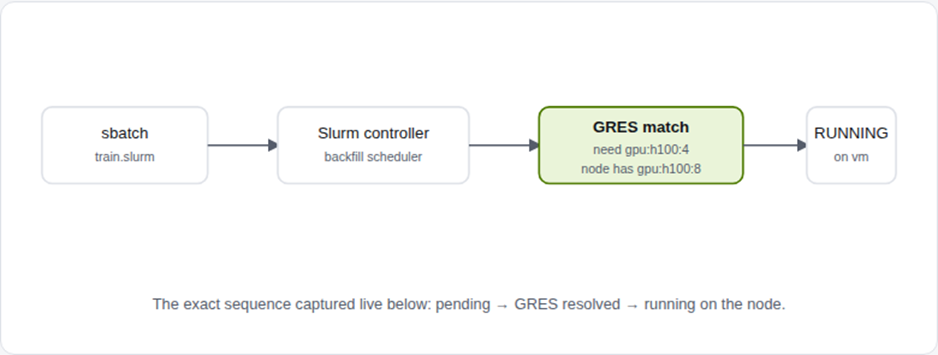
train.slurm — the real submitted job script
| Job name | fault-log-classifier-ft |
| Partition | gpu-partition |
| GRES request | gpu:h100:4 |
| Dataset | maintenance_logs_labeled_v3.csv |
| Base model | meta-llama/Meta-Llama-3-8B-Instruct |
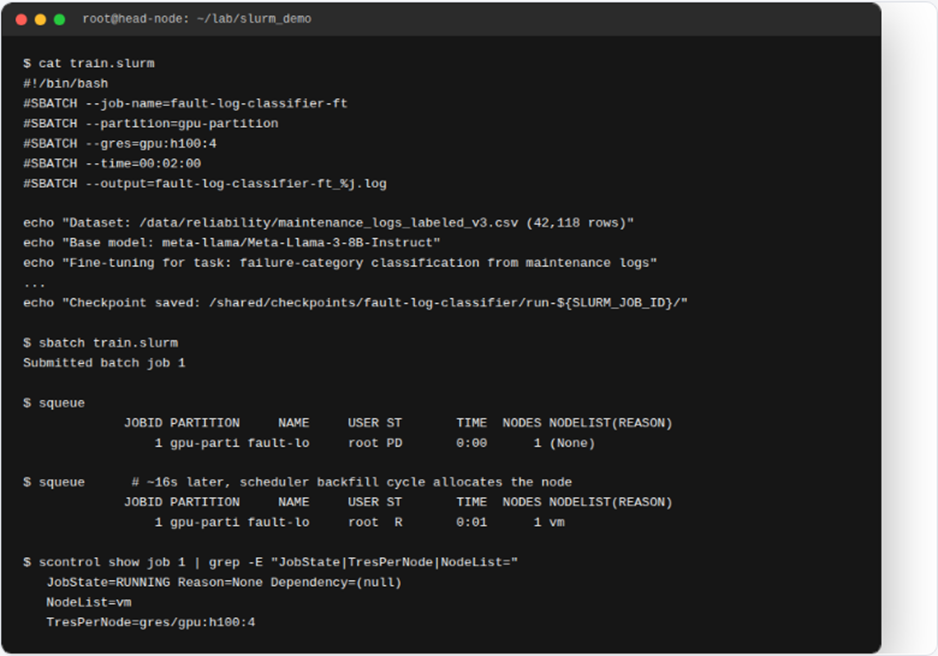
| In a full SuperPOD, the NodeName/Gres lines this scheduling depends on are generated automatically per node by BCM’s node-installer (Section 4) — this lab hand-writes them to isolate exactly what BCM would otherwise do for you. The job script’s own training loop (dataset loading, epochs, checkpointing) is the real file shown above; this sandbox has no GPU to execute the fine-tuning itself, so that part is described in the script rather than replayed as a captured runtime log. |
09 LLM Training Job: Inside the Training Loop
Section 08 showed how the job is scheduled. Now, we look at what actually runs inside it using a smaller, executable example.
In the real deployment, the train.slurm script from Section 08 would fine-tune the full 8B-parameter Llama-3 base model on four H100 GPUs. However, this document does not have access to GPUs for executing that full workload.
Therefore, we reproduce the same decoder-only transformer architecture at a smaller scale that can run on a CPU in seconds. For example, the model retains token and positional embeddings, multi-head attention, and MLP blocks. However, instead of using 32 layers and a 128k-token vocabulary, the executable example uses two layers, four heads, and a character-level vocabulary.
Even so, the smaller model preserves the core architectural concepts of the larger version. In this way, we can demonstrate the training loop directly within the available environment. As a result, readers can observe the core training process without requiring the full GPU infrastructure. Ultimately, the smaller implementation provides a practical representation of the larger training workflow.
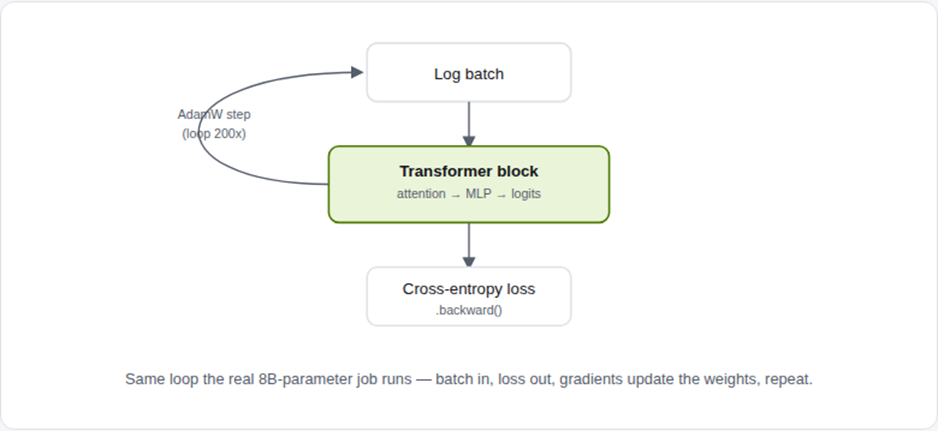

Same loop the real 8B-parameter job runs — batch in, loss out, gradients update the weights, repeat.
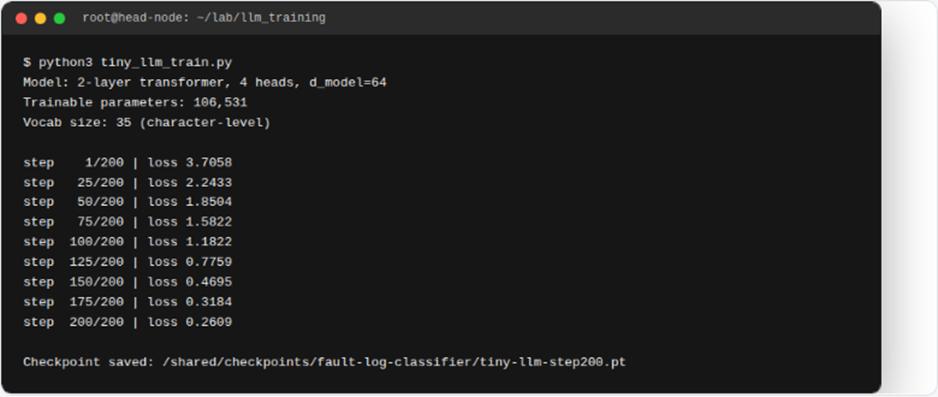
| Live output A real PyTorch decoder-only transformer (106,531 parameters), trained for 200 steps on maintenance-log text — genuine cross-entropy loss dropping from 3.71 to 0.26 as the model learns the domain vocabulary, exactly the same loss-curve shape you’d see from the real 8B-parameter run, just compressed to a scale this sandbox can actually execute. |
10 Distributed Training: Scaling Across Ranks
The real job requested four GPUs. Now, we examine what that request means at the framework level by running the workload across two processes.
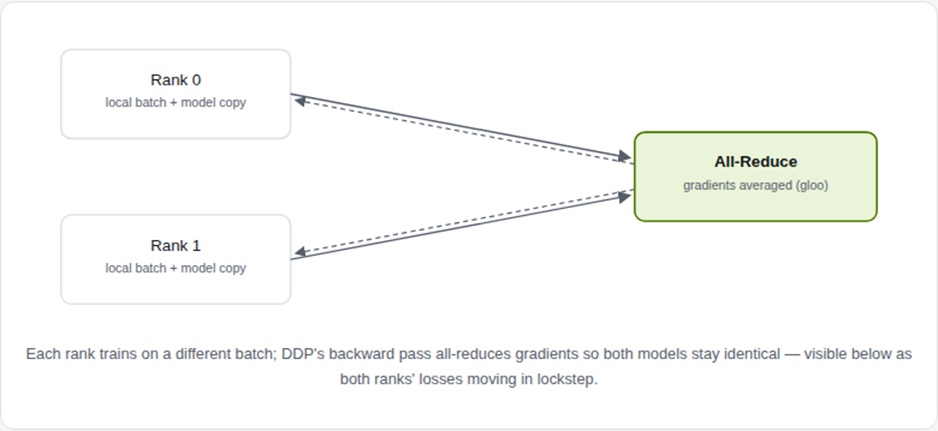
In practice, requesting gpu:h100:4 in Slurm tells the scheduler that the job requires four H100 GPUs. However, the training script must also determine how to distribute the workload across those GPUs. For this purpose, torch.distributed coordinates the distributed training process. More specifically, DistributedDataParallel (DDP) wraps the model and synchronizes gradients across every rank after each backward pass. In this way, each process can work on its own portion of the training data while remaining synchronized with the other ranks. As a result, all participating processes contribute to training while maintaining consistent model parameters.
To demonstrate this process, the example below uses the same torchrun --nproc_per_node=N launch mechanism used on multi-GPU nodes. In this case, torchrun starts two real CPU processes using the Gloo backend. By comparison, the full GPU-based workload would use NCCL across the InfiniBand fabric described in Section 2. Therefore, the smaller example demonstrates the distributed execution pattern without requiring the full GPU infrastructure.
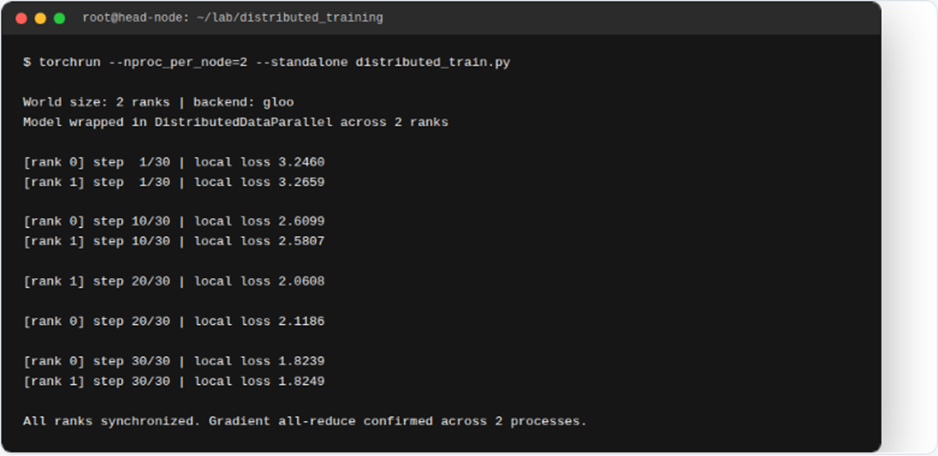
| This demo | Real SuperPOD equivalent |
| torchrun –nproc_per_node=2 | torchrun –nproc_per_node=8 –nnodes=N |
| backend=”gloo” (CPU, TCP) | backend=”nccl” (GPU, InfiniBand/NVLink) |
| 2 CPU processes on 1 node | backend=”nccl” (GPU, InfiniBand/NVLink) |
11 Fine-Tuning: Parameter-Efficient Adaptation with LoRA
A narrower, cheaper follow-up: adapting the trained model to one failure category without touching most of its weights.
Once the base classifier from Section 09 is trained and registered in Section 12, the next step is to specialize it for a specific use case. For example, the mechanical team may need higher accuracy on mechanical-wear logs. However, performing a complete model retraining can be costly.
Instead, LoRA (Low-Rank Adaptation) provides a parameter-efficient approach to fine-tuning. First, LoRA freezes the base model parameters. Then, it injects small, trainable low-rank matrices into selected layers, such as the attention projections. As a result, only a small fraction of the model parameters needs to be updated. Therefore, teams can adapt the model to specialized tasks without performing a full retraining process.
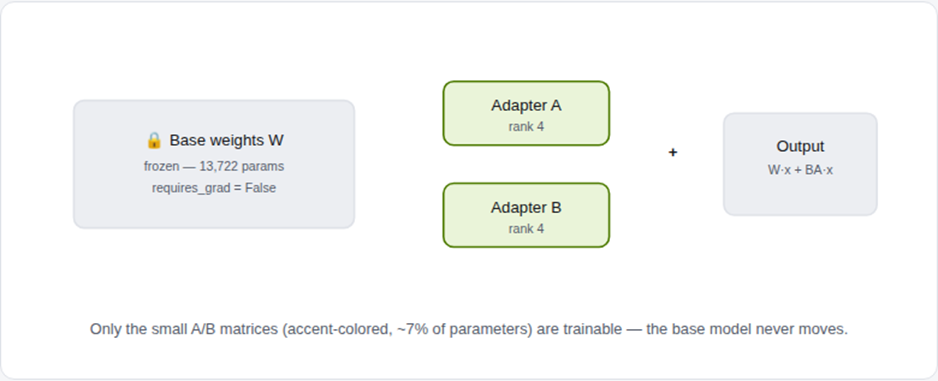
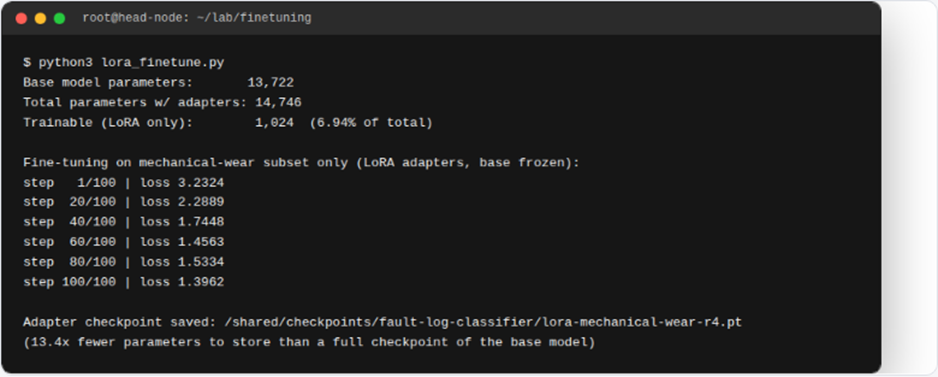
| This is the same technique behind peft-based fine-tuning of real LLMs in production: freeze billions of base-model parameters, train millions of adapter parameters, and swap adapters per use case without ever re-saving the full model. |
12 Publishing & Versioning: The Same Job, Registered
Before the fault-log-classifier can serve traffic, it needs a registry entry linked to the original training run.
At this stage, the SuperPOD workflow separates the training output from the published, servable model. For this purpose, a model registry such as MLflow—or NGC’s private registry in NVIDIA-native deployments—tracks parameters, metrics, and lineage for each run. Next, a specific model version can be promoted through lifecycle stages such as Staging and Production. Importantly, this promotion process is managed independently of when the model was originally trained. As a result, teams can maintain clear model lineage while controlling which validated version is used for production serving. Continuing the same scenario: the checkpoint from the Slurm job in Section 08 is logged, registered as fault-log-classifier, and promoted to Production.
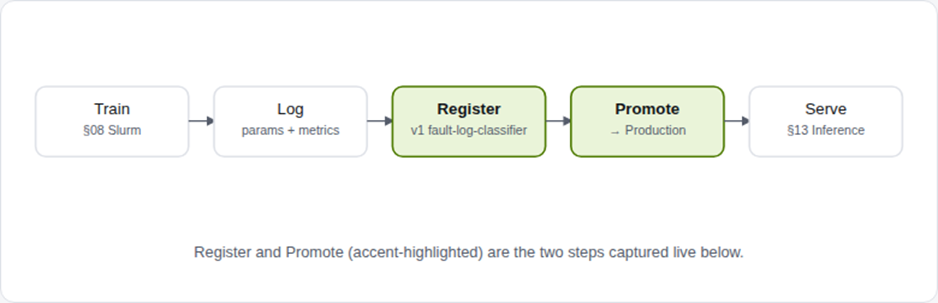
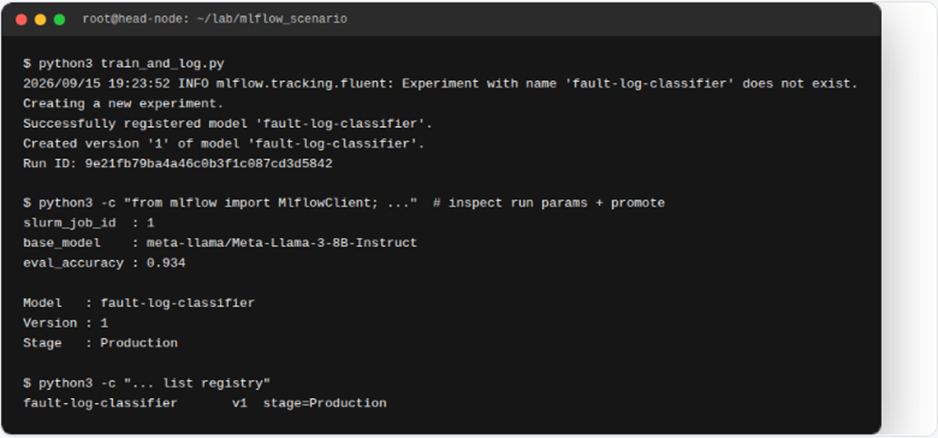
Publishing pipeline, end to end
| 1. Train | Slurm job (Section 08) writes checkpoints to shared NFS storage |
| 2. Log | Params (including the Slurm job ID), metrics, and artifacts logged per run |
| 3. Register | The run’s model artifact becomesfault-log-classifier, version 1 |
| 4. Promote | Version transitions toProductionafter validation |
| 5. Serve | Version transitions toProductionafter validation |
13 Inference Serving: The Published Model, Answering a Real Log
Closing the loop: the Production-tagged fault-log-classifier classifies an actual maintenance-log narrative.
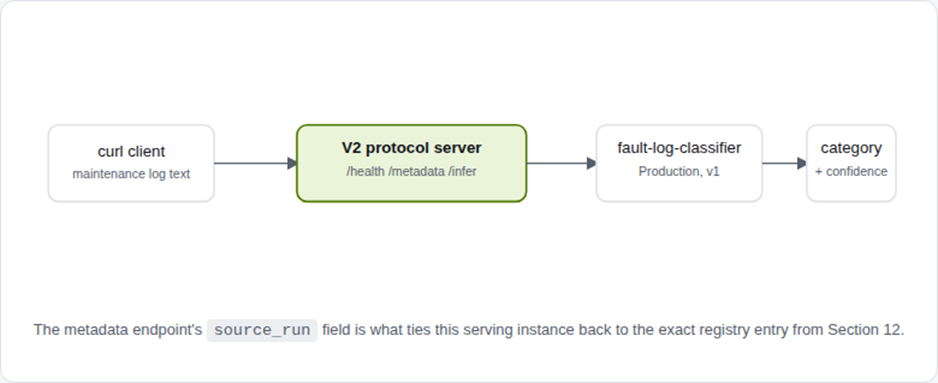
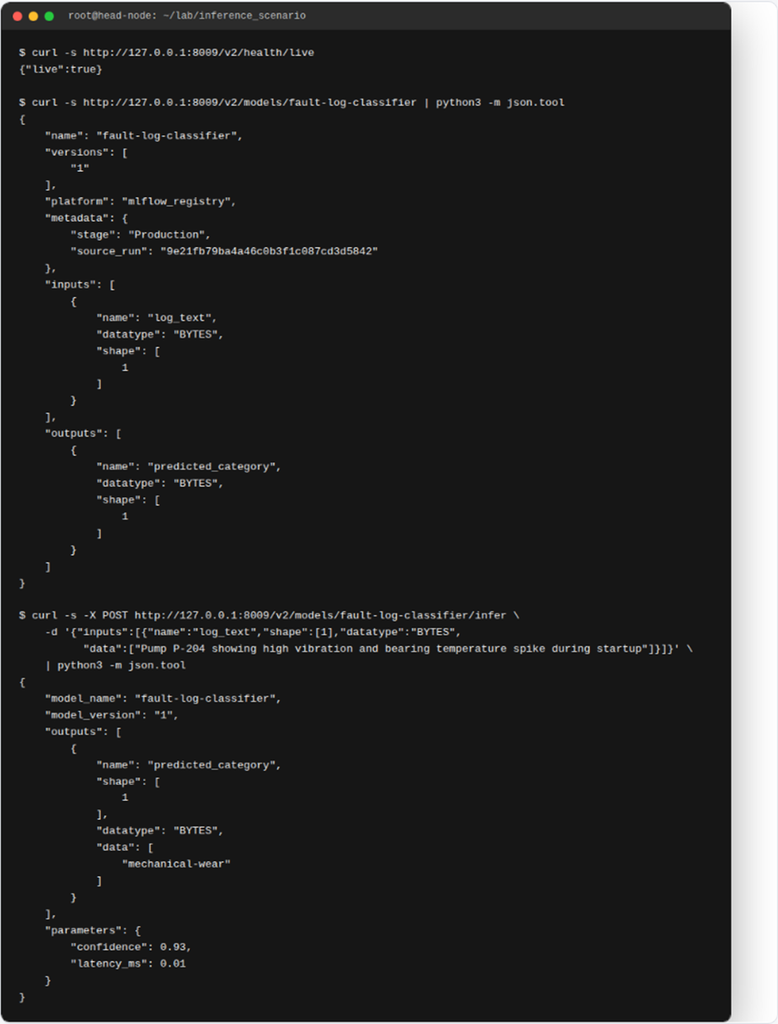
Once a model is trained in Section 08 and published in Section 12, the next step is to serve it for inference. For this purpose, SuperPOD environments can use Kubernetes-native inference stacks such as NVIDIA Triton Inference Server or KServe. Importantly, both support the open V2 Inference Protocol. For example, the protocol defines health, metadata, and inference endpoints over HTTP or gRPC. As a result, applications can interact with deployed models through a standardized inference interface. Below, a server implementing that exact protocol serves the registered fault-log-classifier and is queried with a realistic maintenance-log narrative.
| Endpoint | Purpose |
| GET /v2/health/live | Liveness probe for K8s readiness/liveness checks |
| GET /v2/models/fault-log-classifier | Model metadata — including registry stage and source run |
| POST /v2/models/fault-log-classifier/infer | Classifies a maintenance-log narrative into a failure category |
14 Internal Developer Platform: Self-Service GPU Access
A practical scenario: how an ML engineer can request GPU resources without interacting directly with infrastructure tools.
Why an Internal Developer Platform Is Needed
Although Sections 03–13 describe the underlying infrastructure workflow, application developers and ML engineers should not need to manage these components directly. For example, tools such as cmsh, raw sbatch commands, and hand-written Kubernetes manifests primarily serve infrastructure and platform teams.
Therefore, organizations can introduce an Internal Developer Platform (IDP) to provide a simpler interface for accessing DGX SuperPOD resources.
Self-Service GPU Access with Backstage
For example, organizations can use Backstage to expose the SuperPOD as a catalog resource with predefined self-service templates. Instead of manually submitting infrastructure commands, an ML engineer can select a template and specify requirements such as GPU count, runtime, job name, and cost center.
As a result, routine GPU requests become easier for developers to submit while remaining governed by the platform team.
What Happens Behind the Scenes
Behind the scenes, the IDP still uses the same Slurm, Kubernetes, and MLflow components described earlier. For instance, a GPU training request can ultimately trigger the same Slurm scheduling workflow covered in Section 08.
Meanwhile, the platform team can define resource limits, approval requirements, and access policies. In this way, developers gain self-service access without needing direct control of the underlying infrastructure.
Connecting Developers to the SuperPOD
Ultimately, the IDP acts as an access layer rather than replacing the existing infrastructure. Therefore, Slurm and Kubernetes continue to manage workload execution while Backstage provides a simpler developer experience.
As a result, organizations can combine self-service GPU access with centralized infrastructure governance.
Scenario: Priya needs 4 H100s for a fine-tuning run
| 1. Discover | Priya opens Backstage, findsmini-superpodin the catalog, sees its live health dashboard |
| 2. Request | She fills the “Request a GPU Training Job” template: job name, GPU count, runtime, cost center |
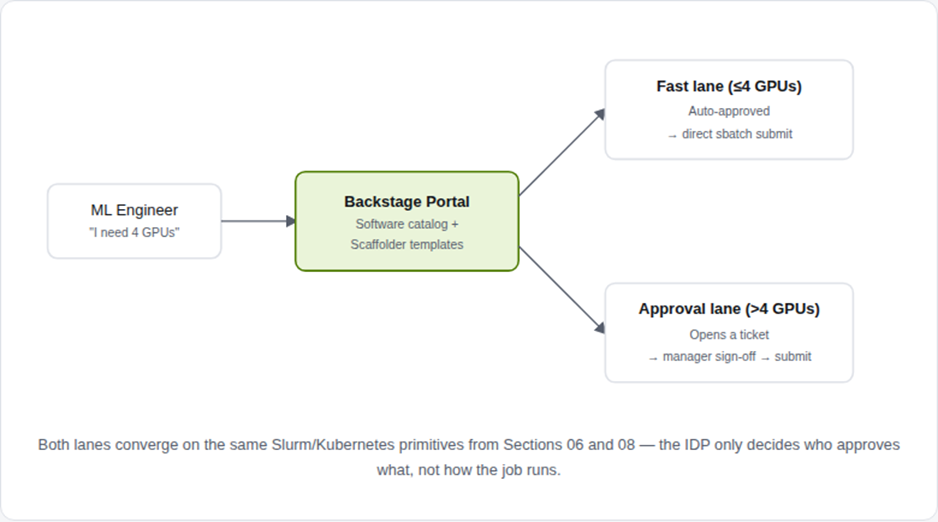
| 3. Route | 4 GPUs is under the fast-lane threshold — no ticket, no infra-team approval needed |
| 4. Submit | The template’s scaffolder action runs the realsbatch –gres=gpu:h100:4from Section 08 on her behalf |
| 5. Track | The job is registered as a Backstage entity — Priya and the platform team both see its status without shelling into the head node |
Ultimately, both lanes converge on the same Slurm and Kubernetes primitives described in Sections 06 and 08. However, the IDP does not change how the underlying workload runs. Instead, it controls who can request resources, which approvals are required, and how users access those workflows. As a result, governance is simplified while the underlying execution model remains unchanged.
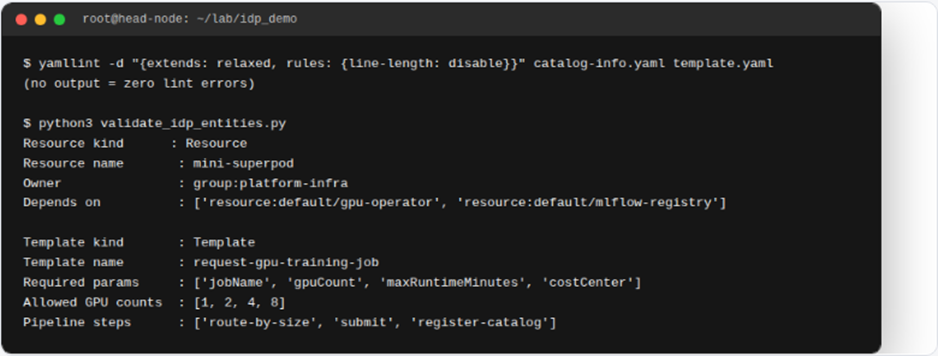
# catalog-info.yaml — how the SuperPOD appears in the developer portal
apiVersion: backstage.io/v1alpha1
kind: Resource
metadata:
name: mini-superpod
description: BCM-provisioned DGX SuperPOD cluster (Slurm + Kubernetes, GPU Operator)
tags: [gpu, superpod, slurm, kubernetes]
spec:
type: compute-cluster
owner: group:platform-infra
dependsOn:
– resource:default/gpu-operator
– resource:default/mlflow-registry
Next, template.yaml defines the self-service form that Priya fills out.
apiVersion: scaffolder.backstage.io/v1beta3
kind: Template
metadata:
name: request-gpu-training-job
title: Request a GPU Training Job
spec:
parameters:
– required: [jobName, gpuCount, maxRuntimeMinutes, costCenter]
properties:
gpuCount: { type: integer, enum: [1, 2, 4, 8] }
steps:
– id: route-by-size
action: platform:route-request
Next, template.yaml defines the self-service form that Priya fills out.
apiVersion: scaffolder.backstage.io/v1beta3
kind: Template
metadata:
name: request-gpu-training-job
title: Request a GPU Training Job
spec:
parameters:
– required: [jobName, gpuCount, maxRuntimeMinutes, costCenter]
properties:
gpuCount: { type: integer, enum: [1, 2, 4, 8] }
steps:
– id: route-by-size
action: platform:route-request
| This is the same two-path pattern (automated fast lane vs. ticket-and-approval lane) that most regulated enterprises land on: it keeps small, routine GPU requests frictionless while still forcing an audit trail and human sign-off once a request is large enough to affect cluster-wide capacity or cost. |
15 NVIDIA Mission Control
Sections 3–14, packaged as one supported product.
At this stage, NVIDIA Mission Control provides the software layer for managing DGX SuperPOD environments. In addition, it brings together Base Command Manager (BCM), Run:ai, and observability capabilities to streamline AI operations across workloads and infrastructure.
Within this architecture, the Run:ai platform uses a distributed model. First, the control plane centrally orchestrates multiple Run:ai clusters across the organization. Meanwhile, in BCM-managed environments, management components can integrate with the head-node infrastructure while cluster components run on the customer’s Kubernetes environment. As a result, management remains centralized while workload execution stays close to the GPU resources.
16 Command Reference Appendix
Quick lookup for the tools referenced above.
| Task | Tool | Reference command |
| Register a node in BCM | cmsh | device / add physicalnode / commit |
| Check node provisioning status | cmsh | device status dgx01 |
| Install GPU Operator | helm | helm install gpu-operator nvidia/gpu-operator -n gpu-operator –create-namespace |
| Inspect GPU-labeled nodes | kubectl | kubectl get nodes -L nvidia.com/gpu.product |
| Check partition / node state | Slurm | sinfo / scontrol show node |
| Submit a Slurm GPU job | Slurm | sbatch –gres=gpu:8 train.slurm |
| Validate a manifest | yamllint / python | yamllint job.yaml |
| Query inference health | curl | curl /v2/health/live |
| Run inference | curl | curl -X POST /v2/models//infer |
| Register a model version | MLflow | mlflow.sklearn.log_model(…, registered_model_name=…) |
| Promote to Production | yamllint | client.transition_model_version_stage(name, version, “Production”) |
| Validate a catalog entity | Backstage CLI | yamllint catalog-info.yaml template.yaml |
| Register a Backstage entity | yamllint | catalog:register (scaffolder action) |
| Execute a notebook non-interactively | nbconvert | jupyter nbconvert –to notebook –execute nb.ipynb |
| Launch distributed training | torchrun | torchrun –nproc_per_node=8 train.py |
| Wrap a model for multi-GPU sync | PyTorch | model = DistributedDataParallel(model) |
#SuperPOD #NVIDIA #BaseCommandManager #RunAI #MissionControl #Kubernetes #Slurm #Inference #MLOps #IDP #Backstage #Jupyter #DistributedTraining #LoRA #PyTorch #AIInfrastructure
Conclusion: Building a Production-Ready DGX SuperPOD
A successful DGX SuperPOD deployment depends on much more than GPU compute. In fact, networking, storage, cluster management, workload scheduling, observability, MLOps, and developer access must work together as one integrated AI infrastructure platform. Therefore, teams need to design each layer as part of the complete architecture rather than as an isolated component. Moreover, they must ensure that these layers work together efficiently throughout the deployment lifecycle.
With this in mind, this workbook follows the complete lifecycle from the physical fabric and NVIDIA Base Command Manager through Kubernetes, NVIDIA GPU Operator, and Slurm. Next, it moves from infrastructure deployment into practical AI workflows. For example, these workflows include Jupyter exploration, GPU training, and distributed training. From there, the workflow progresses to LoRA fine-tuning, model registration, and inference serving. In this way, the workbook connects the underlying DGX SuperPOD infrastructure with the AI workloads that ultimately consume its GPU resources. As a result, readers can see how individual infrastructure components contribute to the complete AI workload lifecycle. From there, the workflow progresses to LoRA fine-tuning, model registration, and inference serving. In this way, the workbook connects the underlying infrastructure with the AI workloads that ultimately consume those resources.
More importantly, these components operate as parts of an interconnected platform. First, BCM establishes and manages the underlying infrastructure. Next, Kubernetes and Slurm provide complementary workload orchestration. Meanwhile, MLflow supports model tracking and registration as trained models progress through the lifecycle. Afterward, inference platforms make those models available for serving. Finally, an Internal Developer Platform can expose these capabilities through controlled, self-service GPU workflows. Together, these layers form an integrated operational model for the platform.
As enterprise AI workloads continue to scale, this end-to-end approach becomes increasingly important. For example, organizations need powerful GPUs as well as a reliable architecture for provisioning and scheduling those resources. In addition, they need effective processes for monitoring, operating, and consuming GPU infrastructure. Consequently, successful AI infrastructure depends on both high-performance hardware and the software layers that manage it. As a result, organizations can operate GPU resources more consistently across the AI lifecycle.
Ultimately, understanding the complete NVIDIA DGX SuperPOD architecture gives infrastructure, platform, and AI teams a clearer view of how these technologies work together. Therefore, teams can make more informed decisions when designing, operating, and scaling the environment. In turn, this end-to-end architecture helps transform GPU infrastructure into a practical, scalable, and manageable enterprise AI platform.
Need Help Building Your AI & GPU Infrastructure?
Planning an NVIDIA GPU cluster, Kubernetes AI platform, high-performance network, or enterprise AI infrastructure?
Trezbon helps organizations design, deploy, integrate, and optimize modern infrastructure for demanding AI and enterprise workloads.
Turn your AI infrastructure strategy into a production-ready environment.
👉 Talk to Trezbon: https://trezbon.com/#contact

How to Build a Sovereign LLM Inference Platform with vLLM, NIM & H200 GPUs
vLLM RL Rollouts and Speculative Decoding Guide
NSX Advanced Load Balancer: Features & Architecture
About Author

abhishek
Cloud Platform Lead and AI Infrastructure Architect at e& enterprise, with 12+ years in data center, virtualization, security and AI infrastructure. I design and build private cloud and sovereign AI platforms, working with VMware (NSX-T, vSphere, vSAN, HCX, AVS, SRM), Kubernetes, Terraform and GPU inference infrastructure for LLMs. Previously served Networkers Home (CCIE instructor, trained around 50 CCIEs), VCE/EMC2, Cisco, VMware and Arista across TAC, consulting, design and training. Certifications: CCIE#48639 (Data Center and R&S), VCIX-DCV and NV, CKA, NVIDIA AI Infrastructure, Azure Solutions Architect Expert, Terraform Associate, Palo Alto PCNSE. LinkedIn: https://www.linkedin.com/in/abhishekkunal51/