NVIDIA GPU Operator on Kubernetes: Cluster Validation Guide – Part 3
Deploying the NVIDIA GPU Operator on Kubernetes is an important step toward building a reliable GPU infrastructure. However, installing the operator is only the beginning. Engineers must also understand how Kubernetes monitors cluster resources, discovers hardware, and prepares GPU workloads.
In Part 2 of the Falcon AI workbook series, we installed the NVIDIA GPU Operator and Network Operator. Both controllers are now running successfully. However, GPU worker nodes have not yet joined the cluster.
So, what happens inside Kubernetes while the operators wait for GPU hardware?
In this guide, we explore four important components: Custom Resource Definitions (CRDs), Role-Based Access Control (RBAC), operator reconciliation, and Node Feature Discovery (NFD).
Additionally, we examine practical Kubernetes commands to verify operator health and identify configuration issues before adding GPU worker nodes.
By the end of this article, you will understand how the NVIDIA GPU Operator on Kubernetes prepares the cluster for GPU node discovery and workload deployment.
Before continuing: Review Part 2 — Installing the GPU and Network Operators to understand the initial configuration.
Prerequisite
You’ve completed Part 2: GPU Operator and Network Operator are both
Runningin thegpu-operatorandnetwork-operatornamespaces on your Falcon AI cluster. Still zero worker nodes — that’s expected.
Recap: where Falcon AI stands
| Role | Count | Hostnames | Status after Part 2 |
|---|---|---|---|
| Management (control plane) | 3 | mgmt-01, mgmt-02, mgmt-03 | Ready, tainted NoSchedule |
| GPU worker | 2 (growing) | gpu-wk-01, gpu-wk-02 | Not yet built — arrives in Part 4 |
| Load balancer | 1 | k8s-lb | Fronting API server on :6443 |
| GPU Operator | — | gpu-operator namespace | Controller Running, idle-watching |
| Network Operator | — | network-operator namespace | Controller Running, idle-watching |
Why this post exists
In Part 2, we successfully deployed the GPU Operator and Network Operator. However, running an operator does not necessarily mean the entire GPU environment is ready.
Therefore, before adding GPU hardware, we must verify that the controllers are functioning correctly.
First, we will examine the operator configuration. Next, we will inspect permissions and controller activity. Finally, we will verify the hardware discovery components.
As a result, engineers can establish a healthy baseline and troubleshoot future GPU deployment issues more effectively.
The four things an Operator does on install — and how to see each one
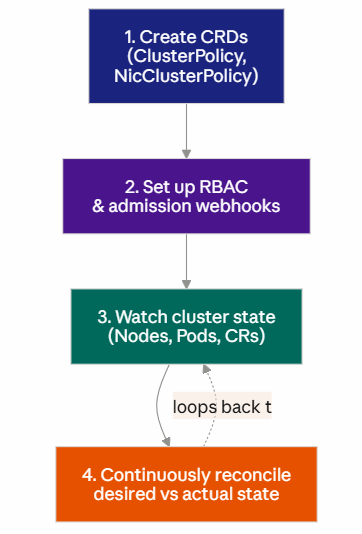
We’ll inspect each of these four in order, on mgmt-01.
1. CRDs — The Operator’s Configuration Model
First, the NVIDIA GPU Operator uses Custom Resource Definitions (CRDs) to extend the Kubernetes API.
For example, the ClusterPolicy resource defines the desired GPU software configuration. Instead of manually configuring every component, administrators can manage settings through this resource.
Additionally, the operator continuously compares the desired configuration with the cluster’s actual state.
Consequently, when GPU worker nodes become available, the operator can begin deploying the required components according to its configuration.
kubectl get crd | grep -i nvidiaExpected output:
clusterpolicies.nvidia.com
nicclusterpolicies.mellanox.com
Inspect the actual policy Falcon AI is running:
kubectl get clusterpolicy -o yamlLook for spec.driver.enabled, spec.devicePlugin.enabled, spec.migManager.enabled — these should match the --set flags from your Part 2 Helm install. This YAML is the operator’s source of truth; when gpu-wk-01 joins, this is the spec it gets reconciled against.
2. RBAC and admission webhooks
Next, Kubernetes uses Role-Based Access Control (RBAC) to manage operator permissions.These permissions allow controllers to monitor resources and perform authorized configuration changes.
In addition, admission webhooks can validate or modify Kubernetes resources before they are stored.
However, not every NVIDIA GPU Operator deployment includes the same webhook configurations. Therefore, administrators should verify which admission controls are installed.
This distinction is important because Kubernetes API validation and operator-specific admission policies serve different purposes.
3. Understanding the Operator Reconciliation Loop
Once the operator starts, its controller monitors relevant Kubernetes resources and works to maintain the desired cluster configuration.
Initially, no GPU worker nodes are available in the Falcon AI environment. Therefore, certain GPU-specific components may remain undeployed.
Nevertheless, the controller can continue operating normally.
To verify its health, administrators should inspect the operator logs, deployment status, and Kubernetes events.
As a result, they can distinguish expected waiting behavior from actual configuration or deployment failures.
4. Node Feature Discovery and GPU Detection
Finally, Node Feature Discovery (NFD) helps Kubernetes identify hardware capabilities.
When a GPU worker node joins the cluster, NFD can detect supported hardware features and publish corresponding node labels.
Subsequently, the NVIDIA GPU Operator uses relevant node information to determine which GPU software components should be deployed.
However, GPU Feature Discovery and NFD perform different roles, and their availability depends on the operator configuration.
Therefore, administrators should inspect the deployed components rather than assume that every discovery pod is already running.
Together, these mechanisms help prepare Kubernetes for GPU workload scheduling.
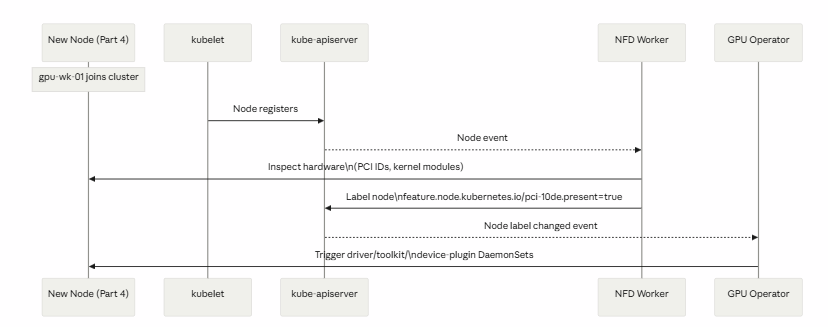
This sequence diagram is the answer to “how does the operator know a GPU showed up” — NFD is the sensor, the operator is the actuator.
Troubleshooting checkpoint
If kubectl logs -n gpu-operator deployment/gpu-operator shows repeated errors instead of clean reconcile lines, resolve those now — don’t carry a noisy operator into Part 4, where errors get much harder to distinguish from genuine hardware issues.
kubectl get events -n gpu-operator --sort-by='.lastTimestamp' | tail -20Conclusion: Validating the NVIDIA GPU Operator on Kubernetes
Successfully deploying the NVIDIA GPU Operator on Kubernetes is only the first step toward building a production-ready GPU environment. However, verifying the operator’s behavior before introducing GPU hardware is equally important.
Throughout this guide, we examined how Kubernetes operators manage configuration, permissions, reconciliation, and hardware discovery.
First, we explored how Custom Resource Definitions (CRDs) and ClusterPolicy establish the desired GPU configuration. Next, we reviewed RBAC permissions and admission controls to understand how Kubernetes manages access and resource validation.
Additionally, we examined the operator reconciliation process to identify normal controller behavior. Finally, we discussed how Node Feature Discovery helps identify hardware capabilities when GPU worker nodes join the cluster.
As a result, infrastructure engineers can establish a reliable baseline for troubleshooting and avoid confusing expected waiting behavior with genuine deployment failures.
The key takeaway: A healthy Kubernetes GPU environment starts with understanding and validating its operators before deploying GPU workloads.
What’s Next in the Falcon AI Series?
In Part 4 — Adding GPU Worker Nodes, we will introduce gpu-wk-01 and gpu-wk-02 into the Falcon AI cluster.
Subsequently, we will examine how hardware discovery, operator reconciliation, NVIDIA drivers, container toolkits, and device plugins work together to prepare GPU resources for Kubernetes workloads.
Continue following the Falcon AI workbook series on NETWORK BACHELOR for practical guidance on NVIDIA GPU infrastructure, Kubernetes operations, and enterprise AI deployments.
Building a Kubernetes GPU Infrastructure for Enterprise AI?
Deploying GPU operators is just one part of building a reliable AI infrastructure. From Kubernetes architecture and GPU networking to infrastructure security and operational readiness, every component requires careful planning.
TREZBON TECHNOLOGIES helps organizations evaluate and design enterprise IT infrastructure, networking, and cybersecurity solutions aligned with their business requirements.
Planning a GPU-enabled Kubernetes environment?
Connect with our consulting team to discuss your infrastructure requirements.
🌐 Explore our services: https://www.trezbon.com/
📩 Contact TREZBON TECHNOLOGIES: https://trezbon.com/contact
Follow NETWORK BACHELOR for practical tutorials on Kubernetes, NVIDIA GPU infrastructure, enterprise networking, and AI technologies.
Next in the series: Part 4 — Adding GPU Worker Nodes, where gpu-wk-01 and gpu-wk-02 join the cluster for real and you’ll watch this entire reconcile chain fire — NFD labels the node, the operator reacts, and driver/toolkit/device-plugin DaemonSets land on the hardware for the first time.

Retina Scanning and Biometric Security: What You Need to Know About Privacy and Data Protection

Agentic Workloads Break Your Capacity Model
API Security Architecture: Inline vs Out-of-Band Enforcement
About Author

abhishek
Cloud Platform Lead and AI Infrastructure Architect at e& enterprise, with 12+ years in data center, virtualization, security and AI infrastructure. I design and build private cloud and sovereign AI platforms, working with VMware (NSX-T, vSphere, vSAN, HCX, AVS, SRM), Kubernetes, Terraform and GPU inference infrastructure for LLMs. Previously served Networkers Home (CCIE instructor, trained around 50 CCIEs), VCE/EMC2, Cisco, VMware and Arista across TAC, consulting, design and training. Certifications: CCIE#48639 (Data Center and R&S), VCIX-DCV and NV, CKA, NVIDIA AI Infrastructure, Azure Solutions Architect Expert, Terraform Associate, Palo Alto PCNSE. LinkedIn: https://www.linkedin.com/in/abhishekkunal51/