NSX-T Edge Deployment Guide: Single vs Multiple N-VDS: Part 12
NSX-T Edge Deployment Guide: VM, Bare Metal, and N-VDS Designs
Deploying an NSX-T Edge node is an important step in building a reliable virtual network. However, choosing the right deployment model requires careful planning.
In this guide, we explain NSX-T Edge deployment using virtual machines and bare-metal servers. We also compare single and multiple N-VDS designs to help you understand their differences.
First, we explore the available Edge node form factors. Next, we explain the key deployment settings, including uplink profiles, Transport Endpoint (TEP) addresses, and transport zones. Finally, we examine how single and multiple N-VDS configurations support different networking requirements.
This article is Part 12 of our VMware NSX-T series. If you are new to NSX-T, we recommend starting with Part 1: Architecture and Deployment.
In the next part, we will explore collapsed and non-collapsed Edge deployment designs.
NSX-T Edge Node Form Factors
Before deploying an NSX-T Edge node, it is important to understand the available deployment options.
NSX-T supports two main Edge node form factors: virtual machines and bare-metal servers. Each option has different benefits. Therefore, your choice should depend on performance requirements, infrastructure capacity, and scalability.
The VM form factor EDGE can be deployed by choosing the following deployment size:

VM Form Factor (Edge VM on ESXi)
The virtual machine form factor is a common deployment option for NSX-T Edge nodes.
In this model, an Edge node runs as a virtual machine on an ESXi host. As a result, administrators can deploy additional Edge nodes as their infrastructure grows.
For example, organizations can use virtual Edge nodes to support multiple tenants or expand network capacity. In addition, they can select an appropriate Edge VM size based on their resource requirements.
However, the selected size must meet the supported CPU, memory, and networking requirements.
The following image shows the Edge VM deployment sizes available in the version covered by this guide.
2. Bare-Metal Edge Node
Alternatively, NSX-T Edge can run directly on supported physical hardware.
Unlike the VM form factor, bare-metal deployment does not require ESXi to host the Edge node. Instead, the Edge software runs on compatible physical infrastructure.
This option can be useful when organizations need dedicated hardware resources or have specific throughput requirements.
However, administrators must verify hardware compatibility before deployment.
The following image illustrates the bare-metal Edge deployment options discussed in this guide.

NSX-T Edge Deployment Architecture
Understanding the internal switching architecture is important before deploying an Edge node.
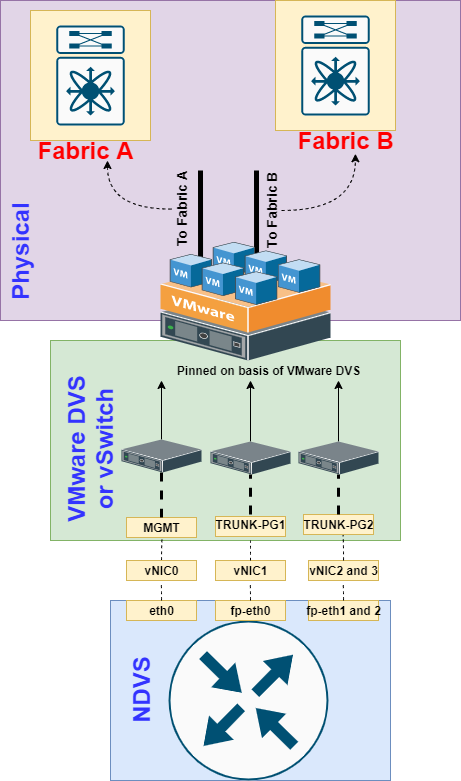
An NSX-T Edge VM contains its own networking components. Therefore, its internal switching configuration is separate from the virtual switch on the underlying ESXi host.
For example, the Edge VM connects to port groups on the host’s virtual switch. Meanwhile, its internal switching components handle traffic according to the Edge transport node configuration.
This arrangement can be visualized as N-VDS over DVS.
Although this resembles a nested virtualization setup, an Edge VM is not another ESXi hypervisor.
Key NSX-T Edge Deployment Parameters
Before deploying an Edge node through NSX-T Manager, configure the following parameters.
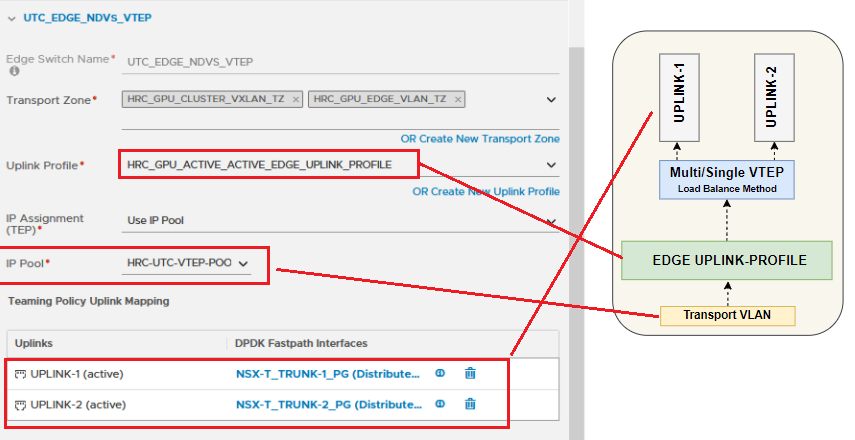
1. Edge Uplink Profile
First, configure the Edge uplink profile. It defines uplink teaming policies and the transport VLAN used by the Edge transport node.
2. TEP IP Pool
Next, assign an IP pool for the Tunnel Endpoints (TEPs).
TEP addresses enable overlay connectivity between transport nodes. In addition, the IP addressing design must support communication between Edge and host TEPs.
For collapsed deployments, separate TEP subnets may be required to avoid specific connectivity issues. We will examine this topic in Part 13.
3. Transport Zones
Then, configure the required transport zones.
Overlay transport zones provide connectivity for overlay segments. VLAN transport zones support the VLAN-backed segments required by the deployment.
4. Uplink Mapping
Finally, map the Edge uplinks to the appropriate vCenter port groups or supported VLAN-backed segments.
Correct uplink mapping is important because it determines how traffic reaches the physical network.
Multiple N-VDS Design in NSX-T
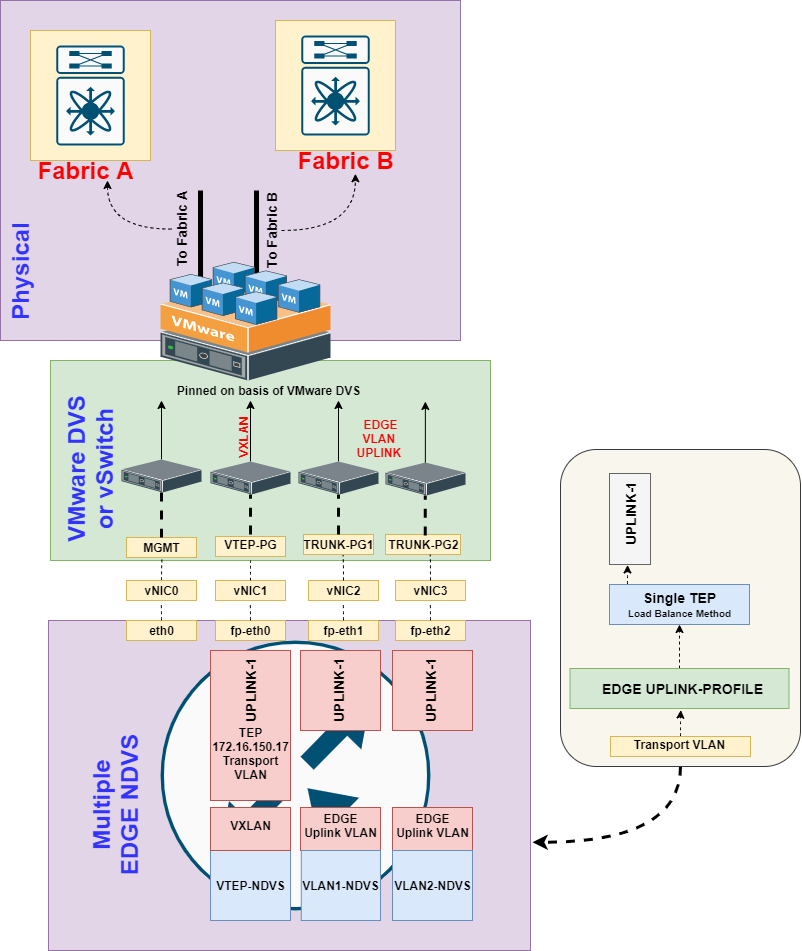
Earlier NSX-T versions used separate N-VDS instances for certain overlay and VLAN uplink configurations.
As a result, administrators often mapped different Edge vNICs to separate N-VDS instances.
This design supports traffic separation across the available virtual interfaces.
For example, an Edge node may use one TEP interface and multiple VLAN uplinks. Alternatively, the deployment may use multiple TEPs, depending on the supported configuration.
However, additional N-VDS instances can increase configuration complexity.
The following topology illustrates a multiple N-VDS design with one TEP and multiple VLAN uplinks.
Single NDVS Design
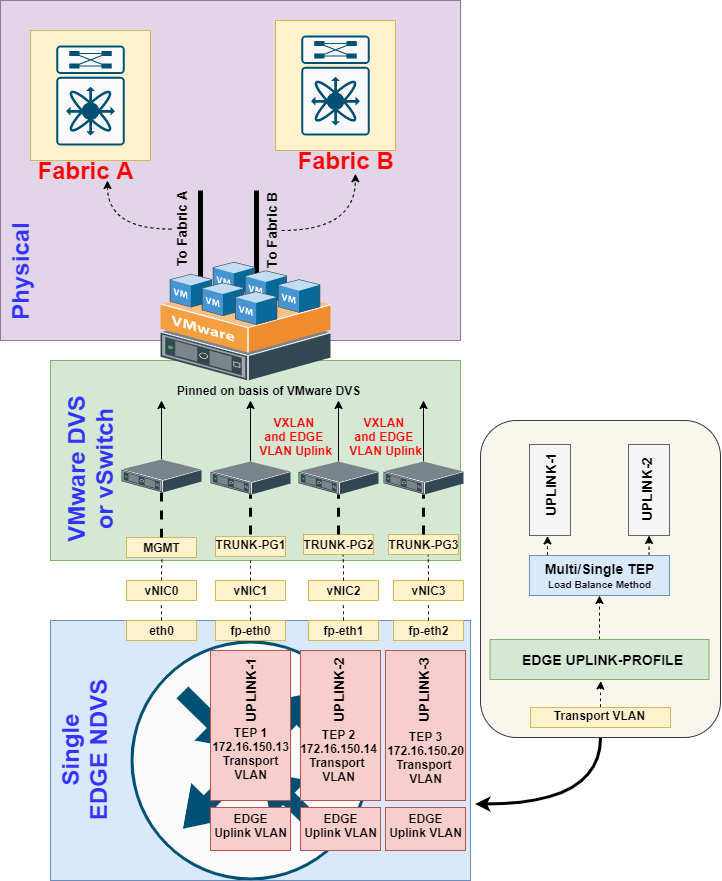
With NSX-T 3.0 we now have option to map VXLAN and Edge VLAN Uplink on single NDVS, this saves us to configure multiple NDVS. Though following in this method we can utilize all vNIC of the EDGE VM and we can see witness 3 TEP bind to respective NIC.
This option will give us the more load-balance Hash option and same interface can be used for VLAN extension too.
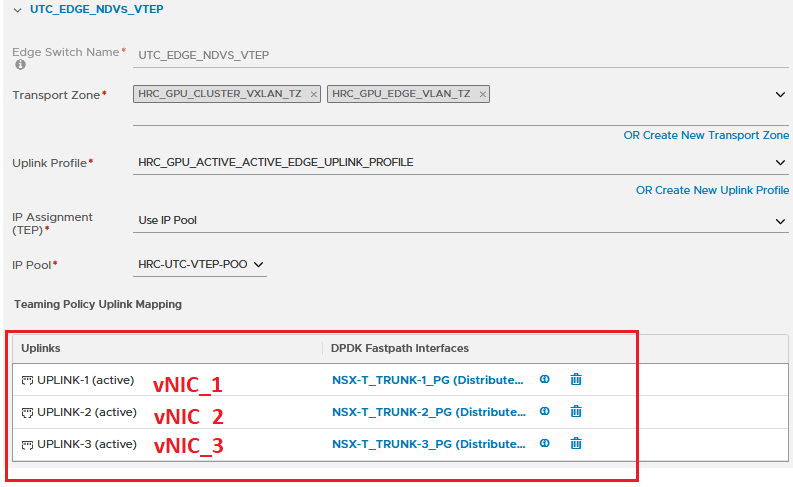
This implementation can be easily understood by following topology diagram:
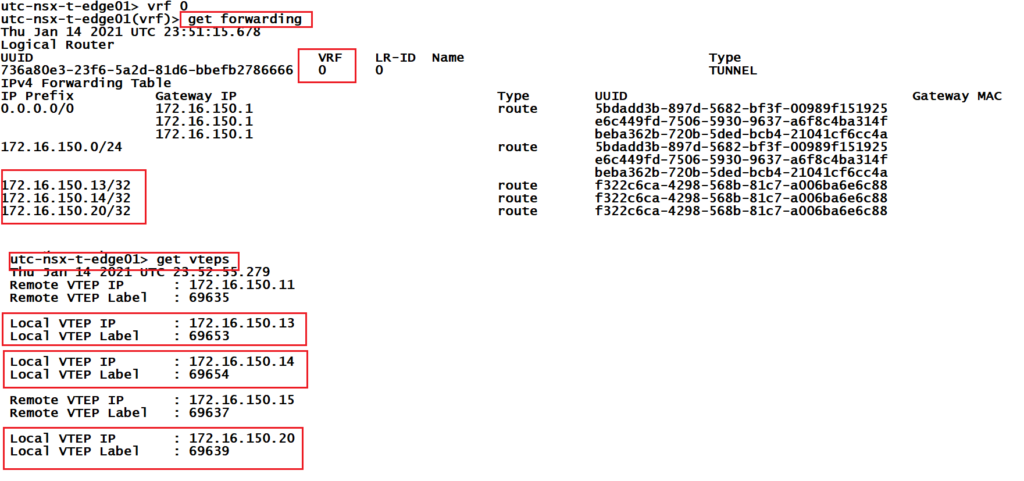
And when you login on NSX-EDGE after it is powered on one can check following verification commands to check TEP configured. I would suggest to follow the new updates of EDGE Design on VMware Blog site.
Conclusion
Choosing the right NSX-T Edge deployment model is important for building a scalable and reliable data center network.
In this guide, we explored the two main Edge node form factors: virtual machines and bare-metal servers. While virtual Edge nodes offer deployment flexibility, bare-metal nodes provide dedicated physical resources for specific performance requirements.
We also compared single and multiple N-VDS designs. Multiple N-VDS configurations provide separate switching instances for different traffic requirements. In contrast, the single N-VDS approach introduced in NSX-T 3.0 can simplify certain Edge configurations.
In addition, we discussed important deployment settings, including uplink profiles, TEP IP pools, transport zones, and uplink mappings.
Overall, understanding these components helps network engineers plan Edge connectivity and avoid common configuration issues.
What’s next?
Continue with NSX-T Series Part 13: Edge Deployment Part 2 to understand collapsed and non-collapsed Edge designs, their challenges, and practical deployment considerations.
Have you deployed NSX-T Edge nodes using single or multiple N-VDS configurations? Share your experience or questions in the comments.
Happy learning!
Build Your VMware NSX-T Knowledge
Understanding NSX-T Edge deployment is only one part of designing a reliable virtual network.
Explore practical tutorials, architecture examples, and troubleshooting guides to strengthen your networking skills.
Explore More VMware NSX-T Tutorials on Network Bachelor
Follow Network Bachelor for more hands-on learning in data center networking, virtualization, and cybersecurity.

Choosing the Right NAC Platform for Your Enterprise: A Data-Driven Evaluation

Slurm Administrator Daily Tasks: HPC & GPU Guide
Bare Metal GPU Cloud for NVIDIA DGX SuperPOD: vMetal Workbook
About Author

abhishek
Cloud Platform Lead and AI Infrastructure Architect at e& enterprise, with 12+ years in data center, virtualization, security and AI infrastructure. I design and build private cloud and sovereign AI platforms, working with VMware (NSX-T, vSphere, vSAN, HCX, AVS, SRM), Kubernetes, Terraform and GPU inference infrastructure for LLMs. Previously served Networkers Home (CCIE instructor, trained around 50 CCIEs), VCE/EMC2, Cisco, VMware and Arista across TAC, consulting, design and training. Certifications: CCIE#48639 (Data Center and R&S), VCIX-DCV and NV, CKA, NVIDIA AI Infrastructure, Azure Solutions Architect Expert, Terraform Associate, Palo Alto PCNSE. LinkedIn: https://www.linkedin.com/in/abhishekkunal51/
Your Blogs are Super helpfull. Thankyou. It’s just like bible for NSX. Thankyou
multiple links are not working.